A common requirement with Business Process Flows is this: the user must capture all the required details on the form before they are allowed to move to the next stage of the BPF.
The BPF can make individual fields required, but it has no idea about all the other fields sitting on the main form. So how do we make the BPF block the Next Stage button until everything is filled in?
One way is to use JavaScript: register a handler using addOnPreStageChange and call preventDefault() on the event arguments to stop the stage change whenever our conditions are not met. We have covered this approach in an earlier post here.
However, there is one more method to achieve this, where we don’t have to intercept the stage change ourselves and let the BPF do the blocking for us.
In this post we will see how we did it using a Boolean field, kept it read-only in the BPF, and set it through JavaScript.
Scenario
Let us look at it by taking an example of the Opportunity BPF. At the Qualify stage the user has to capture a set of details on the main form (contact, account, budget, and so on) before moving on to Develop.
We want:
The user cannot move to the next stage until all the details are captured.
The user should not be able to simply tick a box and bypass the check.
The Approach
We created a Boolean (Two-Option) field, Qualification Details Captured, with a default value of No, and added it to the Qualify stage of the BPF as a required step.
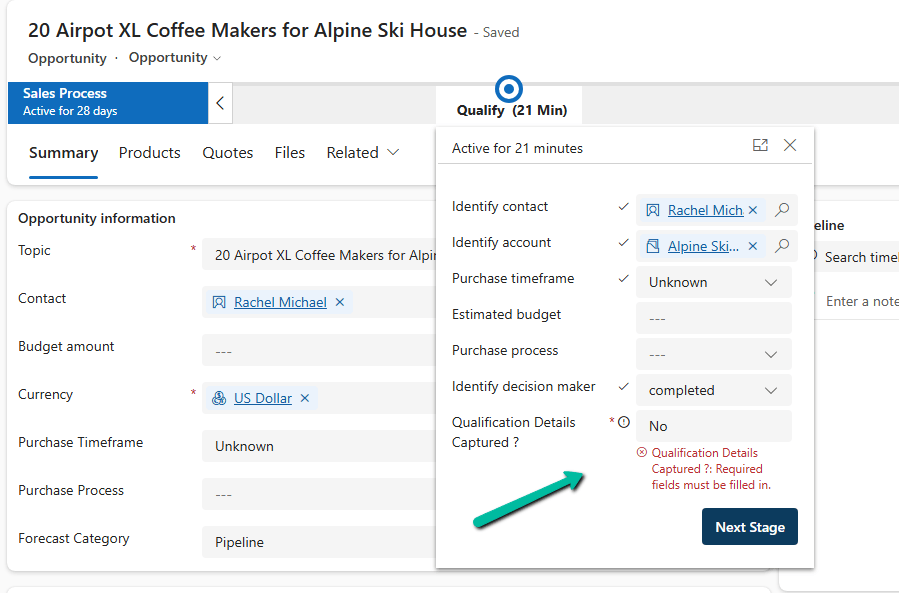
While the value is No, the BPF blocks the stage change and shows “Required fields must be filled in.”
Once all the required data is filled in on the form, we can write JavaScript, as per our specific requirement, to set the field to Yes.
With the value at Yes, the user can click Next Stage.
This works because, as we saw in an earlier post, a required Boolean field in a BPF treats only Yes as a valid value, and No is treated as not filled in. Here we are using that behavior to our advantage.
If the field is editable, the user can just change No to Yes in the BPF flyout and move ahead without filling in anything. That defeats the whole purpose.
The field should be driven by the data, not by the user. So we made it read-only in the BPF, and only the script is allowed to flip the value.
How to Make a Field Read-Only in BPF
The easiest way is through configuration, without any script.
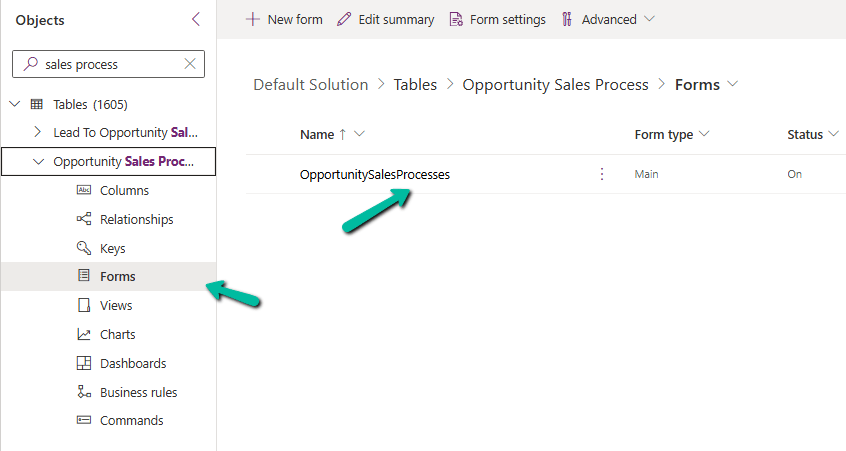
When we create a BPF, Dataverse creates a table for that BPF (named after the BPF). The fields we add to the stages are rendered from the form of this BPF table, so we can control them there like we do for any other column.
Go to Tables, select All (or show all tables), and search for the table with the same name as your BPF.
Open its Forms and select the main form.
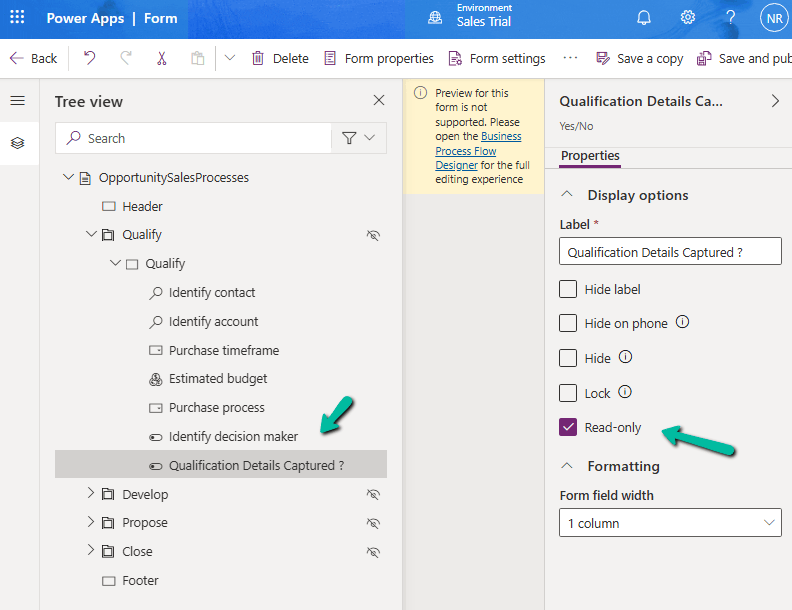
Open the Tree view, expand the stage section, and select the field.
Under Display options, check Read-only.
Save and publish.
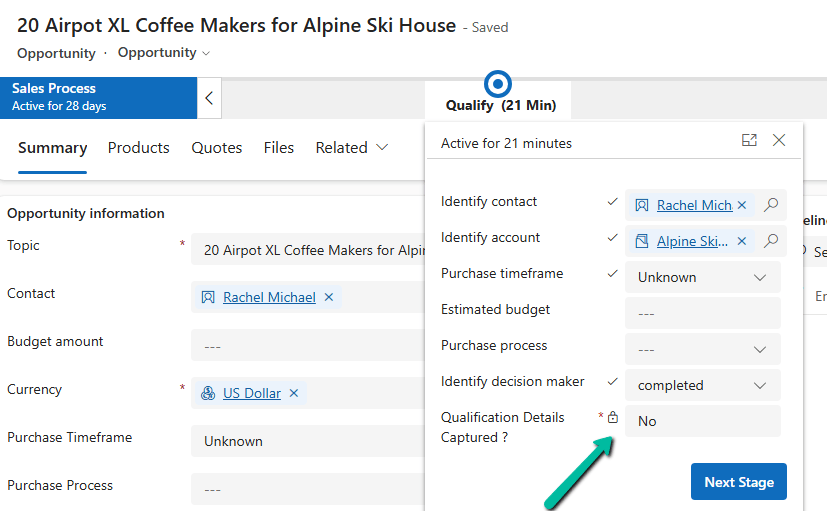
Now in the BPF flyout the field is greyed out, and the user cannot change it.
Setting the Value Using JavaScript
Now the field needs to be set to Yes at the right time. For this, we can write JavaScript on the main form as per our specific requirement, which checks that all the required details are captured and then sets the field to Yes.
Until that happens, the field stays at No, and the user will not be able to move to the next stage by clicking Next Stage.
Result
Fields are incomplete: flag is No, read-only, and Next Stage is blocked.
User fills in all the required details: our JavaScript sets the flag to Yes, and the user can move to the next stage.
The user cannot bypass the check by changing the flag manually.
Key Takeaway
To make a field read-only in a BPF, open the form of the BPF table and check Read-only on the field. Combined with a required Boolean field and a little JavaScript, it gives us a simple way to make the BPF wait until all the required data on the form is captured.
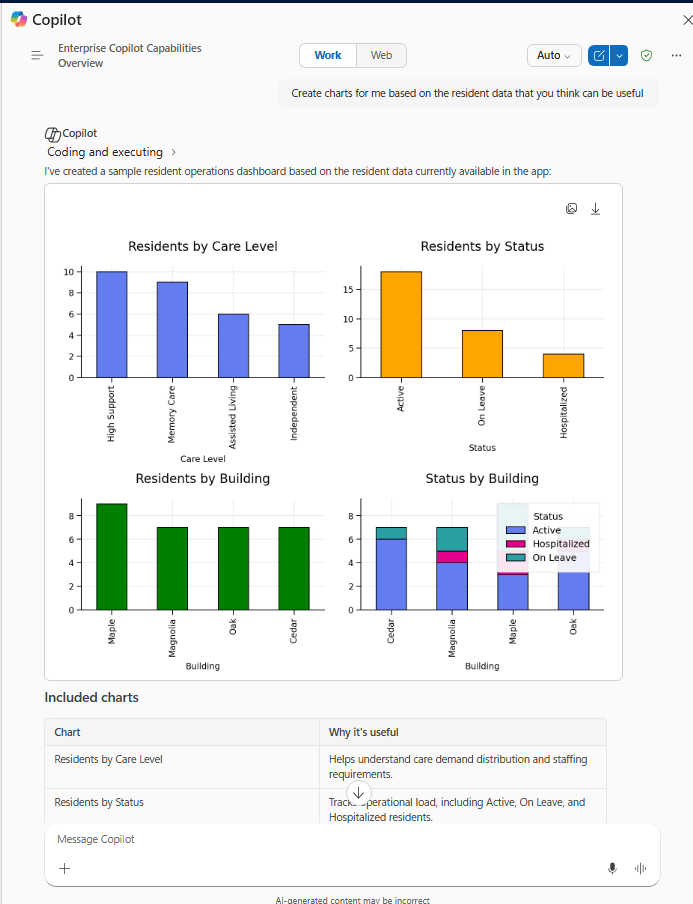
Microsoft 365 Copilot brings conversational AI directly into Model-Driven Apps, allowing users to ask natural language questions about Dataverse data, quickly locate records, and improve productivity without leaving the application.
In this post, we walk through the steps we follow to enable Microsoft 365 Copilot in a Model-Driven App, covering the tenant, environment, and application-level configuration required before the feature becomes available.
What We Need Before We Start
Microsoft 365 Administrator permissions for tenant-level Copilot settings.
Power Platform Administrator access to the target environment.
Dataverse Search enabled for the environment (Default or On).
Sufficient Dataverse database capacity — Microsoft 365 Copilot for Model-Driven Apps relies on Dataverse Search indexing, and turning it on can increase capacity consumption.
Appropriate licensing (covered in Step 4 below).
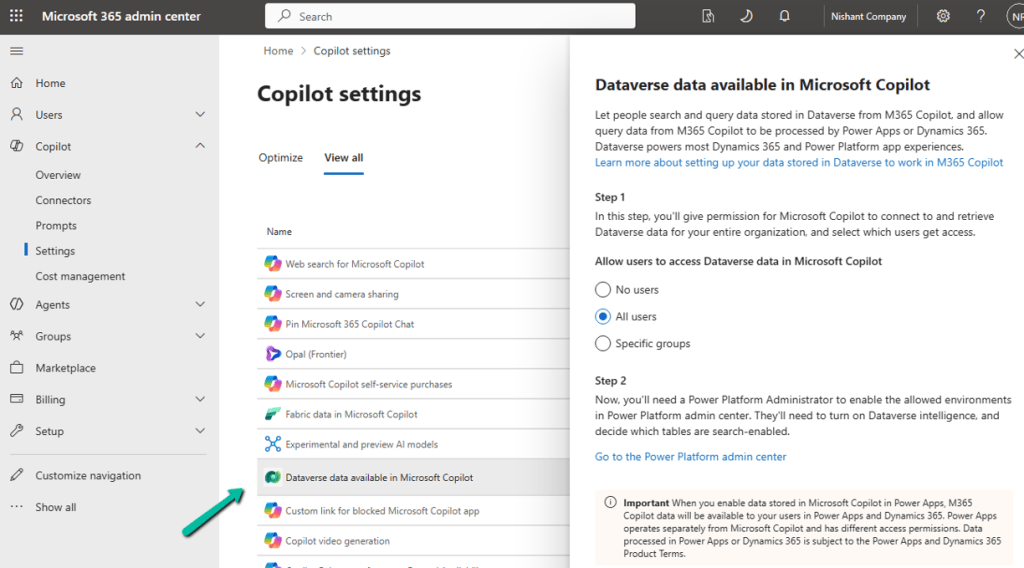
Step 1: Enable Dataverse Data in Microsoft 365 Copilot (Tenant Level)
Sign in to the Microsoft 365 Admin Center → Copilot → Settings, and locate Dataverse data available in Microsoft 365 Copilot.
Turn it on and choose either All Users or Specific Groups, then Save.
This is a tenant-level setting; it must be enabled before users can access Dataverse data through Microsoft 365 Copilot.
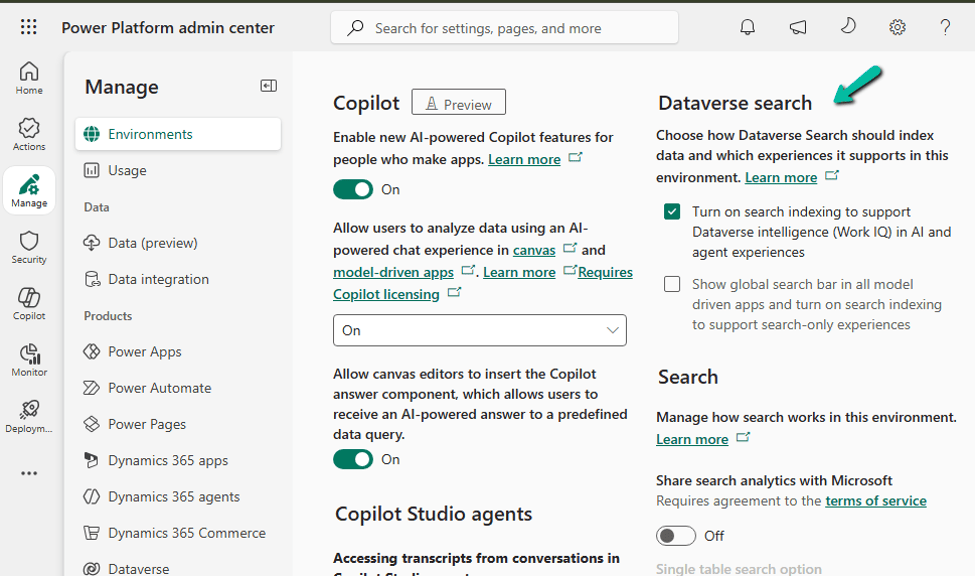
Step 2: Enable Dataverse Search for the Environment
Go to Power Platform Admin Center → Environments → select the environment → Settings → Product → Features, and set Dataverse Search to On, then save.
Dataverse Search is what powers the indexing behind Copilot’s answers, so this has to be on before Copilot can ground its responses in your table data.
Step 3: Verify Dataverse Capacity
Since Microsoft 365 Copilot for Model-Driven Apps relies on Dataverse Search indexing, make sure the environment has enough Dataverse database capacity to support indexing, semantic search, and the Copilot queries themselves. Check this under Power Platform Admin Center → Licensing → Capacity add-on for the environment before rolling this out to a production environment with a large dataset.
Step 4: Verify Licensing
Licensing depends on where the app lives:
Power Apps (Custom Model-Driven Apps) — users need a Power Apps Premium license together with a Microsoft 365 Copilot license.
Dynamics 365 apps — users need a qualifying Dynamics 365 Enterprise or Premium license. A Microsoft 365 Copilot license is also required to unlock advanced Work IQ capabilities beyond standard Dataverse grounding.
Worth confirming this with your licensing/procurement team before you promise the feature to end users — a missing Microsoft 365 Copilot license is one of the most common reasons Copilot doesn’t show up for a user even after everything else is configured correctly.
Step 5: Enable Microsoft 365 Copilot for the Environment
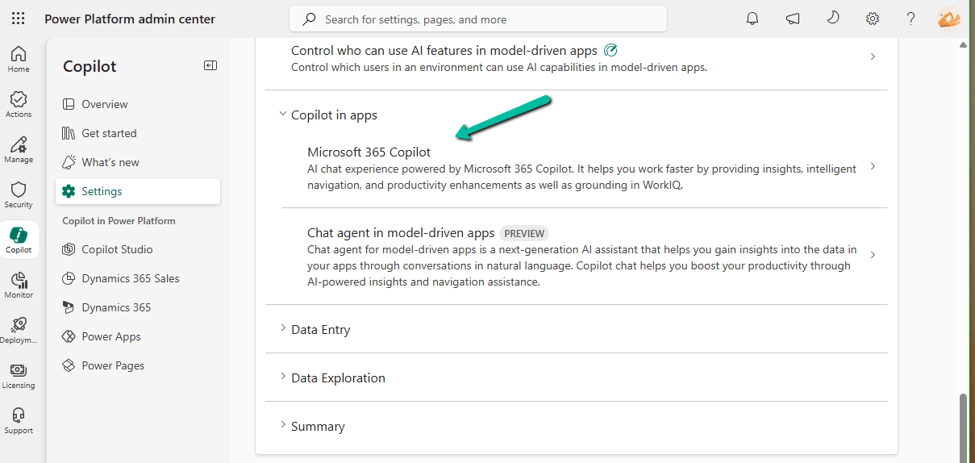
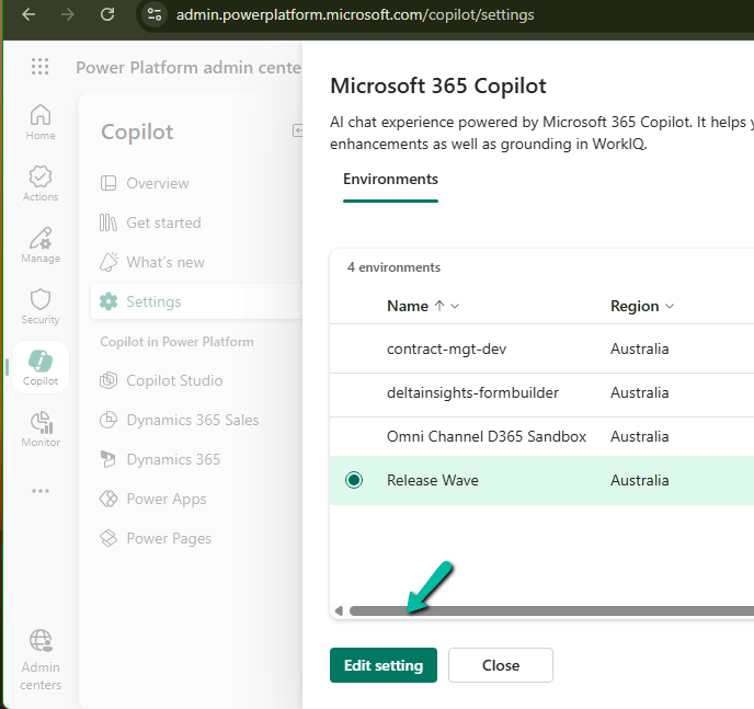
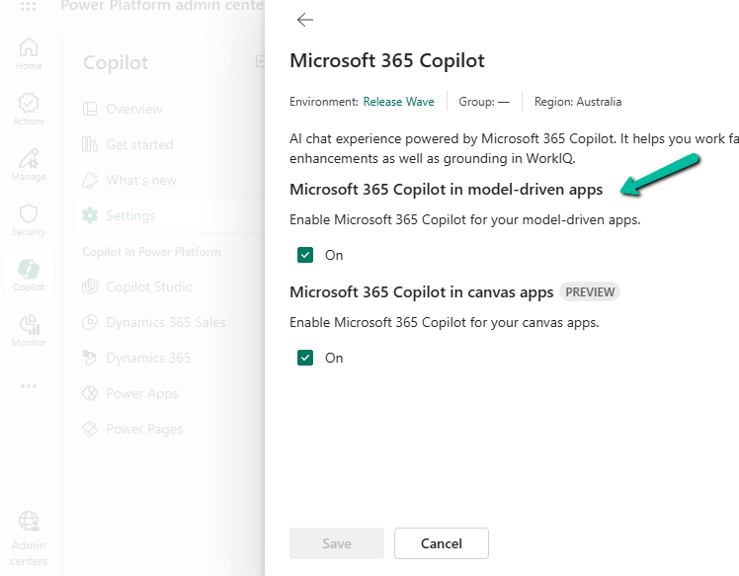
Go to Power Platform Admin Center → Copilot → Settings. Under Power Apps, expand Copilot in Apps, choose Microsoft 365 Copilot, select the environment (or environment group), select Edit Setting, turn it On, and Save.
Step 6: Enable It for the Model-Driven App
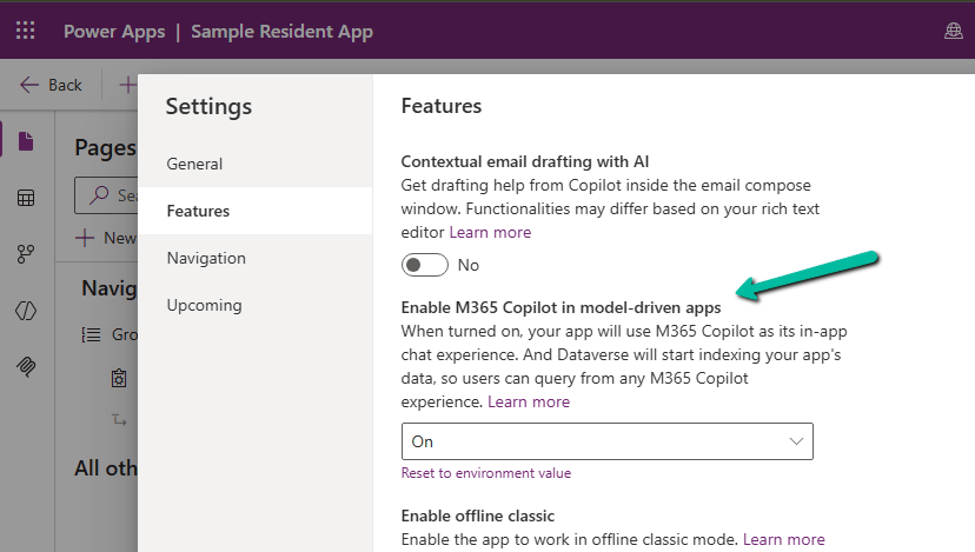
Open the app in the Power Apps Maker Portal → Settings → Features, set M365 Copilot in model-driven apps to On, then Save and Publish the app.
Enable It for All Model-Driven Apps in an Environment
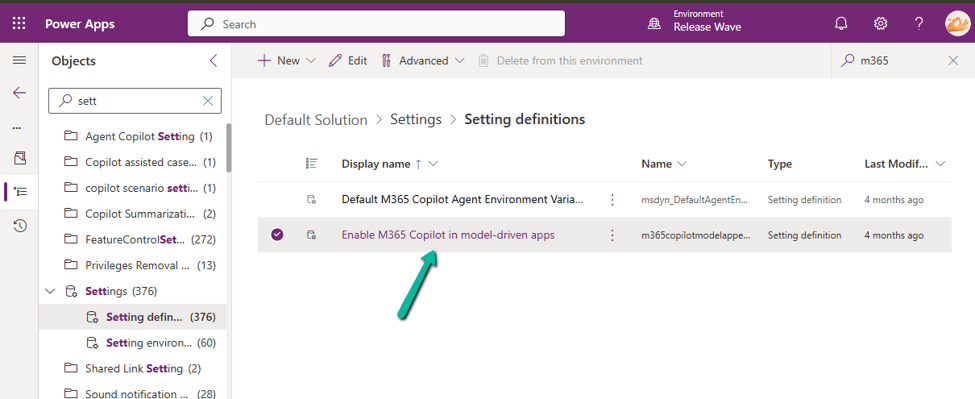
If you’d rather turn this on once instead of app by app, open the Default Solution → Objects → Settings, locate Enable M365 Copilot in model-driven apps, add the value if it doesn’t already exist, set it to 2, Save, and Publish the change.
What Users Will See
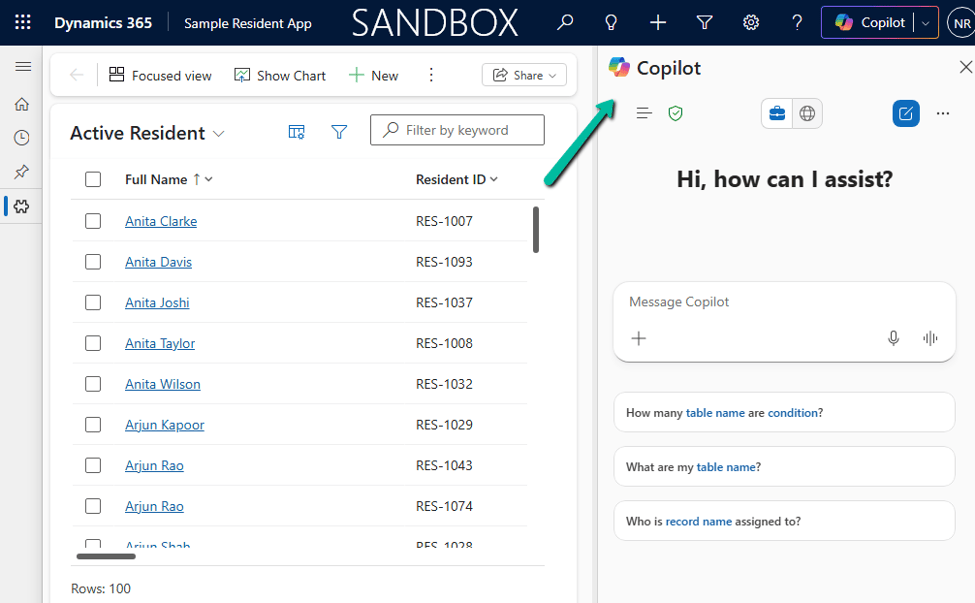
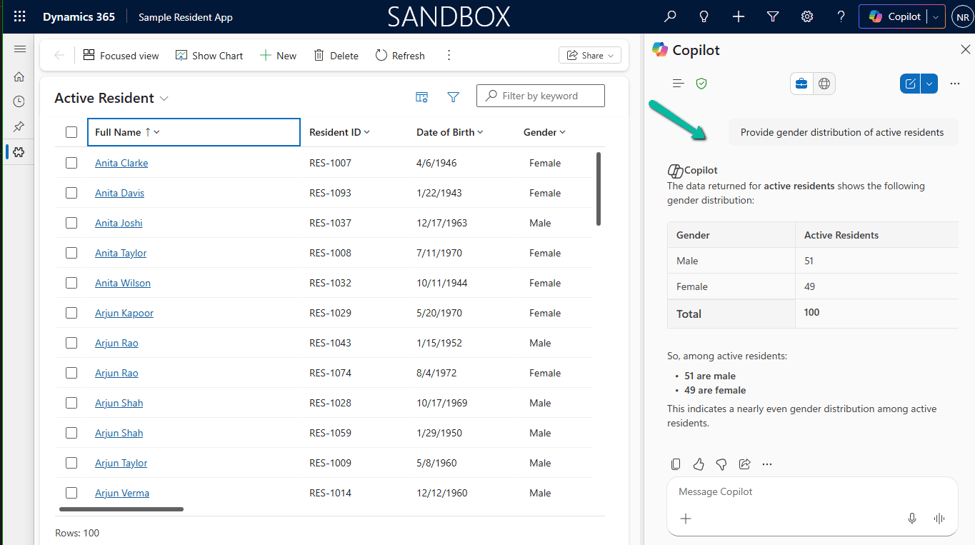
Once everything is configured, users can open Copilot → Chat from the top-right corner of the Model-Driven App and start asking natural language questions about Dataverse records.
The current experience is read-only by default: Copilot can find and summarize data, but it can’t make changes on the user’s behalf unless you’ve customized it with an agent. It’s also worth knowing that Microsoft 365 Copilot for Model-Driven Apps isn’t available in the Power Apps mobile app yet.
Microsoft 365 Copilot vs. Copilot Chat: What’s Changing?
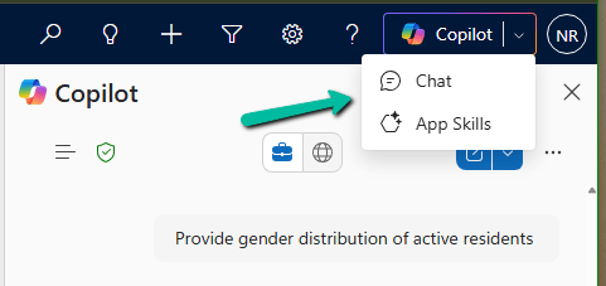
If you’ve previously enabled Copilot Chat in Model-Driven Apps, you’ll now see two options in the Copilot menu: Chat and App Skills. This is part of Microsoft’s transition to Microsoft 365 Copilot, which is becoming the standard AI experience across Power Apps and Dynamics 365.
Area
Microsoft 365 Copilot (Chat)
Copilot Chat (App Skills)
Status
Recommended, actively evolving
Being deprecated
Availability
Power Apps and Dynamics 365
Preview in Power Apps
Dataverse queries
Yes
Yes
Navigation
Yes
Yes
Future direction
Microsoft’s strategic platform
Transitioning out
Deprecation Timeline
Microsoft has announced that Copilot Chat in Model-Driven Apps, for Power Apps environments not enabled for Dynamics 365 apps, began its deprecation starting in January 2026. During the transition period, organizations can enable either one or both experiences while users migrate.
What Users Will See During the Transition
Chat opens Microsoft 365 Copilot.
App Skills opens the legacy Copilot Chat experience.
Both experiences can coexist during the transition.
Recommendation
For new implementations, enable Microsoft 365 Copilot rather than investing further in the legacy Copilot Chat experience. Since Microsoft is standardizing AI experiences across Power Apps and Dynamics 365 around Microsoft 365 Copilot, adopting it now saves you a migration later and gives users access to the latest Dataverse-grounded capabilities, including Work IQ where licensed.
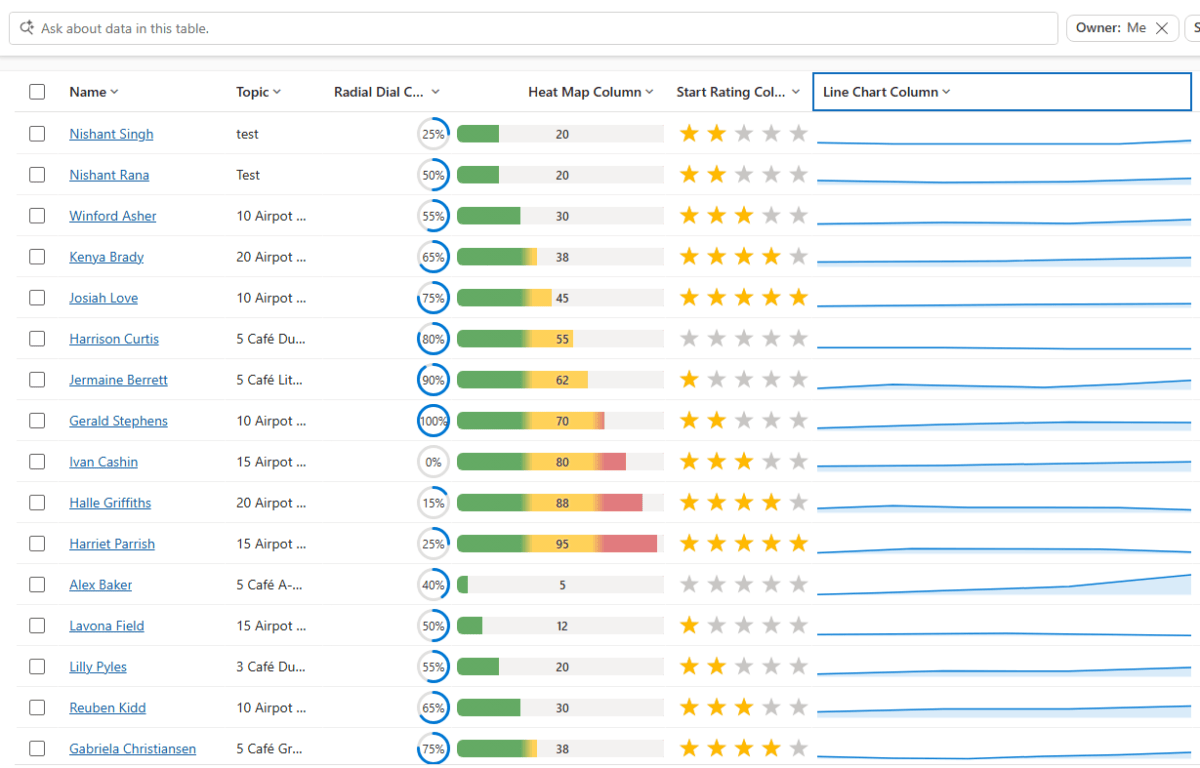
Power Apps now lets us render a column’s data as a small graphic in the grid – a gauge, a sparkline, a colored bar, or stars – instead of plain text. We tried it out on a couple of our own columns, and here’s a quick step-by-step on how to set it up, along with the data format each visualization expects.
This is a preview feature, so it’s best tried out in Dev/Sandbox for now rather than rolled out to production grids.
Pick a Visualization for the Column
Sign in to Power Apps (make.powerapps.com) → Solutions → open the table.
Open the column to edit (or create a new one).
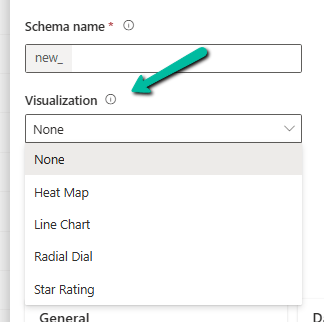
Expand Advanced options → “Visualization”.
Select one of: Heat Map, Line Chart, Radial Dial, Star Rating.
Save. Every grid or view showing that column now shows the graphic automatically.
That’s it – it’s a one-time setting on the column, not something you configure per view.
Know What Data Each One Expects
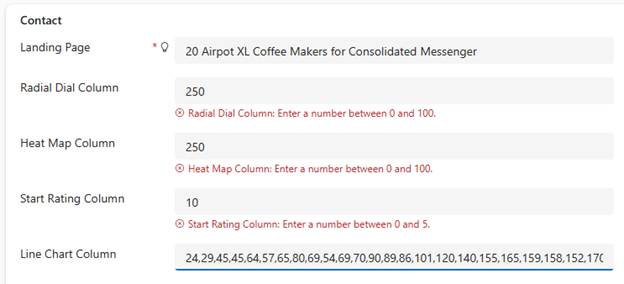
This is the part that actually matters – each visualization is strict about the shape of the data behind it.
Radial Dial: expects a single value, 0–100. Example: 60 → ring 60% full.
Heat Map: expects a single value, 0–100 by default. Example: 90 → bar colored red (high).
Star Rating: expects a value from 0 to the star count, 5 by default. Example: 3 → three stars filled.
Line Chart: expects comma-separated numbers, 100 characters maximum length. Example: 10,20,30,45 → a trend line.
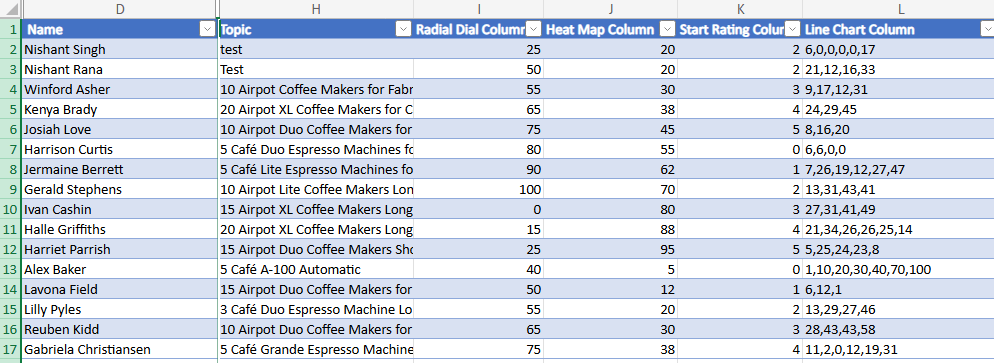
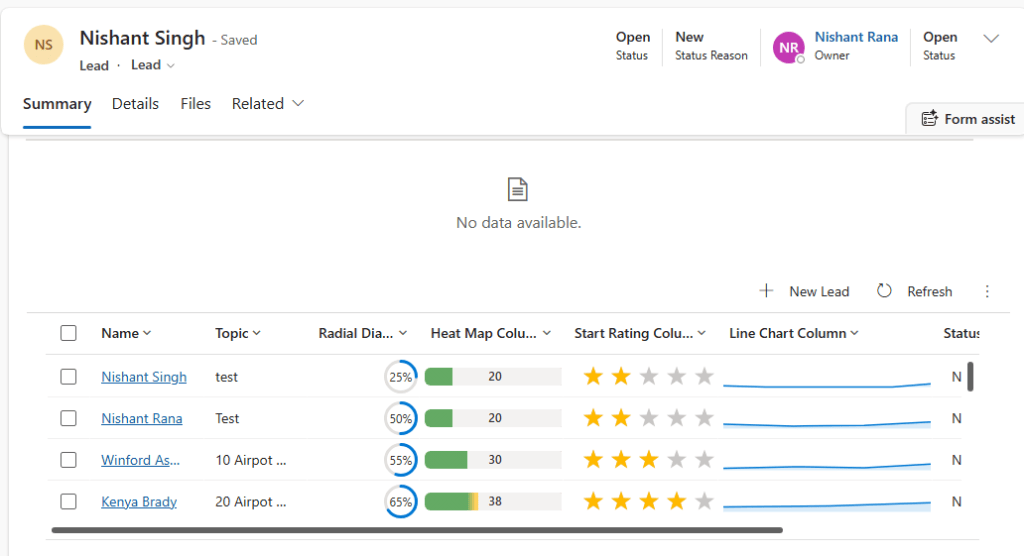
For .e.g the data for these columns –
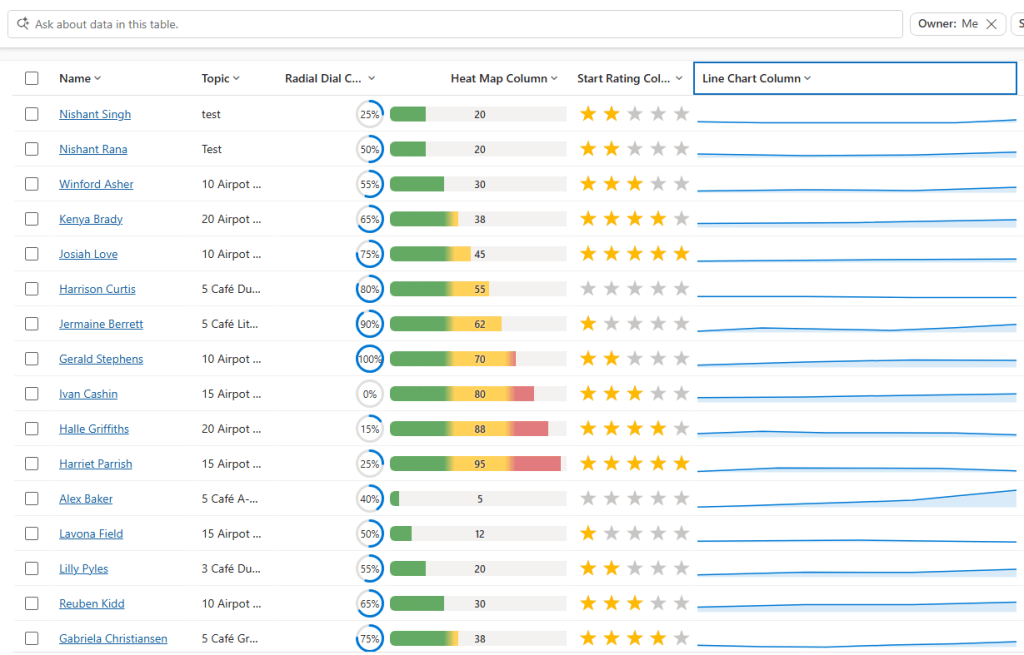
Below is how they are rendered in a view.
And this is as a subgrid.
Key Takeaway
Set the visualization once on the column, keep the underlying data clean (0–100 for Radial Dial/Heat Map, comma-separated numbers for Line Chart, 0 to 5 for Star Rating), and every grid using that column just works. Most issues we ran into came down to one thing – the value wasn’t stored the way the visualization expected.
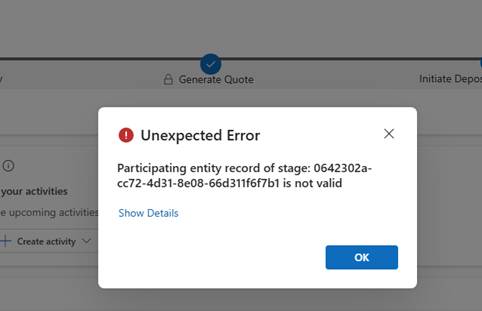
Working on a custom multi-entity Business Process Flow (Opportunity → Quote) recently, we ran into this error while trying to reactivate the process:
The BPF (custom_salesprocess) had already traversed several stages — Generate Opportunity → Qualify → Generate Quote → Initiate Deposit/Bank Guarantee → Sales Completion — before landing on PM Completion, which sits in the “Close” category.
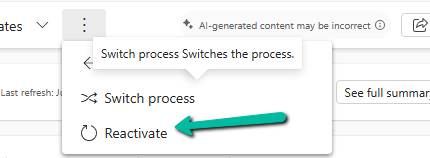
Reactivating the process at that point is where it failed.
In a multi-entity BPF, each stage is bound to a specific entity via processstage.primaryentitytypecode, and the BPF instance record carries a lookup column per non-primary entity used in the flow (e.g. bpf_opportunityid, bpf_quoteid). When a stage tries to activate, Dataverse resolves the “participating entity” for that stage — and if the corresponding lookup on the instance is null, or points to a record that no longer exists (or the user can’t read), we get exactly this error.
Diagnosis
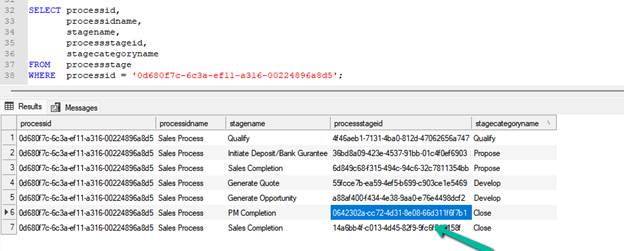
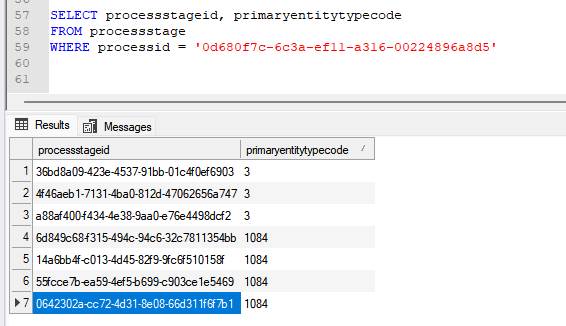
First, we check for the processtageid we got in the error – 0642302a-cc72-4d31-8e08-66d311f6f7b1
SELECT
    processid,
    stagename,
    processstageid,
    stagecategoryname
FROM processstage
WHERE processid = '0d680f7c-6c3a-ef11-a316-00224896a8d5';
Then we confirm what entity each stage actually maps to using the processid:
PM Completion resolves to Quote (1084) — not Opportunity — which meant the BPF instance needed a valid bpf_quoteid to activate it.
Checked the instance directly:
SELECT * FROM custom_salesprocess WHERE businessprocessflowinstanceid = '682f0586-3660-f111-a826-00224892607c' or bpf_opportunityid = '9e5bdc52-62d4-4773-8d30-fba2089ceba2'
bpf_quoteid and bpf_quoteidname both came back NULL — despite an active Quote already existing against the Opportunity. Something along the way (likely the Quote being created outside the BPF’s native “generate related record” flow) never linked it back.
Fix
A quote existed, so it was a matter of linking it. The preferred route is the related-entity picker on the BPF stage bar in the Opportunity form (safest, goes through supported platform logic). Where that’s not viable, updating the lookup directly works:
UPDATE custom_salesprocess SET bpf_quoteid = '18cc66e2-9280-f111-ab0f-7c1e528a7a2a' WHERE businessprocessflowinstanceid = '682f0586-3660-f111-a826-00224892607c';
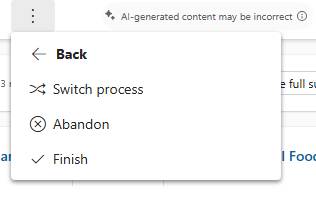
After the update, the process reactivated cleanly.
We got the options to Abandon and Finish the flow.
Rules of thumb
Multi-entity BPF errors on activation → check the stage’s primaryentitytypecode first. If it’s not the primary entity you’re working from, the instance needs a valid lookup to that other entity.
The instance table always carries one lookup column per entity in the flow (bpf_<entity>id) — go straight to that table and check for nulls before looking anywhere else.
A null lookup with a record that already exists usually means the record was created outside the BPF’s intended path (manually, via integration, or via a process that bypasses the stage’s native record-generation step) and never got linked back.
Before manually setting the lookup, confirm the target record’s statecode/statuscode — a Won/Closed or inactive record may satisfy the lookup but still fail stage entry criteria if a business rule checks for an active state.
Prefer the BPF’s own related-entity picker on the form over a direct table update where available — it’s the supported path and won’t skip any platform-side validation.
Key takeaway
“Participating entity record of stage: X is not valid (0x80040216)” on a multi-entity BPF almost always means the stage’s bound entity has no valid linked record on the BPF instance. Trace the stage to its entity via primaryentitytypecode, check the corresponding bpf_<entity>id lookup on the instance, and link a valid, active record.
We recently refactored a large JavaScript solution — replacing a number of deprecated methods with their supported equivalents, along with some performance improvements — the kind of change that touches a lot of files without changing what any of them are actually supposed to do. That solution needed to go out to three Production environments, and before rolling it out, we wanted to be sure of one thing: were all three Prod environments currently running the same JavaScript to begin with? If one of them had quietly drifted from the others over time — a direct hotfix, a missed deployment — we wanted to know that before deploying, not after.
That’s what led us to write this utility. And while our own case was three Prod environments, there’s nothing about it that ties it specifically to Dev/UAT/Prod — that’s just the most common shape for this kind of check. The source is really just “the environment whose solution I want to treat as the baseline,” and the target(s) are “however many environments I want to check that baseline against.” You could just as easily point the source at UAT and compare it against multiple Staging / DM / UAT instances, or point it at Prod and verify a DR/failover environment matches — any number of targets can be listed, and each is compared against the source independently, so you always know exactly which environment(s) are out of step rather than just “something, somewhere, differs.”
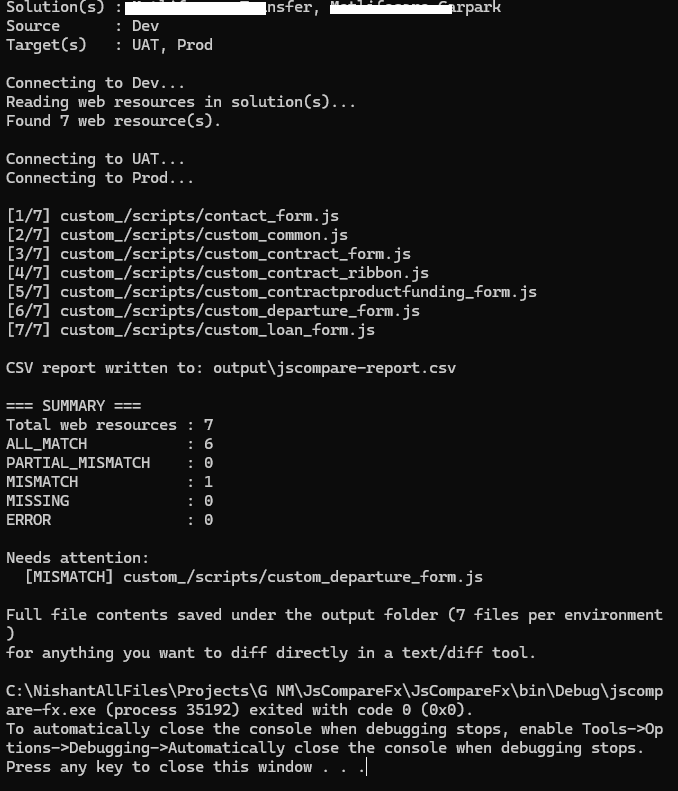
To keep this post simple, we’ll walk through a smaller example here — a Dev environment with two solutions that between them contain a handful of JS web resources — and compare it against UAT and Prod to confirm all three environments.
The approach
Rather than matching components by name across environments, we used the solutioncomponent entity to pull the exact web resource GUIDs belonging to our solution from the source environment (Dev). This matters because a component’s GUID stays the same wherever it travels via solution import — so the same GUID can be looked up directly in every other environment, with no name-matching guesswork involved.
For each web resource, in each environment:
Retrieve the content field (base64-encoded) and decode it.
Compute a SHA-256 hash of the decoded bytes.
If two environments produce the same hash for the same GUID, the files are guaranteed byte-identical. If the hashes differ, something changed — even a single character is enough to produce a completely different hash.
Sample Code –
private const int COMPONENTTYPE_WEBRESOURCE = 61;
private const int WEBRESOURCETYPE_JSCRIPT = 3;

private static List<Guid> GetJavaScriptWebResourceIds(IOrganizationService svc, List<string> solutionUniqueNames)
{
    var solutionQuery = new QueryExpression("solution")
    {
        ColumnSet = new ColumnSet("solutionid")
    };
    solutionQuery.Criteria.AddCondition("uniquename", ConditionOperator.In,
        solutionUniqueNames.Cast<object>().ToArray());
    var solutionIds = svc.RetrieveMultiple(solutionQuery).Entities
        .Select(s => s.Id).Cast<object>().ToArray();

    var compQuery = new QueryExpression("solutioncomponent")
    {
        ColumnSet = new ColumnSet("objectid")
    };
    compQuery.Criteria.AddCondition("solutionid", ConditionOperator.In, solutionIds);
    compQuery.Criteria.AddCondition("componenttype", ConditionOperator.Equal, COMPONENTTYPE_WEBRESOURCE);

    var allWebResourceIds = svc.RetrieveMultiple(compQuery).Entities
        .Select(e => (Guid)e["objectid"])
        .Distinct()
        .ToArray();

    // The Web Resource component type covers every kind of web resource in the solution -
    // JS, HTML, CSS, PNG, SVG, and so on - not JavaScript specifically. We only want the
    // actual scripts, so we filter again on the webresource entity's own type field.
    var wrQuery = new QueryExpression("webresource")
    {
        ColumnSet = new ColumnSet("name")
    };
    wrQuery.Criteria.AddCondition("webresourceid", ConditionOperator.In, allWebResourceIds.Cast<object>().ToArray());
    wrQuery.Criteria.AddCondition("webresourcetype", ConditionOperator.Equal, WEBRESOURCETYPE_JSCRIPT);

    return svc.RetrieveMultiple(wrQuery).Entities
        .Select(e => e.Id)
        .ToList();
}

private static string GetContentHash(IOrganizationService svc, Guid webResourceId)
{
    var e = svc.Retrieve("webresource", webResourceId, new ColumnSet("content"));
    var bytes = Convert.FromBase64String((string)e["content"]);

    using (var sha = SHA256.Create())
    {
        var hash = sha.ComputeHash(bytes);
        return BitConverter.ToString(hash).Replace("-", "");
    }
}
Running this against Dev + UAT + Prod, for every JavaScript web resource GUID found, gives a simple report per environment: MATCH, MISMATCH, or MISSING.
Going a step further — showing what actually changed
A MISMATCH on its own only tells you that something differs, not what. So we extended it to also diff the two files line by line whenever the hashes didn’t match, using a classic LCS (Longest Common Subsequence) based diff — the same underlying idea git diff uses.
private static List<string> DiffTextLines(string baseline, string other, int maxDiffs = 6)
{
    var a = baseline.Replace("\r\n", "\n").Split('\n');
    var b = other.Replace("\r\n", "\n").Split('\n');

    int n = a.Length, m = b.Length;
    var dp = new int[n + 1, m + 1];
    for (int i = n - 1; i >= 0; i--)
        for (int j = m - 1; j >= 0; j--)
            dp[i, j] = a[i] == b[j] ? dp[i + 1, j + 1] + 1 : Math.Max(dp[i + 1, j], dp[i, j + 1]);

    var diffs = new List<string>();
    int x = 0, y = 0;
    while (x < n && y < m && diffs.Count < maxDiffs)
    {
        if (a[x] == b[y]) { x++; y++; continue; }
        if (dp[x + 1, y] >= dp[x, y + 1]) { diffs.Add($"line {x + 1} removed: \"{a[x]}\""); x++; }
        else { diffs.Add($"line {y + 1} added: \"{b[y]}\""); y++; }
    }
    return diffs;
}
This walks a dynamic-programming grid to find the longest sequence of lines common to both files. Everything outside that common sequence is, by definition, either a removed line or an added one — which is exactly what shows up in the report instead of a plain “files differ”.
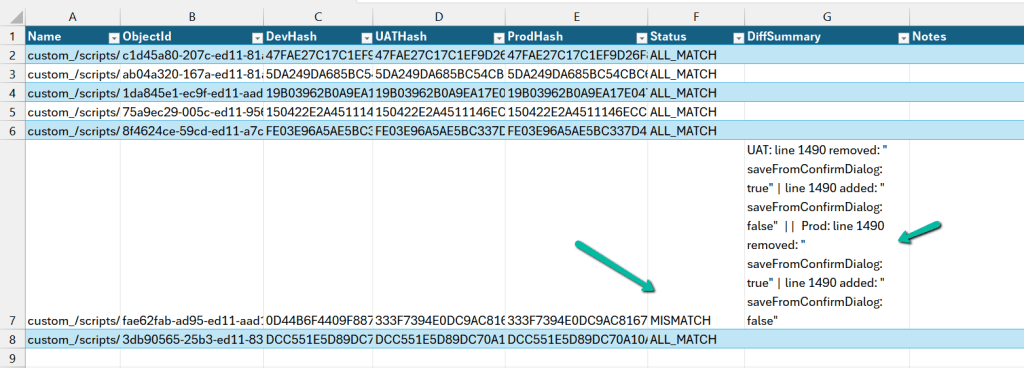
Every result also gets written out to a CSV, one row per web resource, with a hash column per environment, a Status column, and a DiffSummary column showing the actual line-level differences for anything that doesn’t match.
How it works, end to end
Connects to the source environment (Dev) and reads solutioncomponent for the solution’s unique name, filtered to web resources only.
For each web resource GUID found, fetches that same GUID from every target environment listed (UAT, Prod, or as many as you configure).
Hashes the content from each environment and compares every target’s hash against the source’s hash — independently, so you know exactly which target(s) differ, not just that “something” differs.
For anything that doesn’t match, runs the LCS diff and records the specific lines that changed.
Writes a CSV report and saves every environment’s actual file content to disk, so any mismatch can be opened directly in a diff tool if the summary line isn’t enough.
Using it yourself
The console app is config-driven — no code changes needed to point it at your own solution and environments. config.json looks like this:
SolutionNames — the unique name(s) of the solution(s) holding your web resources. You can list more than one, as in the example above, if your JS is spread across a couple of solutions.
Source — the environment you trust as the baseline (usually Dev).
Targets — as many environments as you want to check, each compared independently against Source.
Once config.json is filled in, just run:
jscompare-fx.exe config.json
and the report and diffed files show up under the configured output folder.
Recently, we ran into an interesting issue while working with a Dynamics 365 / Dataverse environment. Even though the user was assigned the System Administrator security role, the environment did not appear in either the Power Platform Admin Center or the Maker Portal. The surprising part was that nothing was actually wrong with the permissions. The environment eventually appeared automatically after about 4 to 6 hours, which suggests there was a synchronization delay. Another interesting aspect was that, out of 3 environments assigned to the user, only 1 had this problem.
The problem
After receiving System Administrator access, we expected the environment to appear immediately in:
• Power Platform Admin Center (PPAC) • Power Apps Maker Portal
However, the environment simply wasn’t listed, even though we could access the Dynamics 365 application directly using its URL.
Open the Maker experience from Advanced Settings
If you already have the Dynamics 365 / CRM URL for the environment, you can continue working without waiting for the synchronization.
Navigate to:
Advanced Settings → Settings → Customize the System
Then select the Try New Experience option.
Selecting Try New Experience opens the modern Maker experience for that environment even when it isn’t listed in the environment selector.
Open the environment directly in PPAC or Maker Portal using the Environment ID
We can also open the environment directly in Power Platform Admin Center or Maket Portal by using the Environment ID.
The Environment ID can also be found in the environment details page. We can use the Environment ID and the corresponding Maker and PPAC URL to open the particular environment.