

We recently refactored a large JavaScript solution — replacing a number of deprecated methods with their supported equivalents, along with some performance improvements — the kind of change that touches a lot of files without changing what any of them are actually supposed to do. That solution needed to go out to three Production environments, and before rolling it out, we wanted to be sure of one thing: were all three Prod environments currently running the same JavaScript to begin with? If one of them had quietly drifted from the others over time — a direct hotfix, a missed deployment — we wanted to know that before deploying, not after.
That’s what led us to write this utility. And while our own case was three Prod environments, there’s nothing about it that ties it specifically to Dev/UAT/Prod — that’s just the most common shape for this kind of check. The source is really just “the environment whose solution I want to treat as the baseline,” and the target(s) are “however many environments I want to check that baseline against.” You could just as easily point the source at UAT and compare it against multiple Staging / DM / UAT instances, or point it at Prod and verify a DR/failover environment matches — any number of targets can be listed, and each is compared against the source independently, so you always know exactly which environment(s) are out of step rather than just “something, somewhere, differs.”
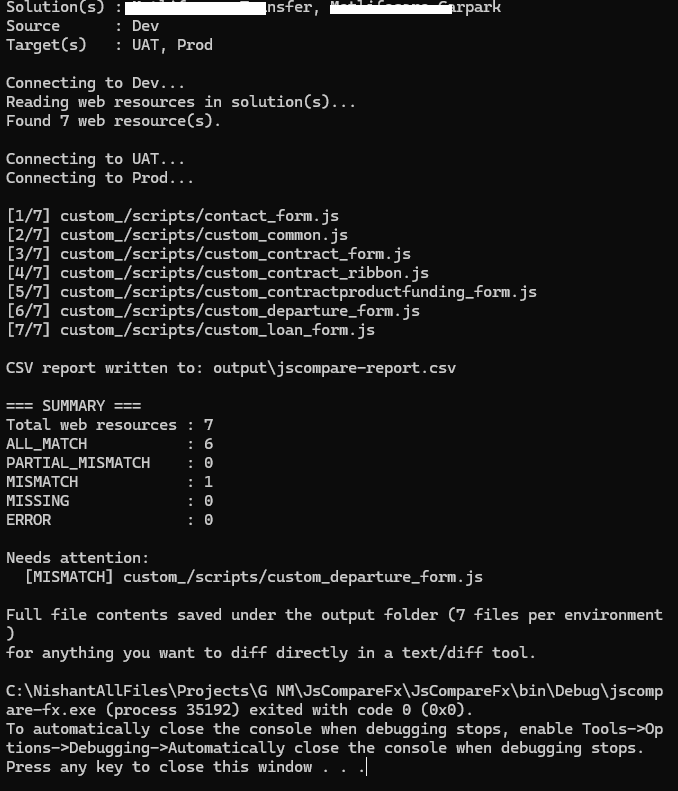
To keep this post simple, we’ll walk through a smaller example here — a Dev environment with two solutions that between them contain a handful of JS web resources — and compare it against UAT and Prod to confirm all three environments.
The approach
Rather than matching components by name across environments, we used the solutioncomponent entity to pull the exact web resource GUIDs belonging to our solution from the source environment (Dev). This matters because a component’s GUID stays the same wherever it travels via solution import — so the same GUID can be looked up directly in every other environment, with no name-matching guesswork involved.
For each web resource, in each environment:
- Retrieve the content field (base64-encoded) and decode it.
- Compute a SHA-256 hash of the decoded bytes.
If two environments produce the same hash for the same GUID, the files are guaranteed byte-identical. If the hashes differ, something changed — even a single character is enough to produce a completely different hash.
Sample Code –
private const int COMPONENTTYPE_WEBRESOURCE = 61;
private const int WEBRESOURCETYPE_JSCRIPT = 3;

private static List<Guid> GetJavaScriptWebResourceIds(IOrganizationService svc, List<string> solutionUniqueNames)
{
    var solutionQuery = new QueryExpression("solution")
    {
        ColumnSet = new ColumnSet("solutionid")
    };
    solutionQuery.Criteria.AddCondition("uniquename", ConditionOperator.In,
        solutionUniqueNames.Cast<object>().ToArray());
    var solutionIds = svc.RetrieveMultiple(solutionQuery).Entities
        .Select(s => s.Id).Cast<object>().ToArray();

    var compQuery = new QueryExpression("solutioncomponent")
    {
        ColumnSet = new ColumnSet("objectid")
    };
    compQuery.Criteria.AddCondition("solutionid", ConditionOperator.In, solutionIds);
    compQuery.Criteria.AddCondition("componenttype", ConditionOperator.Equal, COMPONENTTYPE_WEBRESOURCE);

    var allWebResourceIds = svc.RetrieveMultiple(compQuery).Entities
        .Select(e => (Guid)e["objectid"])
        .Distinct()
        .ToArray();

    // The Web Resource component type covers every kind of web resource in the solution -
    // JS, HTML, CSS, PNG, SVG, and so on - not JavaScript specifically. We only want the
    // actual scripts, so we filter again on the webresource entity's own type field.
    var wrQuery = new QueryExpression("webresource")
    {
        ColumnSet = new ColumnSet("name")
    };
    wrQuery.Criteria.AddCondition("webresourceid", ConditionOperator.In, allWebResourceIds.Cast<object>().ToArray());
    wrQuery.Criteria.AddCondition("webresourcetype", ConditionOperator.Equal, WEBRESOURCETYPE_JSCRIPT);

    return svc.RetrieveMultiple(wrQuery).Entities
        .Select(e => e.Id)
        .ToList();
}

private static string GetContentHash(IOrganizationService svc, Guid webResourceId)
{
    var e = svc.Retrieve("webresource", webResourceId, new ColumnSet("content"));
    var bytes = Convert.FromBase64String((string)e["content"]);

    using (var sha = SHA256.Create())
    {
        var hash = sha.ComputeHash(bytes);
        return BitConverter.ToString(hash).Replace("-", "");
    }
}
Running this against Dev + UAT + Prod, for every JavaScript web resource GUID found, gives a simple report per environment: MATCH, MISMATCH, or MISSING.
Going a step further — showing what actually changed
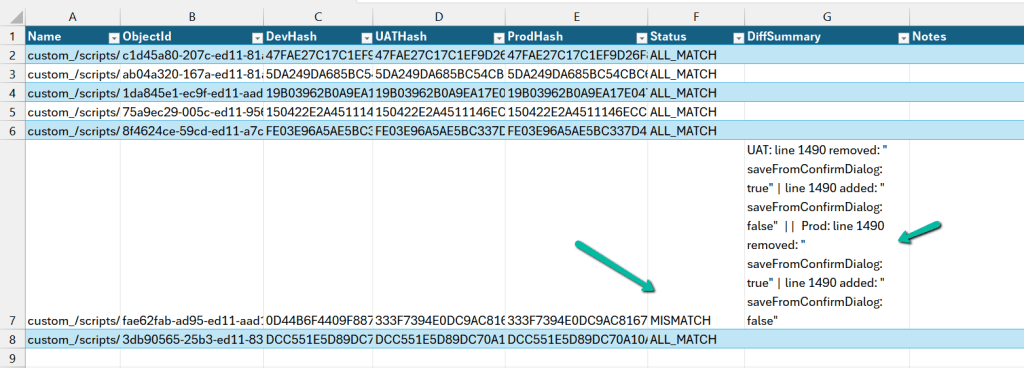
A MISMATCH on its own only tells you that something differs, not what. So we extended it to also diff the two files line by line whenever the hashes didn’t match, using a classic LCS (Longest Common Subsequence) based diff — the same underlying idea git diff uses.
private static List<string> DiffTextLines(string baseline, string other, int maxDiffs = 6)
{
    var a = baseline.Replace("\r\n", "\n").Split('\n');
    var b = other.Replace("\r\n", "\n").Split('\n');

    int n = a.Length, m = b.Length;
    var dp = new int[n + 1, m + 1];
    for (int i = n - 1; i >= 0; i--)
        for (int j = m - 1; j >= 0; j--)
            dp[i, j] = a[i] == b[j] ? dp[i + 1, j + 1] + 1 : Math.Max(dp[i + 1, j], dp[i, j + 1]);

    var diffs = new List<string>();
    int x = 0, y = 0;
    while (x < n && y < m && diffs.Count < maxDiffs)
    {
        if (a[x] == b[y]) { x++; y++; continue; }
        if (dp[x + 1, y] >= dp[x, y + 1]) { diffs.Add($"line {x + 1} removed: \"{a[x]}\""); x++; }
        else { diffs.Add($"line {y + 1} added: \"{b[y]}\""); y++; }
    }
    return diffs;
}
This walks a dynamic-programming grid to find the longest sequence of lines common to both files. Everything outside that common sequence is, by definition, either a removed line or an added one — which is exactly what shows up in the report instead of a plain “files differ”.
Every result also gets written out to a CSV, one row per web resource, with a hash column per environment, a Status column, and a DiffSummary column showing the actual line-level differences for anything that doesn’t match.
How it works, end to end
- Connects to the source environment (Dev) and reads solutioncomponent for the solution’s unique name, filtered to web resources only.
- For each web resource GUID found, fetches that same GUID from every target environment listed (UAT, Prod, or as many as you configure).
- Hashes the content from each environment and compares every target’s hash against the source’s hash — independently, so you know exactly which target(s) differ, not just that “something” differs.
- For anything that doesn’t match, runs the LCS diff and records the specific lines that changed.
- Writes a CSV report and saves every environment’s actual file content to disk, so any mismatch can be opened directly in a diff tool if the summary line isn’t enough.
Using it yourself
The console app is config-driven — no code changes needed to point it at your own solution and environments. config.json looks like this:
{
  "SolutionNames": ["YourSolutionUniqueName1", "YourSolutionUniqueName2"],
  "Source": {
    "Label": "Dev",
    "ConnectionString": "AuthType=ClientSecret;Url=https://yourorg-dev.crm.dynamics.com;ClientId=..;ClientSecret=..;"
  },
  "Targets": [
    { "Label": "UAT",  "ConnectionString": "AuthType=ClientSecret;Url=https://yourorg-uat.crm.dynamics.com;ClientId=..;ClientSecret=..;" },
    { "Label": "Prod", "ConnectionString": "AuthType=ClientSecret;Url=https://yourorg-prod.crm.dynamics.com;ClientId=..;ClientSecret=..;" }
  ],
  "OutputFolder": "output"
}
- SolutionNames — the unique name(s) of the solution(s) holding your web resources. You can list more than one, as in the example above, if your JS is spread across a couple of solutions.
- Source — the environment you trust as the baseline (usually Dev).
- Targets — as many environments as you want to check, each compared independently against Source.
Once config.json is filled in, just run:
jscompare-fx.exe config.json
and the report and diffed files show up under the configured output folder.
https://github.com/nishantranacrm/JsCompareFx
Hope it helps..


