

Recently we had a requirement to export the working hours of Bookable Resources from Dynamics 365 for a specified date range and make that information available to a third-party system.
Rather than reading the underlying calendar rules and building our own logic to calculate the working hours, we looked at using the platform capabilities provided by Dynamics 365 and used the Dataverse ExpandCalendar function
How it works
We first retrieve the Bookable Resources from Dynamics 365 and identify the calendar associated with each resource.
For each calendar, we call the Dataverse ExpandCalendar function for the required date range. Dynamics 365 expands the calendar rules and returns the resulting calendar blocks, including the start and end times along with information such as TimeCode and SubCode.
We then process these results and export the required information to a CSV file.
This approach means we do not need to recreate the calendar rules and recurrence logic ourselves. Dynamics 365 does the calendar expansion for us, and we simply consume the resulting calendar blocks.
Why use ExpandCalendar?
A Bookable Resource calendar is not simply a list of start and end times. Calendar rules can repeat over time and can include changes or exceptions. Building a separate calendar engine to interpret those rules would duplicate logic that Dynamics 365 already understands.
With ExpandCalendar, we provide the calendar and the date range, and Dynamics 365 returns the expanded calendar information for that period.
This makes the solution smaller and easier to maintain, particularly when the calendar configuration changes in Dynamics 365.
Getting the Bookable Resources
The first step is to retrieve the Bookable Resources that we want to process. The important fields for this example are the resource ID, resource name, and calendar ID.
private static List<Entity> GetAllBookableResources(
    IOrganizationService service)
{
    QueryExpression query = new QueryExpression
    {
        EntityName = "bookableresource",
        ColumnSet = new ColumnSet(
            "bookableresourceid",
            "name",
            "calendarid")
    };

    return service.RetrieveMultiple(query).Entities.ToList();
}
The calendar ID is important because it is the calendar that we pass to ExpandCalendar.
Calling ExpandCalendar
The ExpandCalendar function is exposed through the Dataverse Web API. In a .NET console application using Microsoft.PowerPlatform.Dataverse.Client, we can execute the Web API request through the ServiceClient.
private static async Task<List<CalendarBlock>> ExpandCalendarAsync(
    ServiceClient serviceClient,
    Guid calendarId,
    DateTime startUtc,
    DateTime endUtc)
{
    string requestUrl =
        serviceClient.ConnectedOrgUriActual.ToString().TrimEnd('/') +
        "/api/data/v9.2/ExpandCalendar";

    var request = new HttpRequestMessage(
        HttpMethod.Post,
        requestUrl);

    request.Headers.Add(
        "OData-Version",
        "4.0");

    request.Headers.Add(
        "OData-MaxVersion",
        "4.0");

    var body = new
    {
        CalendarId = calendarId,
        Start = startUtc.ToString("yyyy-MM-ddTHH:mm:ssZ"),
        End = endUtc.ToString("yyyy-MM-ddTHH:mm:ssZ")
    };

    string json = JsonConvert.SerializeObject(body);

    request.Content = new StringContent(
        json,
        Encoding.UTF8,
        "application/json");

    HttpResponseMessage response =
        await serviceClient.ExecuteWebRequestAsync(request);

    response.EnsureSuccessStatusCode();

    string responseJson =
        await response.Content.ReadAsStringAsync();

    JObject responseObject =
        JObject.Parse(responseJson);

    List<CalendarBlock> result =
        responseObject["value"]
            .ToObject<List<CalendarBlock>>();

    return result;
}
The exact request shape can vary depending on the Dataverse API version and implementation, so the ExpandCalendar Web API documentation should be used as the authoritative reference for the request parameters.
Working with the response
The response contains the expanded calendar blocks for the requested period. A simplified response can look like this:
{
  "Start": "2026-10-07T19:00:00Z",
  "End": "2026-10-08T04:00:00Z",
  "TimeCode": "Available",
  "SubCode": "Schedulable"
}
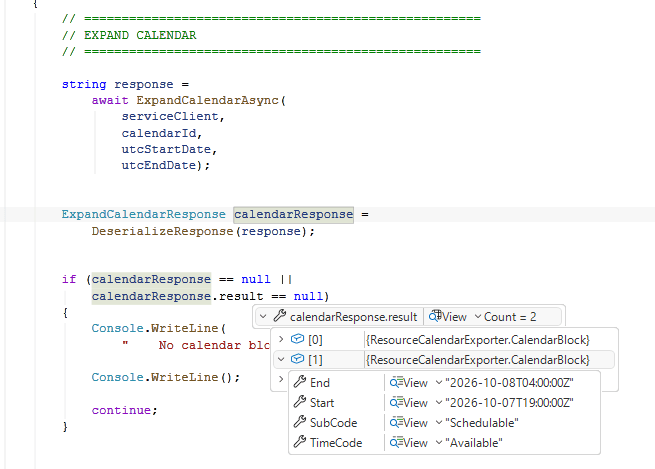
For each block, we can capture the start and end time together with TimeCode and SubCode. The application can then transform these results into the format required by the consuming system.
Working hours vs actual availability
One important distinction is that expanded calendar information should not automatically be treated as the complete scheduling availability of a resource.
ExpandCalendar gives us the expanded calendar information for the requested period. Actual scheduling availability can also be affected by existing bookings, requirements, constraints, and other scheduling factors.
If the requirement is to determine when a resource can actually be booked, the Field Service resource availability APIs should be considered instead. For a requirement focused on exporting configured calendar or working-hour information, ExpandCalendar is a good fit.
Refereces
Hope it helps..
Discover more from Nishant Rana's Weblog
Subscribe to get the latest posts sent to your email.
Share It -


