

Scenario
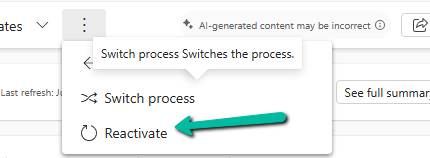
Working on a custom multi-entity Business Process Flow (Opportunity → Quote) recently, we ran into this error while trying to reactivate the process:
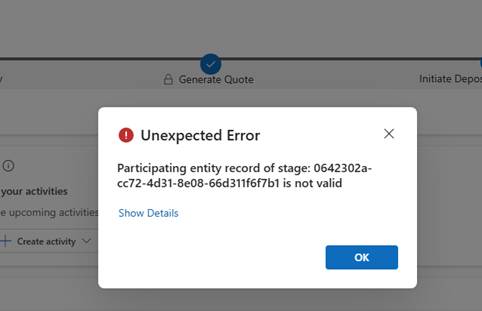
The BPF (custom_salesprocess) had already traversed several stages — Generate Opportunity → Qualify → Generate Quote → Initiate Deposit/Bank Guarantee → Sales Completion — before landing on PM Completion, which sits in the “Close” category.
Reactivating the process at that point is where it failed.
In a multi-entity BPF, each stage is bound to a specific entity via processstage.primaryentitytypecode, and the BPF instance record carries a lookup column per non-primary entity used in the flow (e.g. bpf_opportunityid, bpf_quoteid). When a stage tries to activate, Dataverse resolves the “participating entity” for that stage — and if the corresponding lookup on the instance is null, or points to a record that no longer exists (or the user can’t read), we get exactly this error.
Diagnosis
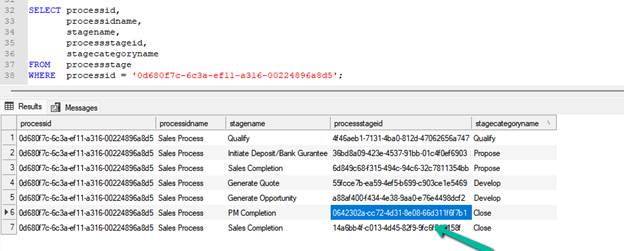
First, we check for the processtageid we got in the error – 0642302a-cc72-4d31-8e08-66d311f6f7b1
SELECT
    processid,
    stagename,
    processstageid,
    stagecategoryname
FROM processstage
WHERE processid = '0d680f7c-6c3a-ef11-a316-00224896a8d5';
Then we confirm what entity each stage actually maps to using the processid:
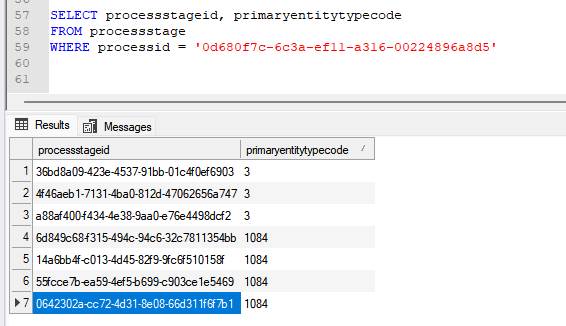
PM Completion resolves to Quote (1084) — not Opportunity — which meant the BPF instance needed a valid bpf_quoteid to activate it.
Checked the instance directly:
SELECT * FROM custom_salesprocess WHERE businessprocessflowinstanceid = '682f0586-3660-f111-a826-00224892607c' or bpf_opportunityid = '9e5bdc52-62d4-4773-8d30-fba2089ceba2'
bpf_quoteid and bpf_quoteidname both came back NULL — despite an active Quote already existing against the Opportunity. Something along the way (likely the Quote being created outside the BPF’s native “generate related record” flow) never linked it back.
Fix
A quote existed, so it was a matter of linking it. The preferred route is the related-entity picker on the BPF stage bar in the Opportunity form (safest, goes through supported platform logic). Where that’s not viable, updating the lookup directly works:
UPDATE custom_salesprocess SET bpf_quoteid = '18cc66e2-9280-f111-ab0f-7c1e528a7a2a' WHERE businessprocessflowinstanceid = '682f0586-3660-f111-a826-00224892607c';
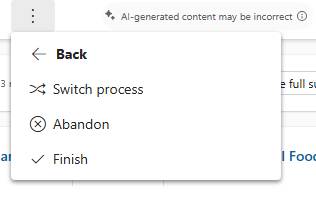
After the update, the process reactivated cleanly.
We got the options to Abandon and Finish the flow.
Rules of thumb
- Multi-entity BPF errors on activation → check the stage’s primaryentitytypecode first. If it’s not the primary entity you’re working from, the instance needs a valid lookup to that other entity.
- The instance table always carries one lookup column per entity in the flow (bpf_<entity>id) — go straight to that table and check for nulls before looking anywhere else.
- A null lookup with a record that already exists usually means the record was created outside the BPF’s intended path (manually, via integration, or via a process that bypasses the stage’s native record-generation step) and never got linked back.
- Before manually setting the lookup, confirm the target record’s statecode/statuscode — a Won/Closed or inactive record may satisfy the lookup but still fail stage entry criteria if a business rule checks for an active state.
- Prefer the BPF’s own related-entity picker on the form over a direct table update where available — it’s the supported path and won’t skip any platform-side validation.
Key takeaway
“Participating entity record of stage: X is not valid (0x80040216)” on a multi-entity BPF almost always means the stage’s bound entity has no valid linked record on the BPF instance. Trace the stage to its entity via primaryentitytypecode, check the corresponding bpf_<entity>id lookup on the instance, and link a valid, active record.
Reference
Business process flows overview – Microsoft Learn
Discover more from Nishant Rana's Weblog
Subscribe to get the latest posts sent to your email.
Share It -


