

While optimising the performance of a Dataverse plugin, we noticed a QueryExpression using ColumnSet(true). The business logic only required a few attributes, so replacing ColumnSet(true) with a minimal ColumnSet looked like an easy performance improvement. The query also used Distinct = true, which we left unchanged because it had always been there and everything was working correctly.
The Original Query
query.ColumnSet = new ColumnSet(true);
query.Distinct = true;
We changed the query to retrieve only the attributes required by the business logic:
query.ColumnSet = new ColumnSet(
    "msdyn_systemstatus",
    "msdyn_datewindowstart",
    "custom_cancelledreason");
query.Distinct = true;
The optimisation looked perfectly valid. The query returned the expected records, but part of the plugin logic suddenly stopped working.
The Unexpected Bug
The plugin compared Work Orders using Entity.Id to determine whether a record already existed in a collection. During debugging, we discovered that every retrieved entity had Guid.Empty as its Id, causing the comparison logic to fail and duplicate records to be added.
Finding the Root Cause
To isolate the problem, we reproduced the behaviour with a simple Lead query.
QueryExpression query = new QueryExpression("lead");
query.ColumnSet = new ColumnSet("lastname");
query.Distinct = true;
Once again, the record was returned successfully, but Entity.Id was Guid.Empty.
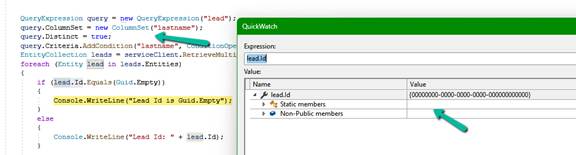
While reading the Microsoft documentation for QueryExpression.Distinct, we found the following remark:
“When the Distinct property is true, the results returned don’t include primary key values for each record because they represent an aggregation of all the distinct values.”
The Fix
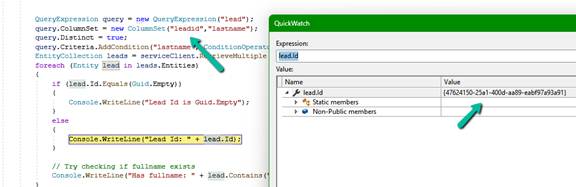
Including the primary key in the ColumnSet resolved the issue.
query.ColumnSet = new ColumnSet("leadid", "lastname");
query.Distinct = true;
After this change, both Entity.Id and the leadid attribute were populated correctly.
One More Observation
While investigating the issue, we realised something else. The original query used ColumnSet(true) together with Distinct = true. Since ColumnSet(true) retrieves every readable attribute, including the primary key, every record is already unique because the primary key itself is unique. In that particular QueryExpression there were no LinkEntity joins or other scenarios that could naturally produce duplicate rows. That meant Distinct = true was not really providing any value. In fact, once we reviewed the query, removing Distinct = true was a cleaner solution than simply adding the primary key back into the ColumnSet.
This serves as a useful reminder that performance optimisation is not just about reducing the columns retrieved. It is also a good opportunity to question whether every part of the original query is still necessary.
Lessons Learned
• Replacing ColumnSet(true) with a minimal ColumnSet is a good optimisation.
• If a query uses Distinct = true and the code relies on Entity.Id, include the primary key in the ColumnSet.
• Review whether Distinct = true is actually required. In many QueryExpression scenarios, especially those without joins, it may be redundant.
• Small performance improvements can sometimes expose subtle behaviours that are easy to overlook.
Hope it helps..
Discover more from Nishant Rana's Weblog
Subscribe to get the latest posts sent to your email.
Share It -


One thought on “When Entity.Id Is Guid.Empty with QueryExpression.Distinct = True (Dataverse)”