

While validating record counts for a Work Orders view in Dynamics 365 Field Service, we ran into the same underlying issue covered in an earlier post – Why SQL4CDS Record Counts May Not Match Advanced Find for Date Filters.
This time, instead of just explaining the root cause again, we put together a quick reference table for converting an Advanced Find date range into the correct SQL4CDS UTC boundary, for any user time zone.
The Scenario
Advanced Find query on Work Orders, filtered on Created On:
- On or After 01/01/2026
- On or Before 05/01/2026
The user running this is in Auckland, New Zealand. (User’s Time Zone is Auckland)

We were running SQL4CDS in UTC mode. A query that simply matches the literal date strings against createdon will not reliably reproduce the Advanced Find count, because Advanced Find evaluates the date range in the user’s local time zone, while createdon is stored in UTC. The two only line up once the date range is converted to explicit UTC boundaries.
The Reliable Formula
StartBoundaryUTC = StartDate 00:00:00 (user’s local time) → converted to UTC
EndBoundaryUTC = (EndDate + 1 day) 00:00:00 (user’s local time) → converted to UTC
WHERE createdon >= StartBoundaryUTC AND createdon < EndBoundaryUTC
Two points worth calling out:
- The upper boundary always uses End Date + 1 day, with a strict <, not <=. This avoids any ambiguity around milliseconds and reliably captures the entire end date.
- For time zones ahead of UTC (New Zealand, India), convert by subtracting the offset. For time zones behind UTC (Hawaii, US), convert by adding the offset.
Quick Reference Table
Boundary used below: 1/01/2026 to 5/01/2026 (end boundary = 6/01/2026 local, converted to UTC).
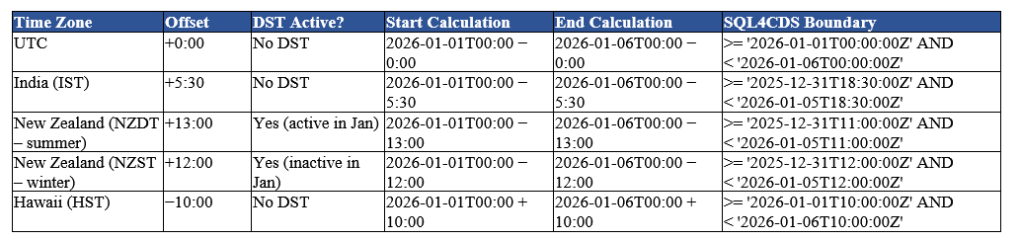
| Time Zone | Offset | DST Active? | Start Calculation | End Calculation | SQL4CDS Boundary |
| UTC | +0:00 | No DST | 2026-01-01T00:00 − 0:00 | 2026-01-06T00:00 − 0:00 | >= ‘2026-01-01T00:00:00Z’ AND < ‘2026-01-06T00:00:00Z’ |
| India (IST) | +5:30 | No DST | 2026-01-01T00:00 − 5:30 | 2026-01-06T00:00 − 5:30 | >= ‘2025-12-31T18:30:00Z’ AND < ‘2026-01-05T18:30:00Z’ |
| New Zealand (NZDT – summer) | +13:00 | Yes (active in Jan) | 2026-01-01T00:00 − 13:00 | 2026-01-06T00:00 − 13:00 | >= ‘2025-12-31T11:00:00Z’ AND < ‘2026-01-05T11:00:00Z’ |
| New Zealand (NZST – winter) | +12:00 | Yes (inactive in Jan) | 2026-01-01T00:00 − 12:00 | 2026-01-06T00:00 − 12:00 | >= ‘2025-12-31T12:00:00Z’ AND < ‘2026-01-05T12:00:00Z’ |
| Hawaii (HST) | −10:00 | No DST | 2026-01-01T00:00 + 10:00 | 2026-01-06T00:00 + 10:00 | >= ‘2026-01-01T10:00:00Z’ AND < ‘2026-01-06T10:00:00Z’ |
Since January falls in NZ summer, the Auckland user’s boundary above uses NZDT (+13:00):
SELECT count(1)
FROM msdyn_workorder
WHERE createdon >= '2025-12-31T11:00:00Z'
AND createdon < '2026-01-05T11:00:00Z'
This reproduces the Advanced Find count for the same range.
NZ DST Transition Windows
New Zealand does not stay on a single offset year-round, so the correct value depends on the date range being queried, not the date the query is run.
| Period | Offset |
| Late Sep – early Apr (NZDT) | UTC+13 |
| Early Apr – late Sep (NZST) | UTC+12 |
Confirm the exact transition dates for the specific year, as they shift slightly.
Rules of Thumb
| Rule | Reason |
| End boundary = End Date + 1 day, use < not <= | Captures the full end date without truncating time |
| Time zones ahead of UTC: subtract the offset | UTC = Local − Offset |
| Time zones behind UTC: add the offset | UTC = Local + Offset |
| Check DST for the query dates, not today’s date | The same time zone can have two different offsets depending on the time of year |
Key Takeaway
When running SQL4CDS in UTC mode, the reliable and repeatable approach is to convert the Advanced Find date range into explicit UTC boundaries using the local-time offset (accounting for DST where applicable), and query using >= / < against those boundaries.
Reference
For more background on how SQL4CDS interprets date and time values in UTC vs Local mode, see Mark Carrington’s article: Date/Time handling in SQL 4 CDS
Hope it helps..
Discover more from Nishant Rana's Weblog
Subscribe to get the latest posts sent to your email.
Share It -


One thought on “SQL4CDS UTC Mode: Converting Advanced Find Date Filters to UTC Boundaries– A Quick Reference (Dataverse / Dynamics 365)”