
Let us try exploring Editable Grid in Dynamics 365
We’d enable it on Contact Entity ( editable grid works for custom entities as well)
- Go to Contact entity, control tab and click on Add Control

- Add Editable Grid

- Enable Editable Grid as default for Web, Phone and Tablet
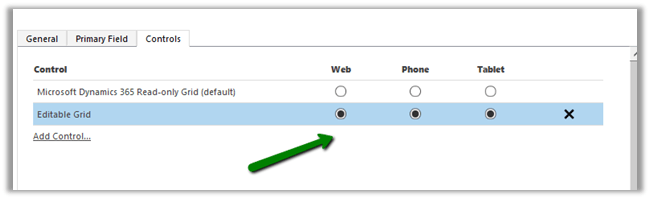
- Save and Publish the change.
- Go to Contact Home Grid. (fields now can be edited, Status, Composite fields etc are not editable)

- We can do Group By on the grid


- Similarly, in Associated View of Contact we have the same behavior

- To switch back to Read Only Grid, select SHOW AS command

- Back to our old Read Only Grid (no grouping)

- We can add JScript for fields inside grid.
- Let us try Adding function on OnChange of Address 1: City field inside Editable Grid

- On changing the City field in the grid

For Subgrid,


Hope it helps..
Discover more from Nishant Rana's Weblog
Subscribe to get the latest posts sent to your email.
Share It -


In which Dynamics release is this available?
LikeLike
It is already available in Dynamics 365 for new customers. The existing customers can upgrade to Dynamics 365 through December update. I am talking about Online here. Need to check for On Premise.
LikeLike