How to – Download File from File Column using InitializeFileBlocksDownload and DownloadBlock Request (Dynamics 365/ CRM / Dataverse)


Sharing a sample code which we can use to download the file from the File Column

Also read –

https://nishantrana.me/2021/10/01/using-file-and-image-data-type-in-dataverse-dynamics-365/

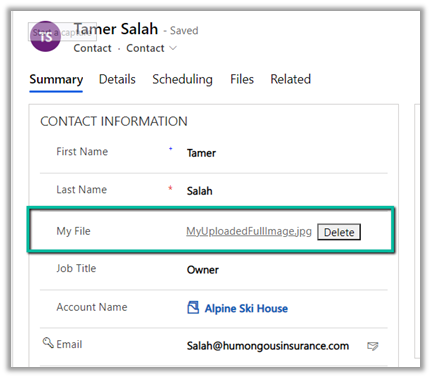
File Attribute

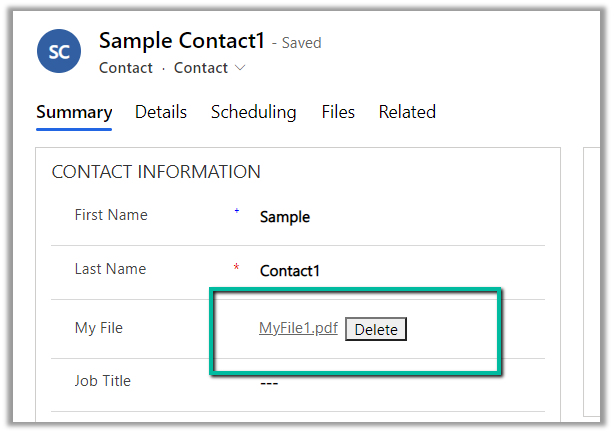
Here we would download the below file uploaded to one of the contact records.

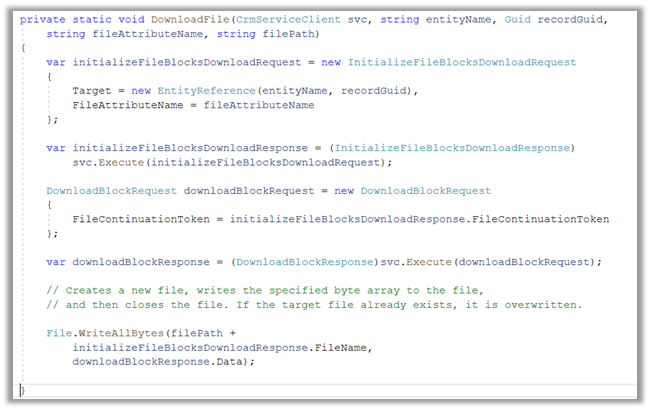
The sample code –

On calling the method –

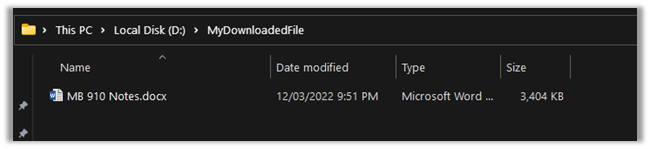
We can see the file downloaded at the location specified

Here the file transfers are limited to a maximum of 16 MB in a single call. In case of more than 16 MB, we need to divide the data into 4 MB or smaller chunks, combine or join the downloaded data to form the complete file.

https://docs.microsoft.com/en-us/powerapps/developer/data-platform/file-attributes#example-net-c-code-for-download-with-chunking

Get more details – Retrieve File Data

*interestingly enough we didn't get any error while trying to download files with size more than 16 GB by using the DownloadBlockRequest

Hope it helps..

private static void DownloadFile(CrmServiceClient svc, string *interestingly enough we didn't get any error while trying to download files with size entityName, Guid recordGuid, 
            string fileAttributeName, string filePath)
        {
            var initializeFileBlocksDownloadRequest = new InitializeFileBlocksDownloadRequest
            {
                Target = new EntityReference(entityName, recordGuid),
                FileAttributeName = fileAttributeName
            };

            var initializeFileBlocksDownloadResponse = (InitializeFileBlocksDownloadResponse)
                svc.Execute(initializeFileBlocksDownloadRequest);

            DownloadBlockRequest downloadBlockRequest = new DownloadBlockRequest
            {
                FileContinuationToken = initializeFileBlocksDownloadResponse.FileContinuationToken
            };

            var downloadBlockResponse = (DownloadBlockResponse)svc.Execute(downloadBlockRequest);

            // Creates a new file, writes the specified byte array to the file,
            // and then closes the file. If the target file already exists, it is overwritten.

            File.WriteAllBytes(filePath + 
                initializeFileBlocksDownloadResponse.FileName, 
                downloadBlockResponse.Data);

        }
Advertisements

Fixed – User Presence not working – Customer Service Workspace / Omnichannel (Dynamics 365/CRM)


Recently while exploring Customer Service Workspace we could not see the presence being loaded for the users.

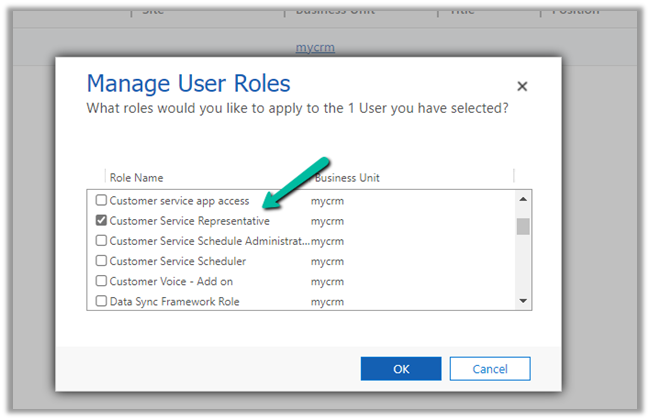
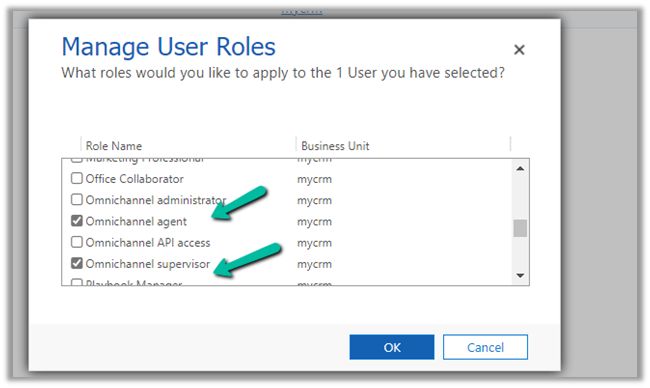
The first thing we need to check here is if the user has either the Omnichannel Agent / Supervisor role or Customer Service Representative role assigned. (it will not load even if you are a system admin or Omnichannel Administrator role only)

The next thing to check is the omnichannel record (Channel Integration Framework V2.0 Providers entity/table)

Check the value for the Channel URL field –

It should be

https://oc-cdn-ocprod.azureedge.net/convcontrol/ChatControl.htm?uci=true&clientName=zfp&cloudType=Public&env=prod&ocBaseUrl=https://unq0c996fcff27241fb845216a48ece6-crm.omnichannelengagementhub.com&ucilib=https://org749544d7.crm.dynamics.com/webresources/Widget/msdyn_ciLibrary.js

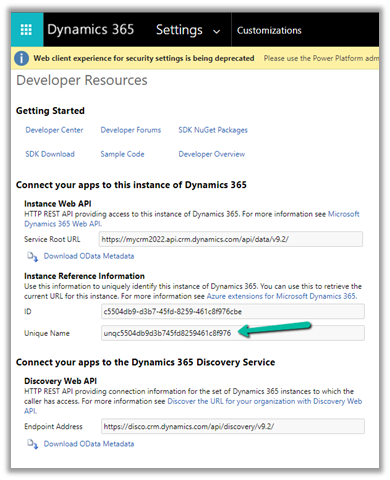
Replace the first part in ocBaseUrl with your organization’s Unique Name (Customization > Developer Resources)

and second is the organization base url in the uclib.

If it still doesn’t work or gets stuck at 25 or 57 percent, check if you have security defaults enabled in the tenant if so either disable it.

Disable Security Defaults while login into Power Platform / Dynamics 365 – Nishant Rana’s Weblog

Or make sure the users have the multi-factor authentication set up on their account.

After we made sure all the above settings – we had the presence working for the users.

Get all the details here-

Troubleshoot issues in Omnichannel for Customer Service

Hope it helps..

Advertisements

How to – Disable / Read Only fields in Editable Grid control (Dynamics 365 / CRM)


Say for e.g. we have a requirement to make a certain field or column in the Editable Grid as read-only.

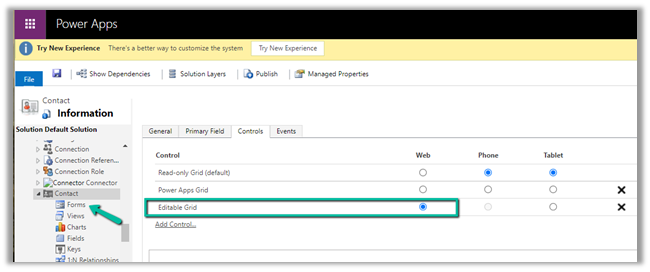
Here we have enabled Editable Grid control for Contact table.

Below are the 2 ways of achieving it –

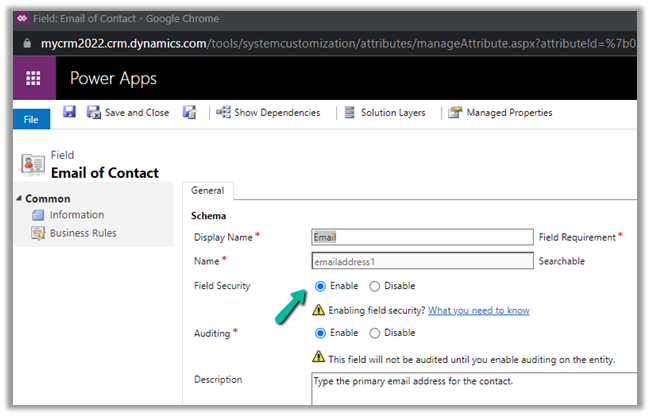
Here we are taking the email field as an example.

  • Field level security

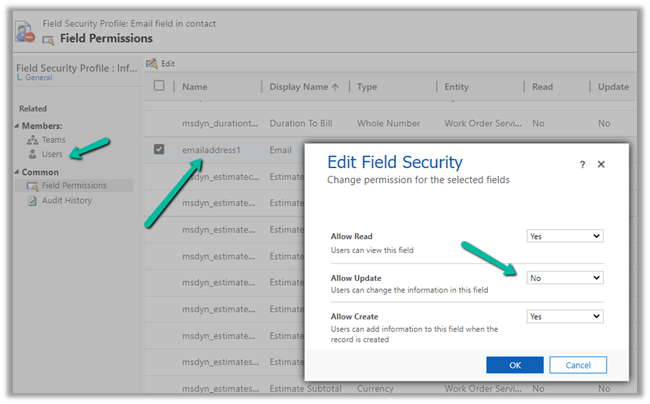
We have enabled Field Security on the Email field.

And we have set Allow Read and Allow Create as Yes and Allow Update as No.

And added the appropriate users or teams to which this profile should apply.

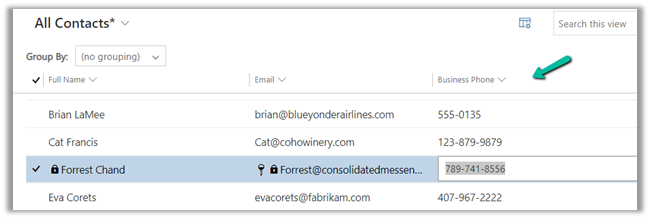
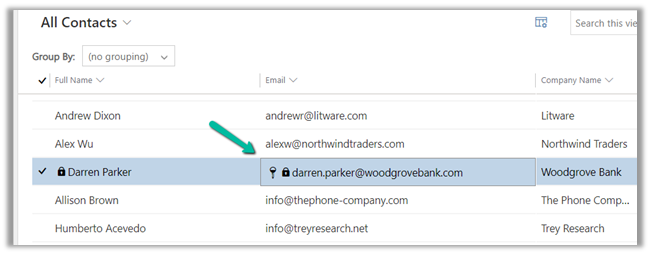
Now when the user tries to make changes in the email field, it comes as locked.

The other fields still come as editable as we have not enabled them for field security.

  • The other option is JavaScript on the OnRecordSelect event

Code –

function onGridRowSelected(context) {
    context
        .getFormContext()
        .getData()
        .getEntity()
        .attributes.forEach(function (attr) {
            if (attr.getName() === "emailaddress1") {
                attr.controls.forEach(function (myField) {
                    myField.setDisabled(true);
                });
            }
        });
}

The result –

Also check  – https://nishantrana.me/2022/02/15/power-apps-grid-control-in-model-driven-apps-dynamics-365-crm/

Hope it helps..
Advertisements

How to – Free up File Usage – Dataverse Storage Capacity (Dynamics 365 / CRM)


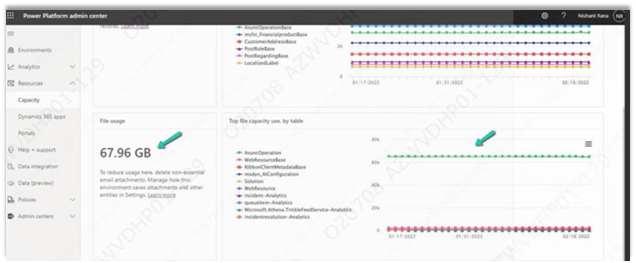
Recently we saw File usage for one of the environments reaching around 68 GB.

We managed to bring it down to around 10 GB or so by (Microsoft Support quickly helped us by sharing the required details here)

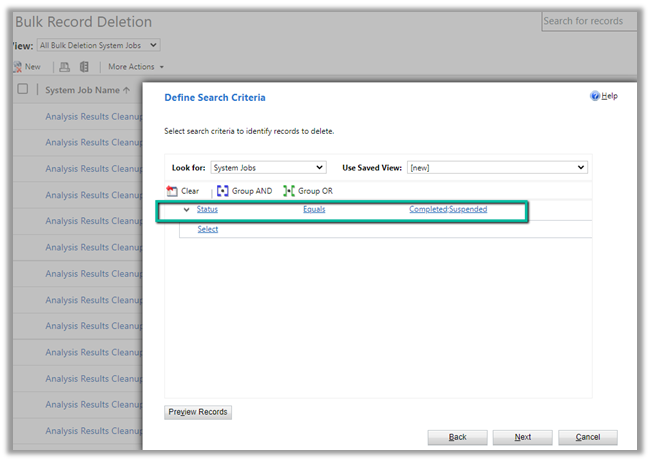
  • Deleting the System Job of Type Workflow with Status as Successful.
  • We ran Bulk Deletion Job to delete successful and suspended System Jobs.

     Settings >> Data Management >> Bulk Record Deletion

  • We can also delete attachments or emails or notes having attachments either through Advanced Find or Bulk Deletion job if not using them.
  • Uninstalled the Analytics Solution for Sales to delete the analytics data.

https://docs.microsoft.com/en-us/dynamics365/sales/uninstall-sales-insights#how-to-uninstall-sales-insights

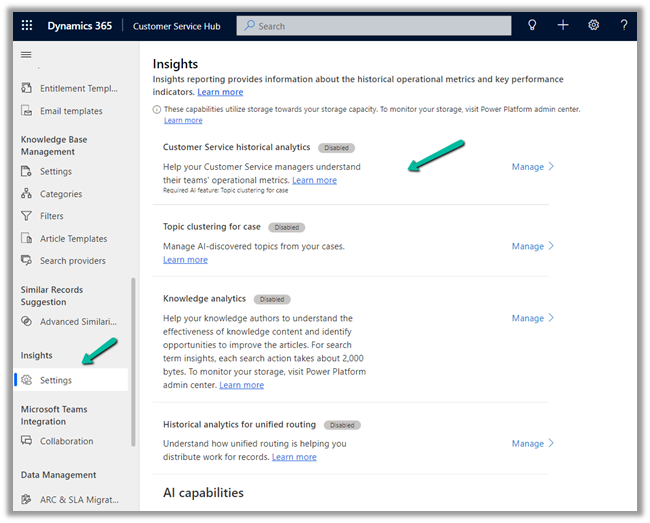
  • Disabled the Analytics / Insights for Customer Service Hub.

Customer Service Hub >> Service Management >> Insights (Settings)

Nicely explained here –

https://community.dynamics.com/365/f/dynamics-365-general-forum/416139/customer-guide-how-to-reduce-consumption-of–analytics-tables

Also, check

https://docs.microsoft.com/en-us/power-platform/admin/free-storage-space

Hope it helps..

Advertisements

Sample Code – Update format of Autonumber attribute in Dataverse (Dynamics 365 / CRM)


At times we may have a requirement to update the format of the Auto Number dynamically / programmatically so that the new set of records take up the new format.

Let us understand through a simple example.

Right now for the below field, we have the auto-number format set as

{SEQNUM:4}


Below is the sample code to update the auto-number format programmatically.

It makes use of our RetrieveAttribute and UpdateAttribute requests.

https://docs.microsoft.com/en-us/dynamics365/customerengagement/on-premises/developer/create-auto-number-attributes?view=op-9-1#autonumberformat-options

We have retrieved the attribute then have specified a new auto number format, followed by update request.

After executing the above code successfully, and creating a new contact record we can see the new number generated as per the specified format.

Sample Code

        string ConnectionString = "AuthType = OAuth; " +
              "AppId=51f81489-12ee-4a9e-aaae-a2591f45987d; " +
              "Username=test@test.onmicrosoft.com; " +
              "Password=test; " +
              "RedirectUri=app://58145B91-0C36-4500-8554-080854F2AC97;" +
              "Url = https://test.crm.dynamics.com/;";


        CrmServiceClient svc = new CrmServiceClient(ConnectionString);

        if (svc.IsReady)
        {
            var retAttributeRequest = ((RetrieveAttributeResponse)
                             svc.Execute(new RetrieveAttributeRequest
                             {
                                 EntityLogicalName = "contact",
                                 LogicalName = "cr59f_myautonumber",
                                 RetrieveAsIfPublished = true
                             })).AttributeMetadata;

            retAttributeRequest.AutoNumberFormat = "MyFormat-{SEQNUM:6}-{DATETIMEUTC:yyyyMMddhh}-{RANDSTRING:6}";

            var updateAttrRequest = new UpdateAttributeRequest
            {
                EntityName = "contact",
                Attribute = retAttributeRequest
            };

            var updateAttrResponse = (UpdateAttributeResponse)
                svc.Execute(updateAttrRequest);

Check other posts on Auto Number attribute –

Hope it helps..

Advertisements

How to – Unify (Map, Match and Merge) Entities in Dynamics 365 Customer Insights


In the earlier posts, we set up the trial of Dynamics 365 Customer Insights, configured our data sources, one from Microsoft Dataverse and the other from a local excel file.

In this post, we will unify the contact in our different data sources and create the Customer Profile.

Navigate to Unify, and click on +Select entities to select our contact entities from the different data sources for creating the customer profile.

We have selected all the fields from ContactsLocal Excel Data Source.

We have selected Id, emailaddress1, first name, gender code, last name, mobile phone field selected from the contact entity of CRMDataSource.

Click on Apply.

For CRM Data Source – Contact, we can see the field auto mapped as we have Intelligent mapping on by default.

For the primary key, we have specified ID as the primary key.

For Contact – Local Excel Data Source, we can see one field not mapped.

As we cannot find the field in the existing list of fields, we can type in and that will create the new field.

For the primary key, we have selected email.

Save the mapping.

Now let us move to Match.

Here we will define the order first.

Here we have specified our CRM’s Contact as the primary data source and specified that all the records from it should be included.

Next, we need to define the rules for matching the records between the data sources.

We have selected the email field and set the precision as Basic – Medium.

The other option for Precision is Custom, where a value between 1 to 100 can be specified and we can also add additional rules.

For now, we’d only keep the email address rule with precision as a basic – medium.

Save the changes and Run the rule.

We can see the results after some time.

Time for Merge now. Clicking on Merge, we can see that it has auto-combined 2 fields first name and last name.

We have the option of Editing, renaming, separating, excluding, moving fields up and down.

We’d save and run the Merge.

For Run, we have 2 options –

Run Only Merge will affect the unified customer entity, whereas Run Merge and downstream processes will run enrichment, segments, measures process followed by changes in the customer profile.

Here we have selected Run Only Merge.

After around 5 minutes we can see the Merge successful.

Clicking on Customers asks us to configure the last step – Search & filter index.


Click on Add fields to define fields for searching and filtering.

We have selected below fields for indexing

Save and Run.

After a couple of minutes, we can see the indexing is successful.

Click on Back to customers to see our customer profile ready.

We will explore other features of Customer Insights in the coming posts.

Hope it helps..

Advertisements