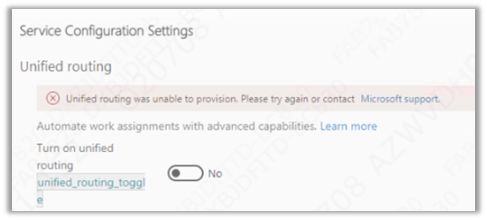
Recently while trying to set up Unified Routing, we got the below error.
“Unified routing was unable to provision. Please try again or contact Microsoft Support”
The user had the system administrator role and we already had the global administrator’s consent, which should be good enough to set up unified routing.
We tried with different system administrator users but that doesn’t resolve that error.
Eventually, we tried the setup with the same user but in a different VDI (Virtual Desktop Infrastructure), and the setup worked properly without any error. One probable reason could be, that the appropriate URLs being accessed during setup were already whitelisted in the other VDI, which wasn’t the case in the first VDI where we were trying.
“We couldn’t load you user roles from the selected Dynamics 365 Organization. Please try again”
The user had the system administrator role, which is good enough to set up marketing.
We tried replicating the same in other trial environments but were not able to replicate the above error.
Eventually, we tried the setup with the same user but in a different VDI (Virtual Desktop Infrastructure), and the setup worked properly without any error. One probable reason could be, that the appropriate URLs being accessed during setup were already whitelisted in the other VDI, which wasn’t the case in the first VDI where we were trying earlier.
This blog will discuss new component added to Power Apps. It is about the “Settings” component. Indeed, this component allows adding a configuration layer for a model-driven application. This allows to easily activate or deactivate a feature for a model-driven app.
For more information on this component, I invite you to read this excellent blog from Power Apps team
Scenario:
Enable app makers to transform a classic model-driven app into a multi-session one using the settings components. You can check out the demo at the end of the blog before continuing reading.
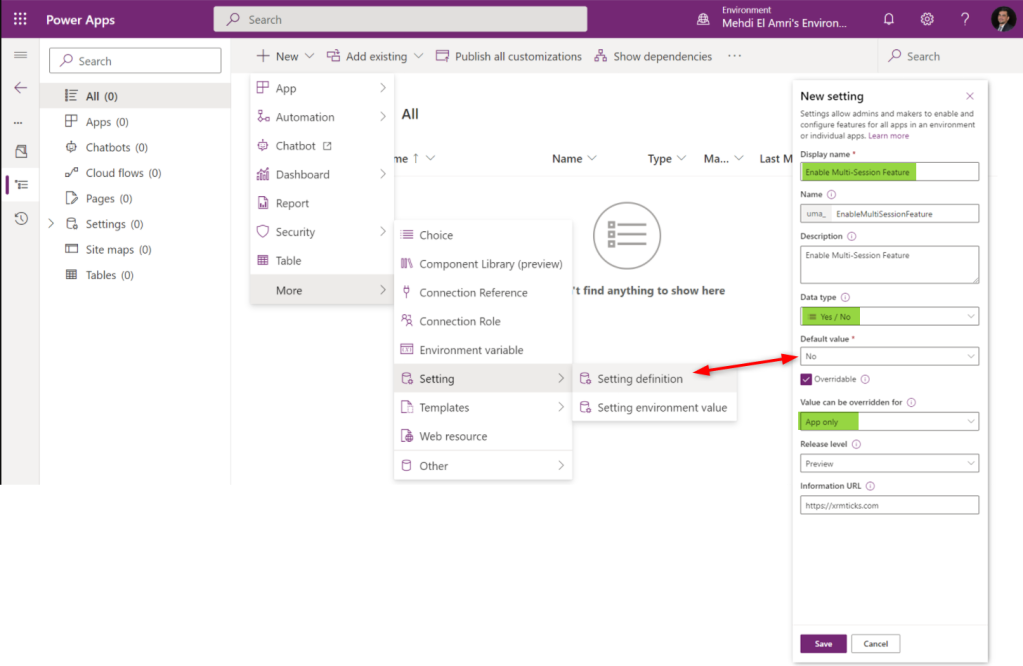
Step 1: Create the Setting Definition
First, create a solution through make.preview.powerapps.com. Yes, we will implement everything on the preview version of PowerApps. Then, create a new setting definition. In my case I named it “Enable Multi-Session Feature” and applied the following values:

















 Nishant Rana's Weblog