Fixed – Unable to process template language expressions for trigger. In the template language function ‘convertToUtc’, the value provided for the time zone id ‘Gulf Standard Time’ was not valid while using Delay Until property– Power Automate


Recently while using Delay until property of the trigger, in one of the flows, we got the below error

“Unable to process template language expressions for trigger ‘When_a_row_is_added,_modified_or_deleted’ at line ‘1’ and column ‘16344’: ‘In the template language function ‘convertToUtc’, the value provided for the time zone id ‘Gulf Standard Time’ was not valid. ‘.”

Usage of Delay until is nicely explained here by Debajit –

https://debajmecrm.com/how-to-delay-a-power-automate-flow-execution-till-a-specified-date-and-time/

https://debajmecrm.com/replicate-dynamics-365-workflow-timeout-wait-condition-in-microsoft-flows/


Delay until = convertToUtc(‘2022-05-16T17:22:00′,’Gulf Standard Time’)

It turns out that Gulf Standard Time is not a valid time zone id.

Changing it to Arabian Standard Time resolved the issue for us.

i.e.

convertToUtc(‘2022-05-16T19:22:00′,’Arabian Standard Time’)


Also check – https://nishantrana.me/2022/01/19/how-to-use-do-until-and-delay-in-power-automate/

Hope it helps..
Advertisements

Fixed – Invalid template. Unable to process template language expressions in action. Template language expression cannot be evaluated: the template action is not defined in the current scope (Power Automate)


While testing a cloud flow in Power Automate, for one of the actions, we got the below error

Unable to process template language expressions in action ‘Update_a_row’ inputs at line ‘0’ and column ‘0’: ‘Template language expression cannot be evaluated: the template action ‘Do_until’ is not defined at current scope.’.


We were getting the error because we were referring Current Iteration Index of Do Until control, which was inside Scope 1, in the Update a Row action of Scope 2, i.e. outside the scope of Do Until control.

Scopes – https://nishantrana.me/2022/05/10/d365-implement-try-catch-finally-in-powerautomate/

The way we resolved it was to initialize a variable, setting it inside the Do Until action with the current iteration index and then referring it inside Scope 2.

Do Until – https://nishantrana.me/2022/01/19/how-to-use-do-until-and-delay-in-power-automate/

Hope it helps..

Advertisements

Fixed – Authorization failed. The client with object id does not have authorization to perform action ‘Microsoft.Authorization/roleAssignments/write’ over scope ‘/subcriptions’ while configuring Azure Synapse Link for Dataverse


Recently while configuring Azure Synapse Link for Dataverse, for exporting data to Azure Data Lake we got the below error –

{“code”:”AuthorizationFailed”,”message”:”The client ‘abc’ with object id ‘d56d5fbb-0d46-4814-afaa-e429e5f252c8’ does not have authorization to perform action ‘Microsoft.Authorization/roleAssignments/write’ over scope ‘/subscriptions/30ed4d5c-4377-4df1-a341-8f801a7943ad/resourceGroups/RG/providers/Microsoft.Storage/storageAccounts/saazuredatalakecrm/providers/Microsoft.Authorization/roleAssignments/2eb81813-3b38-4b2e-bc14-f649263b5fcf’ or the scope is invalid. If access was recently granted, please refresh your credentials.”}


As well as the below error –


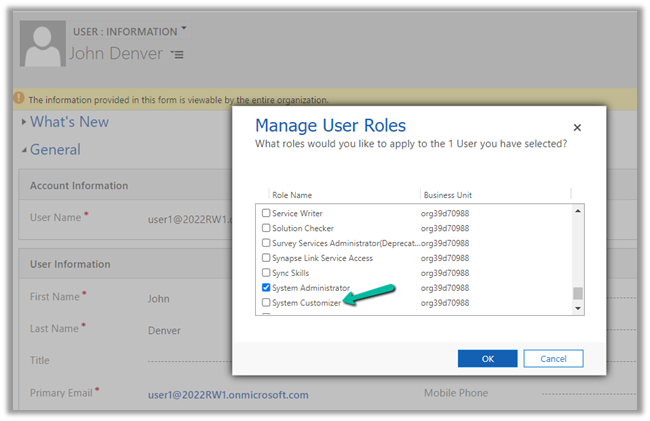
As the error suggests the error was because the user account used was not having the appropriate role(s) assigned.

The user needs to have the Owner as well as Blob Storage Data Contributor role on the Azure Data Lake Storage Gen2 account.

Also check –

https://nishantrana.me/2020/09/07/error-access-to-the-resource-is-forbidden-while-trying-to-connect-to-azure-data-lake-storage-gen2-using-power-bi-desktop/

https://nishantrana.me/2021/06/24/fixed-authorizationfailed-the-client-with-object-id-does-not-have-authorization-to-perform-action-microsoft-authorization-roleassignments-write-over-scope-storageaccou/

https://docs.microsoft.com/en-us/power-apps/maker/data-platform/azure-synapse-link-synapse#prerequisites

Hope it helps..

Advertisements

Fixed –Available for specific video sites error- Chromecast in Windows 10 / 11


While trying to cast a tab from Chrome Browser on Windows to Android  TV, we started getting the below error.

“Available for specific video sites”

Casting was working properly from the android phone, infect even from the chrome browser it had been working properly earlier

As it turned out, setting the system’s date /time correctly on the Windows Laptop fixed the casting issue.

Hope it helps..

Advertisements

D365: Implement Try…Catch…Finally in PowerAutomate


Interesting use case ..

Ajit Patra's avatarAjit Patra

Recently, we were working on a requirement to send PDF as an attachment in email on click of a custom ribbon button on Lead record. More details here:
D365: Generate Word Document using Content Control, save to SharePoint and convert to pdf usingPowerAutomate
D365: Download SharePoint document, attach to Email using PowerAutomate and AzureFunction
D365: Execute PowerAutomate from Ribbon button usingJS

As part of this requirement, we also wanted to show form notification based on the execution status of PowerAutomate whether it’s completed successfully or failed somewhere in the middle.
To achieve this, we created a custom option set field(with options In Progress, Error and Successful) on Lead entity to hold the status of execution of PowerAutomate. We tried implementing Try..Catch..Finally blocks in PowerAutomate.

Try Block: This block should contain all the core actions that PowerAutomate needs to accomplish. We used this block to update the custom option set…

View original post 382 more words

Autonumber field values in case of exception in Dynamics 365 / CRM


Recently in one of our projects, where we were using the auto number attribute (with sequential numbers), we realized that it gets incremented even in case of an exception thrown during Pre Stage of the Plugin Execution. We were assuming the number gets incremented only after the record gets created i.e. on post-stage.

But as the documentation mentions, the number gets pre-selected as soon as the record is started.

https://docs.microsoft.com/en-us/power-apps/maker/data-platform/autonumber-fields

Let us see it in action also –

Here we have the lead record created with My Autonumber as the auto number column with seed as 1000

The auto number field has a value of 1009 currently.

Now let us register a plugin on the Pre-Create stage that throws the exception.

Let us try creating a new lead record, which as expected will throw the exception.

Let us try saving the record 3 times more, triggering the record creation as well as the plugin along with the exception.

Now let us disable the plugin step and save/create the record.

As expected the record gets created, and the auto number field has a value of 1014.

The same behavior was observed in case of Pre-Validation stage.

Hope it helps..


Advertisements

Nishant Rana's Weblog

Everything related to Microsoft .NET Technology

Skip to content ↓