Fatal error during installation- Microsoft Dynamics CRM Report Authoring Extension Setup.


Hi,

Was getting the below error while trying to install

Microsoft Dynamics CRM 2013 Report Authoring Extension (with SQL Server Data Tools support)

https://www.microsoft.com/en-us/download/details.aspx?id=40343g

The solution was to delete the following registry key

HKLM\SOFTWARE\Microsoft\Windows\CurrentVersion\Installer\UserData\S-1-5-18\Components\0EF1E6B4EFCDA2649B26A424D56DAACD


After deleting the key the installation was successful.


https://support.microsoft.com/en-us/kb/2988630

Hope it helps..

Missing Posts tab in Social Pane in CRM 2013.


Hi,

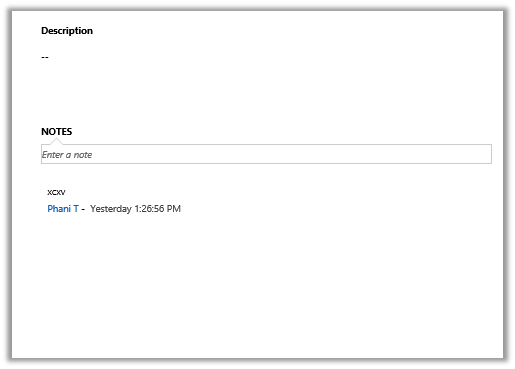
Recently we added Social Pane to one of our custom entity form in CRM 2013. It was only showing Notes and Activities tab. Posts tab was missing.

To get the Posts tab we need to activate Post for that custom entity, which can be done through Post Configurations page.

However the Post Configuration area was missing in our CRM’s site map navigation.

To add it back, we need to follow the steps mentioned this post

http://www.crmcodex.com/2013/11/mscrm-2013-missing-posts-tab-on-the-new-activity-feeds/

i.e. to add the following SubArea

<SubArea Id=”nav_administration” ResourceId=”Homepage_Administration” DescriptionResourceId=”Administration_SubArea_Description” Icon=”/_imgs/ico_18_administration.gif” Url=”/tools/Admin/admin.aspx” AvailableOffline=”false” />

<SubArea Id=”nav_social” ResourceId=”Social_SubArea_Title” DescriptionResourceId=”Social_SubArea_Description” Icon=”/_imgs/area/16_social.png” Url=”/tools/social/social_area.aspx” AvailableOffline=”false” />

<SubArea Id=”msdyn_postconfig” ResourceId=”Activity_Feed_Configuration” Entity=”msdyn_postconfig” />


Add Email and Post Configuration to SiteMap

https://technet.microsoft.com/en-us/library/dn486920%28v=crm.6%29.aspx

Hope it helps..


Missing Activities tab in Social Pane in CRM 2013


Hi,

Was working on a task wherein we had to add Social Pane to a form of a custom entity. We enabled the Notes for the entity (Activities was already enabled).

However after adding it to the form it was only showing only Notes tab.

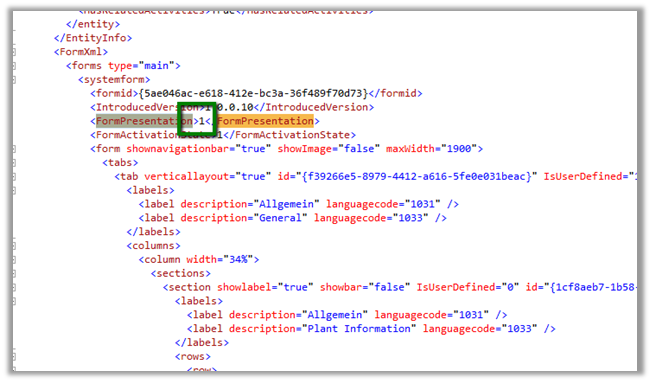
The solution we found was to export the entity and change the following value to 1 for the particular form.

Saving and importing back the solution fixed the issue.


The helpful post

https://thecrmgrid.wordpress.com/2013/11/22/social-pane-control-not-working-in-custom-forms/

Hope it helps..

Reports in Dynamics CRM 2013


List of OOB reports in CRM

CRMCONSULTANT's avatarMicrosoft Dynamics CRM Blog

Microsoft Dynamics CRM 2013 includes reports that provide useful business information to the user. These reports are based on Microsoft SQL Server Reporting Services, and provide the same set of features that are available for the Microsoft SQL Server Reporting Services reports. The report definition (data and layout) of Microsoft Dynamics CRM reports are contained in an .rdl file, and the contents of the .rdl file conform to the Microsoft SQL Server Report Definition Language Specification.

1. System Reports (Out-of-box Reports):

Dynamics CRM 2013 comes with 25 out-of-box reports for viewing your business data. The following table shows a list of available reports and what data they get when you run.

NameDescription
Account DistributionIdentify patterns in top revenue-generating accounts.
Account OverviewView a one-page overview of an account.
Account SummaryView a chronological summary of an account.
ActivitiesDisplay a list of activities.
Campaign Activity StatusTrack campaign…

View original post 723 more words

“The formula is empty” exception while importing solution in CRM 2015


Got this error while trying to import a managed solution.

It was giving this error for Calculated fields.

On checking these fields in the source CRM realized that these fields were missing Action in them.

Adding appropriate action to them and then exporting and importing the same solution worked fine.

Hope it helps..

“The entity referenced by this process includes a currency value that does not exist in your organization. Select a different currency and try again.” Error in Workflow in CRM.


After importing one of the solution was getting the below error in one of the processes

The solution was to find out the Currency field and set it to the currency that existed in our organization.

Hope it helps..