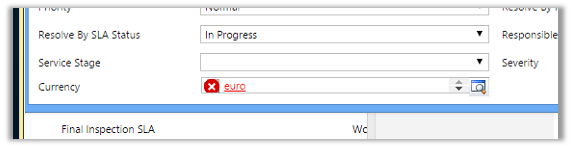
After importing one of the solution was getting the below error in one of the processes

The solution was to find out the Currency field and set it to the currency that existed in our organization.
Hope it helps..

After importing one of the solution was getting the below error in one of the processes
The solution was to find out the Currency field and set it to the currency that existed in our organization.
Hope it helps..

Query execution time of 60 seconds exceeded the threshold of 10 seconds warning in CRM 2013.
We were getting the below warning in one of our test environment
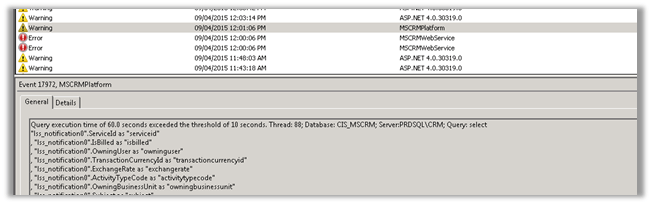
On analyzing figured out that one of the plugin was using retrieve with ColumnSet(true) option i.e. retrieving all the columns of the entity which was not required in this case.
Fetching only the required columns fixed the warning.
The other option could have been indexing or increate the value for LongQueryThersholdInSeconds column in ServerSetingProperties table of MSCRM_Config.
Helpful posts
Hope it helps..

Hi,
To fire a plugin when an incident is resolved we need to register the plugin in
Close message for the incident entity.
And in the input parameters of the context we need to check for IncidentResolution.
This entity is a special entity that holds the information about the incident record that is being closed.
The sample plugin below gets the actual end attribute value of IncidentResolution and subtracts created on attribute value of Incident to get the duration and updates the duration (custom field) in the case being resolved.
public void Execute(IServiceProvider serviceProvider)
{
// Obtain the execution context from the service provider.
IPluginExecutionContext context = (IPluginExecutionContext)
serviceProvider.GetService(typeof(IPluginExecutionContext));

if (context.InputParameters.Contains("IncidentResolution"))
{
Entity incidentResolution = (Entity)context.InputParameters["IncidentResolution"];
Guid relatedIncidentGuid = ((EntityReference)incidentResolution.Attributes["incidentid"]).Id;
DateTime actualEnd = DateTime.Now;
if (incidentResolution.Contains("actualend"))
{
actualEnd = (DateTime)incidentResolution.Attributes["actualend"];
}
// Obtain the organization service reference.
IOrganizationServiceFactory serviceFactory = (IOrganizationServiceFactory)serviceProvider.GetService(typeof(IOrganizationServiceFactory));
IOrganizationService service = serviceFactory.CreateOrganizationService(context.UserId);

// Get created on of incident

Entity retrievedIncident = service.Retrieve("incident", relatedIncidentGuid, new ColumnSet(true));
DateTime createdOn = (DateTime)retrievedIncident.Attributes["createdon"];

TimeSpan totalTimeSpent = actualEnd.Subtract(createdOn);

Entity incident = new Entity("incident");
incident.Id = relatedIncidentGuid;
incident.Attributes["new_duration"] = totalTimeSpent.TotalMinutes;
service.Update(incident);

}
}
The helpful post
http://varghesedanny.com/2011/02/24/plug-in-when-case-incident-is-closed/

Took my first CRM 2015 exam this Monday and somehow managed to clear it.
There were total 49 questions with passing marks of 700 in 2 hours’ time.
Refer to the below helpful post for the training material
http://www.nzcrmguy.com/microsoft-dynamics-crm-2015-exams-elearning-courseware/

 Note
Note
The FetchXML query uses the organization’s fiscal year settings for all fiscal date queries.
Using FetchXML fiscal date conditional operators
The following example shows a FetchXML expression that finds all orders fulfilled in the last fiscal period, according to the organization’s fiscal year settings. For example, if the organization uses fiscal months, the query returns orders fulfilled in the last fiscal month. If the organization uses fiscal quarters, the query returns orders fulfilled in the last fiscal quarter. If the organization uses fiscal semesters, orders fulfilled in the last fiscal semester are returned.
<fetch> <entity name="order"> <attribute name="name"/> <filter type="and"> <condition attribute="datefulfilled" operator="last-fiscal-period"/> </filter> </entity></fetch>
The following example shows a…
View original post 319 more words

Looking at the title of the topic, you must be wondering what’s new in here. I think many of us by this time already know that we can clone one record of an entity to create another record easily using the Xrm.Utility.openEntityForm method. For e.g suppose we have an account record and we have a functionality provided to clone the account record. The cloned record would contain the same values and the parent record.
To do this in CRM, all you need to do is the following.
Now comes the big question. Although its pretty simple to copy field values from one record to another using the above method, imagine of a situation where there are lot of fields on the form to clone. Even for that matter there can be situations where the field is not even in the form of the parent record but you would still need…
View original post 145 more words


