Recently we had to write a plugin that should trigger only when a user has manually associated the record from the form (N-N relationship). This was because we were also doing the same association through another plugin, in which case we didn’t want this new plugin to trigger.
Here we can make use of ParentContext property to identify if the plugin is getting triggered because of another plugin.
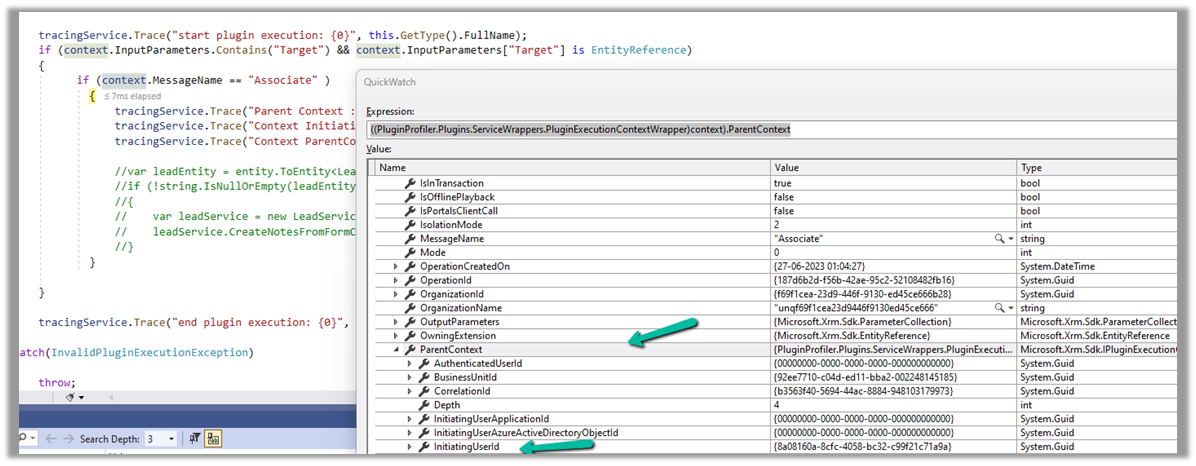
Below we can see ParentContext property getting populated and also in the InitiatingUserId property we get the id of the user who triggered the plugin.
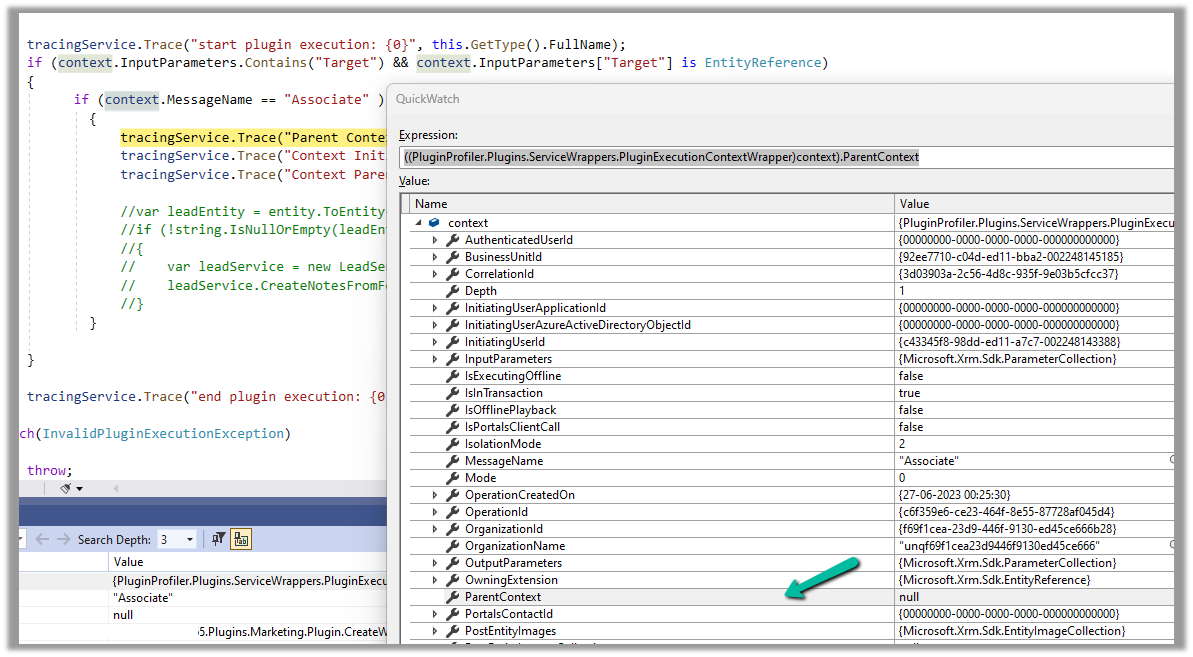
And if the user has manually performed the association from the form, we can see ParentContext being null.
Recently in one of our custom pages, we had to set the default value (DefaultSelectedItems) of the combo box based on one of the lookup fields on the record. We were opening the custom page from the ribbon button on the form.
Below is our function to pass the record’s GUID to the custom page from the button.
    openSearchCustomPage: function (primaryControl, firstPrimaryItemId) {
        var pageInputCustom = {
            pageType: 'custom',
            name: 'custom_searchproduct_570ed',
            entityName: 'lead',
            recordId: firstPrimaryItemId
        };

        var navigationOptions = {
            target: 2,
            position: 1,
            width: 1350
        };

        Xrm.Navigation.navigateTo(pageInputCustom, navigationOptions).then(
            function success(result) {
                console.log(result);
            },
            function error(error) {
                console.log(error);
            }
        );
    }
Next in App’s OnStart, we are setting the GUID of the record to a variable first, and than setting another variable to store the GUID of the Region lookup field on that record.
// text variable passed by the form / webresource/ ribbon
Set(varEnquiryIdWithoutCurlyBraces,GUID(Substitute(Substitute(Param("recordId"),"{",""),"}","")));

// get the Region Of Interest from the Lead / Enquiry ID
// If value present use it for prefiltering the Gallery Items
Set(varRegionOfInterest,LookUp(Enquiries,Lead=varEnquiryIdWithoutCurlyBraces, 'Region of Interest'));
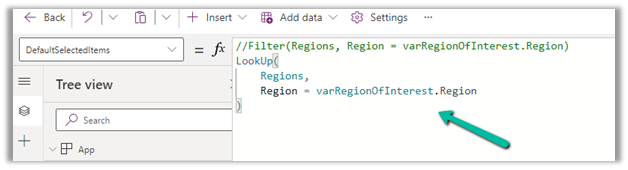
And lastly, for the combo box (Items = Region (custom table)), we are setting the DefaultSelectedItems as follows
LookUp(Regions,Region=varRegionOfInterest.Region)
We also tried using the Filter option, but it was giving incorrect values.
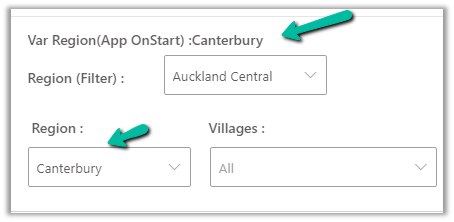
The value on the form –
The value in the Custom Page –
Correct value populated for combo box Region, and incorrect for the one using Filter formula
Recently we faced an issue wherein the custom page was not loading any data, however, it was working for users with the System Administrator role.
The gallery control shows the Product details.
There were no errors in the Developer Tools, we tried by giving all Organization level rights to the users on the tables involved etc. but that didn’t help.
Eventually, it all came down to this particular line in the formula used for the Items property of the Gallery Control i.e. Asset Status field (custom field).
We had a field security profile created which had Read set as No and the users were part of that security profile, which explained why it was only working for System Admin users.
Changing the Read access to Yes for that column fixed the issue for us.



















 Nishant Rana's Weblog