Hi,
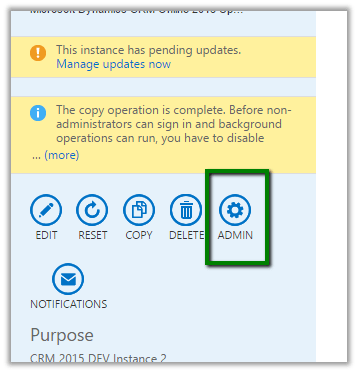
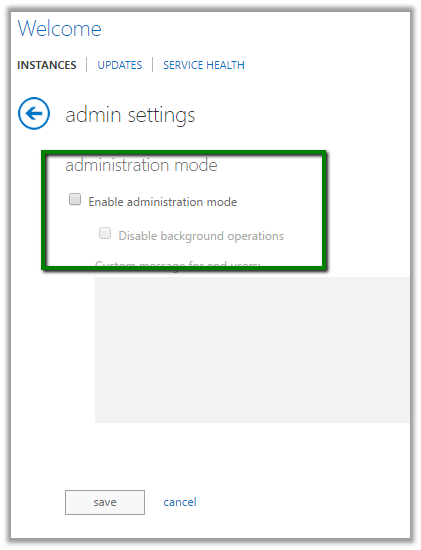
After we copied our Dev instance to another Sandbox instance we got this message on opening CRM.

To disable it.
Go to Office 365 Administration Section
Select your sandbox instance.
Select Admin

Uncheck Enable Administration Mode

Hope it helps.
Hi,
After we copied our Dev instance to another Sandbox instance we got this message on opening CRM.

To disable it.
Go to Office 365 Administration Section
Select your sandbox instance.
Select Admin

Uncheck Enable Administration Mode

Hope it helps.
Hi,
We recently had a requirement wherein we were working with DateTime fields in a Plugin. It was related to Time Zone.
These articles were of extreme help.
http://develop1.net/public/post/Dynamics-CRM-DateTimes-the-last-word.aspx
http://inogic.com/blog/2015/06/handling-datetime-fields-in-microsoft-dynamics-crm-update-1/
http://ttidbit.blogspot.com/2013/01/crm-timezone-codes.html
Sample Code to use LocalTimeFromUtcTimeRequest
var currentUserSettings = organizationProxy.RetrieveMultiple(
new QueryExpression("usersettings")
{
ColumnSet = new ColumnSet("timezonecode"),
Criteria = new FilterExpression
{
Conditions =
{
new ConditionExpression("systemuserid", ConditionOperator.EqualUserId)
}
}
}).Entities[0];
var timeZoneCode = currentUserSettings.Attributes["timezonecode"].ToString();
DateTime time1 = DateTime.UtcNow;
LocalTimeFromUtcTimeRequest convert = new LocalTimeFromUtcTimeRequest();
convert.UtcTime = time1.ToUniversalTime();
convert.TimeZoneCode = Convert.ToInt32(timeZoneCode);
LocalTimeFromUtcTimeResponse response = (LocalTimeFromUtcTimeResponse)organizationProxy.Execute(convert);
MessageBox.Show(response.LocalTime.ToString());
The interesting part was that our plugin was running under the context of System account, so to get the logged in user from UI, we added an additional field and populated the value of time zone in it on on load using current logged in user’s information, and used the same field in plugin.
Hope it helps..
Recently we had a requirement to filter sub grid on one of the forms. We thought of using Plugin on Retrieve Multiple for this.
Here we were showing Opportunity Sub Grid on Account form.
So we created a view for Opportunity that will be used as Sub Grid. Used it as Related Record Sub Grid so that we can have the GUID of the Account record being passed to the plugin.
The problem we faced à Sorting and Paging stopped working for the Sub Grid.

http://crmtipoftheday.com/2015/10/05/limitations-of-retrieve-plugins/v
</p>
<p>void IPlugin.Execute(IServiceProvider serviceProvider)<br />
{<br />
// Obtain the execution context from the service provider.<br />
IPluginExecutionContext context = (IPluginExecutionContext)<br />
serviceProvider.GetService(typeof(IPluginExecutionContext));</p>
<p>// Obtain the organization service reference.<br />
IOrganizationServiceFactory serviceFactory = (IOrganizationServiceFactory)serviceProvider.GetService(typeof(IOrganizationServiceFactory));<br />
IOrganizationService service = serviceFactory.CreateOrganizationService(context.UserId);</p>
<p>// The InputParameters collection contains all the data passed in the message request.<br />
if (context.InputParameters.Contains("Query") && context.InputParameters["Query"] is QueryExpression && context.MessageName == "RetrieveMultiple")<br />
{<br />
QueryExpression qe = (QueryExpression)context.InputParameters["Query"];<br />
if (qe.EntityName == "opportunity")<br />
{<br />
string currentCustomerId = string.Empty;<br />
ConditionExpression[] filters = qe.Criteria.Conditions.ToArray();<br />
foreach (var filter in filters)<br />
{<br />
currentCustomerId = filter.Values[0].ToString();<br />
}</p>
<p>FetchXmlToQueryExpressionRequest req = new FetchXmlToQueryExpressionRequest();<br />
req.FetchXml = "<fetch version='1.0' output-format='xml-platform' mapping='logical' distinct='false'>" +<br />
"<entity name='opportunity'>" +<br />
" <attribute name='name' />" +<br />
"<attribute name='customerid' />" +<br />
"<attribute name='estimatedvalue' />" +<br />
"<attribute name='statuscode' />" +<br />
"<attribute name='opportunityid' />" +<br />
"<order attribute='name' descending='false' />" +<br />
"<link-entity name='account' from='accountid' to='parentaccountid' alias='ad'>" +<br />
" <filter type='and'>" +<br />
" <filter type='or'>" +<br />
" <condition attribute='accountid' operator='eq' uiname='aaass' uitype='account' value=' " + currentCustomerId + "' />" +<br />
" <condition attribute='accountid' operator='under' uiname='aaass' uitype='account' value='" + currentCustomerId + "' />" +<br />
"</filter>" +<br />
"</filter>" +<br />
"</link-entity>" +<br />
"</entity>" +<br />
"</fetch>";<br />
FetchXmlToQueryExpressionResponse resp = (FetchXmlToQueryExpressionResponse)service.Execute(req);<br />
context.InputParameters["Query"] = resp.Query;</p>
<p>}<br />
}</p>
<p>
Hope it helps..
Using Under Operation
Recently my friend called up for a requirement where they needed to show all contacts in customer hierarchy. Let me explain the scenario here before moving further
Suppose Account A is parent customer for Account B and Account B is the parent customer for Account C.
So the requirement is when Account A form is loaded, a sub-grid should on the form should show all the contacts of Account A + Account B + Account C. If Account B is loaded then the sub-grid should show all the contacts of Account B + Account C.
Let us approach the solution here. Ideally it is a two step solution.
Now for the first part, CRM 2015 introduces the new ‘ operator which eases out our task like anything. After some discussion, my friend came up with a perfect fetchxml to achieve this. For e.g the following is the fetchxml to show…
View original post 149 more words
Hi,
Was getting the below error while trying to import few records

The reason being there were two field in the entity having same Display Name. Renaming one of the fields fixed the issue and import ran successfully.

Hope it helps ..
Hi,
Recently we had a requirement to search based on a particular attribute within the lookup view. The initial thought was to add a Find Columns to the lookup view. But then realized we do not have option of adding Find Columns to the lookup view.
The next thought was if I add that particular field to the list of Find Columns in Quick Find view will it work in Lookup View also? And it worked, basically adding any fields in the Find Column will make it Searchable.
The search works properly in the Lookup View as well as Lookup Inline View.

Hope it helps..