Another awesome tool by the awesome guy
Author: Nishant Rana
I love working in and sharing everything about Microsoft.NET technology !


Annual Report – 2016 in Blogging– “Nishant Rana’s Weblog”
As there will be no Year in Review Annual Report for the wordpress blog this year I have created the report myself, following the same pattern used by wordpress.
 :-
:-
The blog was viewed about 206,021 times in 2016 with 145,939 visitors.

 :-
:-
Below were the top posts in 2016.

 :-
:-
Below were the top referrers

‘
 :-
:-

Share It -

“getRequiredLevel is not a function” error while creating a new contact record in Dynamics 365.
We were getting the strange getRequiredLevel is not a function error while creating a new record (in New Form Rendering)
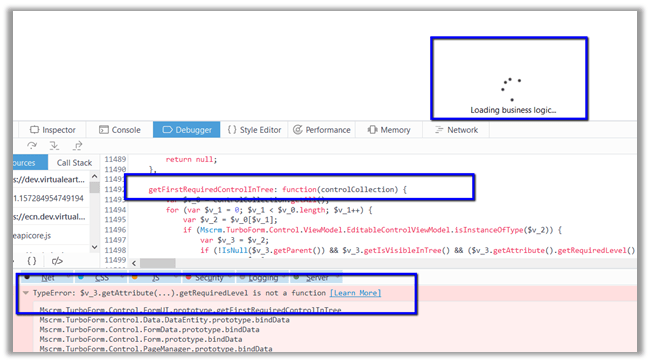
After debugging, we figured out that it was failing for the following field “mapcontrollink”.

We commented out the entire section and imported it back (unsupported). This fixed the issue.
Strangely enough we couldn’t find that field in the Vanilla version, in our case it is the upgraded environment so that could be reason of having that extra field.
Hope it helps..
Share It -

Sample Code to consume UNData API using JavaScript
Sharing a sample code that can be used to consume UNData API
http://data.un.org/Host.aspx?Content=API
The below code fetches the population data for country India.
Sample Code
var xmlHttp;
// creatng the xmlHttp object
xmlHttp = new ActiveXObject("Microsoft.XMLHTTP");
// Calling the web service using post and true means asynchronous call
xmlHttp.open("POST", "http://data.un.org/WS/NSIEstatV20Service.asmx", false);

// Setting the request header to let the web service find the soap request we would be sending
xmlHttp.setRequestHeader("Content-Type", "text/xml; charset=utf-8");

xmlHttp.setRequestHeader("SOAPAction", "http://ec.europa.eu/eurostat/sri/service/2.0/extended/GetCompactData");

var soapRequest = "<!--?<span class="hiddenSpellError" pre="" data-mce-bogus="1"-->xml version='1.0' encoding='utf-8'?>"+
"<soap:Envelope xmlns:soap='http://schemas.xmlsoap.org/soap/envelope/' xmlns:xsi='http://www.w3.org/2001/XMLSchema-instance' xmlns:xsd='http://www.w3.org/2001/XMLSchema'>"+
"<soap:Body>"+
"<GetCompactData xmlns='http://ec.europa.eu/eurostat/sri/service/2.0/extended'>"+
"<Query>"+
"<message:QueryMessage xsi:schemaLocation='http://ec.europa.eu/eurostat/sri/service/2.0/SDMXMessage.xsd http://ec.europa.eu/eurostat/sri/service/2.0/%20SDMXMessage.xsd' xmlns:generic='http://www.SDMX.org/resources/SDMXML/schemas/v2_0/generic' xmlns:message='http://www.SDMX.org/resources/SDMXML/schemas/v2_0/message' xmlns:query='http://www.SDMX.org/resources/SDMXML/schemas/v2_0/query' xmlns:xsi='http://www.w3.org/2001/XMLSchema-instance'>"+
"<message:Header>"+
"<message:ID>onh14833545733929527</message:ID>"+
"<message:Test>false</message:Test>"+
"<message:Prepared>2017-01-01</message:Prepared>"+
"<message:Sender id='online-help' />"+
"</message:Header>"+
"<message:Query>"+
"<query:DataWhere>"+
"<query:And>"+
"<query:Dimension id='INDICATOR'>SP_POP_TOTL</query:Dimension>"+
"<query:Dimension id='AGE'>_T</query:Dimension>"+
"<query:Dimension id='SEX'>_T</query:Dimension>"+
"<query:Dimension id='LOCATION'>_T</query:Dimension>" +
"<query:Dimension id='REF_AREA'>DEU</query:Dimension>" +
"<query:Dimension id='SCENARIO'>H</query:Dimension>"+
"<query:Time>"+
"<query:StartTime>2014-01-02</query:StartTime>"+
"<query:EndTime>2017-01-02</query:EndTime>"+
"</query:Time>"+
"<query:Dataflow>DF_UNDATA_WPP</query:Dataflow>"+
"</query:And>"+
"</query:DataWhere>"+
"</message:Query>"+
"</message:QueryMessage>"+
"</Query>"+
"</GetCompactData>"+
"</soap:Body>" +
"</soap:Envelope>";

xmlHttp.send(soapRequest);
var xmlDoc = jQuery.parseXML(xmlHttp.responseText);
var popValue = xmlDoc.getElementsByTagName('ns1:Obs')['0'].attributes['OBS_VALUE'].nodeValue;
alert("Total Population " + popValue);
Output
<?xml version="1.0" encoding="utf-8"?>
<soap:Envelope xmlns:soap="http://schemas.xmlsoap.org/soap/envelope/"
xmlns:xsi="http://www.w3.org/2001/XMLSchema-instance"
xmlns:xsd="http://www.w3.org/2001/XMLSchema">
<soap:Body><GetCompactDataResponse
xmlns="http://ec.europa.eu/eurostat/sri/service/2.0/extended">
<GetCompactDataResult>
<CompactData
xmlns:ns1="urn:sdmx:org.sdmx.infomodel.datastructure.DataStructure
=UNSD:DSD_WPP_UNDATA(1.0):ObsLevelDim:TIME_PERIOD"
xmlns="http://www.SDMX.org/resources/SDMXML/schemas/v2_0/message"
xmlns:common="http://www.SDMX.org/resources/SDMXML/schemas/v2_0/common"
xmlns:xsi="http://www.w3.org/2001/XMLSchema-instance"
xmlns:xml="http://www.w3.org/XML/1998/namespace"><Header>
<ID>DF_UNDATA_WPP</ID><Test>false</Test><Prepared>2017-01-06T08:25:46
</Prepared>
<Sender id="1B0">
<Name xml:lang="en">United Nations Statistics Division</Name>
<Contact><Email>statistics@un.org</Email></Contact></Sender>
<KeyFamilyRef>DSD_WPP_UNDATA</KeyFamilyRef><KeyFamilyAgency>UNSD
</KeyFamilyAgency><DataSetAgency>UNSD</DataSetAgency>
<DataSetID>DF_UNDATA_WPP_1B0_2017-01-06T082546</DataSetID>
<DataSetAction>Information</DataSetAction>
<Extracted>2017-01-06T08:25:46</Extracted>
<Source xml:lang="en">
United Nations Population Division World Population Prospects</Source>
</Header>
<ns1:DataSet DATASET_NAME="World Population Prospects"
DATASET_SOURCE="United Nations Population Division"
DATASET_DESC="The United Nations World Population Prospects contains estimates and projections for every country in the world, including estimates and projections of demographic indicators such as birth rates, deaths rates, infant mortality rates and life expectancy." UNDATA_LASTUPDATE="20 Aug 2013" UNDATA_NEXTUPDATE="2015 release" METADATA="http://esa.un.org/unpd/wpp/index.htm"><ns1:Series AGE="_T" FREQ="A" INDICATOR="SP_POP_TOTL" LOCATION="_T" SEX="_T" REF_AREA="DEU" SCENARIO="H"><ns1:Obs TIME_PERIOD="2015" OBS_VALUE="83178.615" UNIT="NUMBER" UNIT_MULT="3" TIME_SPAN="2015" /></ns1:Series></ns1:DataSet></CompactData></GetCompactDataResult></GetCompactDataResponse></soap:Body></soap:Envelope>
Hope it helps.
Share It -

Sample code to consume UNData API in C#
Hi,
Recently we were working on an application that had to fetch country specific details. For this we used the UNData API.
http://data.un.org/Host.aspx?Content=API
We can make use of SDMX Browser in helping us to write a query
http://data.un.org/SdmxBrowser/start
Create a console app\windows application and add web reference to the following web service
http://data.un.org/WS/NSIEstatV20Service.asmx
Below is the sample C# Code
string queryMsg = @"<message:QueryMessage
xsi:schemaLocation='http://ec.europa.eu/eurostat/sri/service/2.0/SDMXMessage.xsd
http://ec.europa.eu/eurostat/sri/service/2.0/%20SDMXMessage.xsd'
xmlns:generic='http://www.SDMX.org/resources/SDMXML/schemas/v2_0/generic'
xmlns:message='http://www.SDMX.org/resources/SDMXML/schemas/v2_0/message'
xmlns:query='http://www.SDMX.org/resources/SDMXML/schemas/v2_0/query'
xmlns:xsi='http://www.w3.org/2001/XMLSchema-instance'>
<message:Header>
<message:ID>onh14833545733929527</message:ID>
<message:Test>false</message:Test>
<message:Prepared>2017-01-01</message:Prepared>
<message:Sender id='online-help'/>
</message:Header>
<message:Query>
<query:DataWhere>
<query:And>
<query:Dimension id='INDICATOR'>SP_POP_TOTL</query:Dimension>
<query:Dimension id='AGE'>_T</query:Dimension>
<query:Dimension id='SEX'>_T</query:Dimension>
<query:Dimension id='LOCATION'>_T</query:Dimension>
<query:Dimension id='REF_AREA'>IND</query:Dimension>
<query:Time>
<query:StartTime>2014-01-02</query:StartTime>
<query:EndTime>2017-01-02</query:EndTime>
</query:Time>
<query:Dataflow>DF_UNDATA_WPP</query:Dataflow>
</query:And>
</query:DataWhere>
</message:Query>
</message:QueryMessage>";
NSIEstatV20Service service = new NSIEstatV20Service();
System.Xml.XmlDocument queryMessageDocument = new XmlDocument();
queryMessageDocument.LoadXml(queryMsg);
System.Xml.XmlNode queryMessage = queryMessageDocument.DocumentElement;
var result = service.GetCompactData(queryMessage);
MessageBox.Show(result.InnerXml);
The output
The query here basically returns the Total population of India

Hope it helps..
Share It -

Using MediaWiki API for Showing content of Wikipedia page inside Dynamics 365 form
Hi,
Recently we had a requirement to show content of Wikipedia page and display it inside CRM in one of the entities form.
For this purpose, we can make use of “MediaWiki web service API.”
https://www.mediawiki.org/wiki/API:Main_page
To create the query, we can use the below tool
https://en.wikipedia.org/wiki/Special%3aApiSandbox
The html source code
<!DOCTYPE html>
<html xmlns="http://www.w3.org/1999/xhtml">
<head>
<title></title>
<script src="https://ajax.googleapis.com/ajax/libs/jquery/3.1.1/jquery.min.js"></script>
<script type="text/javascript">
function SetWikiContent() {
// get country name from crm form
if (Xrm.Page.getAttribute("new_name") != null) {
var title = Xrm.Page.getAttribute("new_name").getValue();
// set the url
var url = "https://en.wikipedia.org/w/api.php?format=json&action=parse&page=" + title + "&prop=text§ion=0&callback=?";
$.getJSON(url, function (data) {
for (text in data.parse.text) {
var text = data.parse.text[text].split("
");
var pText = "";
for (p in text) {
//Remove html comment
text[p] = text[p].split("<!--");
if (text[p].length > 1) {
text[p][0] = text[p][0].split(/\r\n|\r|\n/);
text[p][0] = text[p][0][0];
text[p][0] += "
";
}
text[p] = text[p][0];
//Construct a string from paragraphs
if (text[p].indexOf("
") == text[p].length - 5) {
var htmlStrip = text[p].replace(/<(?:.|\n)*?>/gm, '') //Remove HTML
var splitNewline = htmlStrip.split(/\r\n|\r|\n/); //Split on newlines
for (newline in splitNewline) {
if (splitNewline[newline].substring(0, 11) != "Cite error:") {
pText += splitNewline[newline];
pText += "\n";
}
}
}
}
pText = pText.substring(0, pText.length - 2); //Remove extra newline
pText = pText.replace(/\[\d+\]/g, ""); //Remove reference tags (e.x. [1], [4], etc)
Xrm.Page.getAttribute('new_wikiinfo').setValue(pText);
}
});
}
}
</script>
</head>
<body onload="SetWikiContent();">
</body>
</html>


The helpful article
Hope it helps..

 Nishant Rana's Weblog