

To enable the new search experience, we need to turn on the relevance search on that environment.
Login to the admin portal and environments section
https://admin.powerplatform.microsoft.com/environments
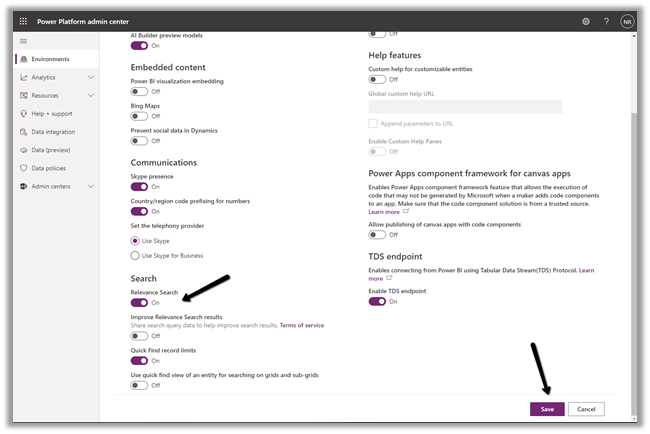
Navigate to Settings -> Features and turn on the Relevance Search
This places the search bar in the header, making it easy to access while navigating across different pages.
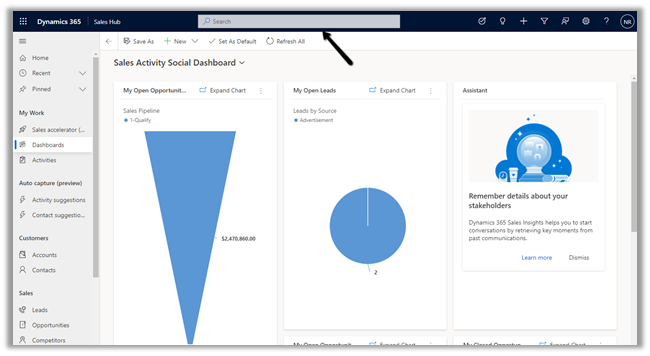
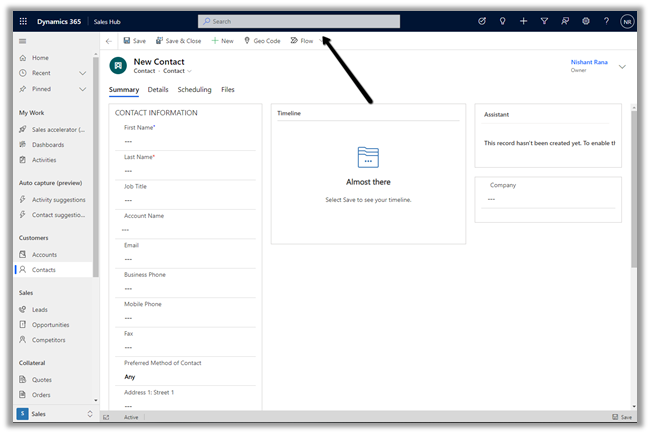
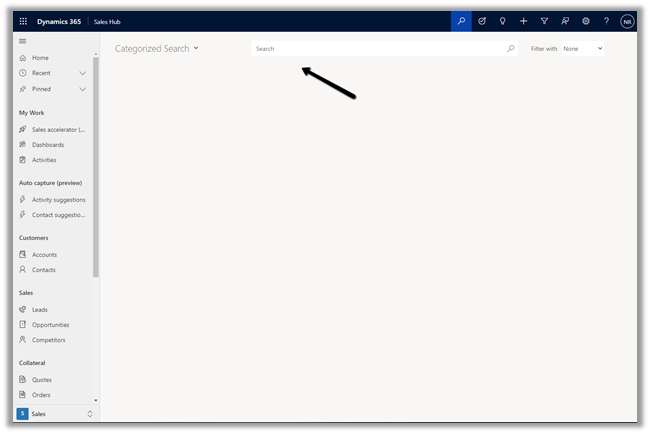
With Relevance search turned off à
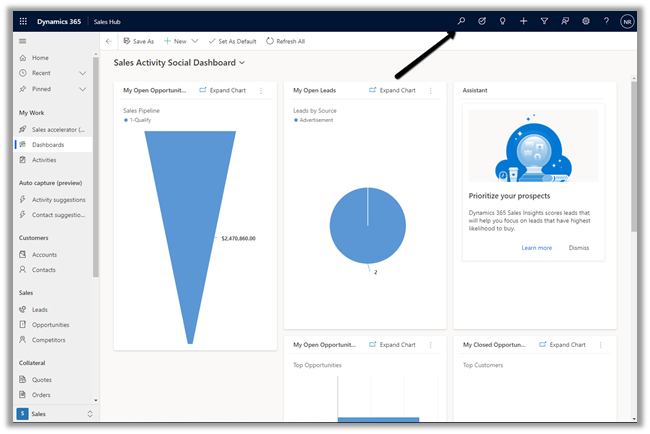
On clicking the search icon à we are navigated to the categorized search page.
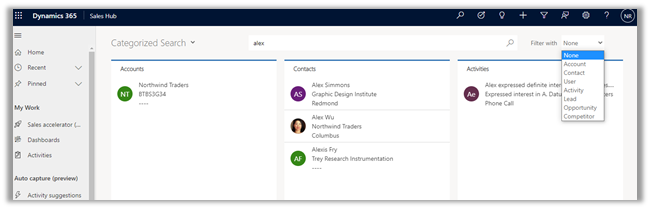
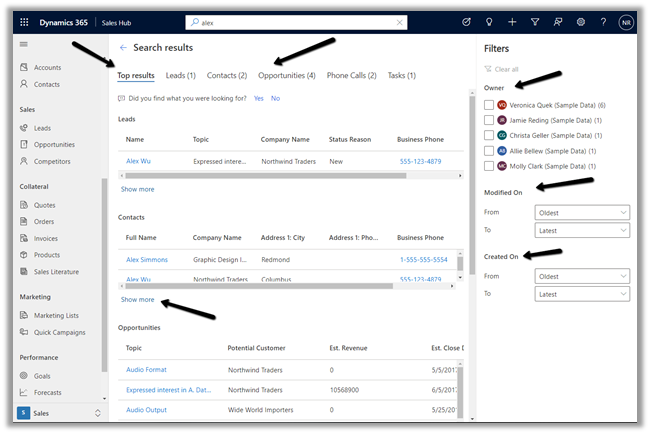
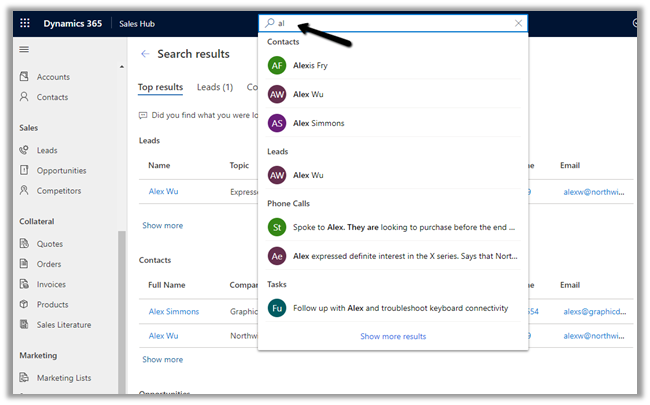
The search result for the term “alex” with Relevance Search on–
Even before we can enter our query in the search box, the search box displays the recent terms (seems like max 3) used for search along with recent records (seems like max 6) accessed.
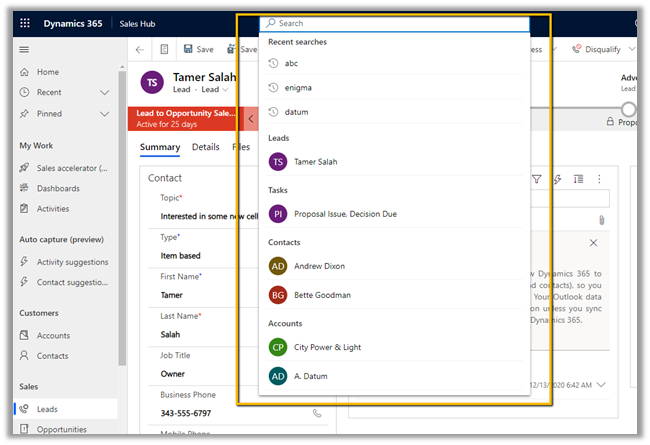
Provides increment search or real-time suggestions while we are tying the search term
Get all the details here
And must-read article on the new search experience à
https://jukkaniiranen.com/2020/11/make-your-power-apps-search-experience-more-relevant/
Blog posts on 2021 Release Wave 1 – Dynamics 365
Hope it helps..
- Business Process Flow Error: “Participating entity record of stage: X is not valid” (0x80040216) (Dynamics 365 / Dataverse)
 Scenario Working on a custom multi-entity Business Process Flow (Opportunity → Quote) recently, we ran into this error while trying to reactivate the process: The BPF (custom_salesprocess) had already traversed several stages … Continue reading “Business Process Flow Error: “Participating entity record of stage: X is not valid” (0x80040216) (Dynamics 365 / Dataverse)”
 - Comparing Web Resources (JavaScript) Across Multiple Dataverse Environments Using a Console App
 We recently refactored a large JavaScript solution — replacing a number of deprecated methods with their supported equivalents, along with some performance improvements — the kind of change that touches a lot … Continue reading “Comparing Web Resources (JavaScript) Across Multiple Dataverse Environments Using a Console App”
 - Power Platform Environment Not Showing Up in Maker Portal & Power Platform Admin Center (Dataverse / Dynamics 365)
 Recently, we ran into an interesting issue while working with a Dynamics 365 / Dataverse environment. Even though the user was assigned the System Administrator security role, the environment did not appear … Continue reading “Power Platform Environment Not Showing Up in Maker Portal & Power Platform Admin Center (Dataverse / Dynamics 365)”
 - SQL4CDS UTC Mode: Converting Advanced Find Date Filters to UTC Boundaries– A Quick Reference (Dataverse / Dynamics 365)
 While validating record counts for a Work Orders view in Dynamics 365 Field Service, we ran into the same underlying issue covered in an earlier post – Why SQL4CDS Record Counts May … Continue reading “SQL4CDS UTC Mode: Converting Advanced Find Date Filters to UTC Boundaries– A Quick Reference (Dataverse / Dynamics 365)”
 - Hide Expired Sessions in Event Registration Form using JavaScript (Dynamics 365 Customer Insights – Journeys)
 One of our recent requirements was to ensure that users could no longer register for event sessions once the session had already ended. The goal was to improve the user experience by … Continue reading “Hide Expired Sessions in Event Registration Form using JavaScript (Dynamics 365 Customer Insights – Journeys)”
 - When Entity.Id Is Guid.Empty with QueryExpression.Distinct = True (Dataverse)
 While optimising the performance of a Dataverse plugin, we noticed a QueryExpression using ColumnSet(true). The business logic only required a few attributes, so replacing ColumnSet(true) with a minimal ColumnSet looked like an … Continue reading “When Entity.Id Is Guid.Empty with QueryExpression.Distinct = True (Dataverse)”
 - Implementing Cloudflare Turnstile for Dynamics 365 Customer Insights – Journeys Real-Time Marketing Forms
 Check the previous posts for more details – In one of our recent projects, we implemented Cloudflare Turnstile (Invisible) for a Dynamics 365 Customer Insights – Journeys Real-Time Marketing form. In this … Continue reading “Implementing Cloudflare Turnstile for Dynamics 365 Customer Insights – Journeys Real-Time Marketing Forms”
 - Custom Form Submission Validation in Dynamics 365 Customer Insights – Journeys: Inside the Validation Pipeline and the “ms_captcha_solution” Error
 While implementing custom form submission validation (server side validation) for Dynamics 365 Customer Insights – Journeys Real-Time Marketing forms, we came across the following error, “Required params cannot be null or empty … Continue reading “Custom Form Submission Validation in Dynamics 365 Customer Insights – Journeys: Inside the Validation Pipeline and the “ms_captcha_solution” Error”
 - Implementing Server-Side Honeypot Validation for Dynamics 365 Customer Insights – Journeys Forms
 In our previous post, we implemented a simple Honeypot for Dynamics 365 Customer Insights – Journeys Real-Time Marketing forms using JavaScript.Although that prevents most automated submissions, the validation only runs in the … Continue reading “Implementing Server-Side Honeypot Validation for Dynamics 365 Customer Insights – Journeys Forms”
 - Implementing a Simple Honeypot in Dynamics 365 Customer Insights – Journeys Real-time Marketing Forms
 While working with Dynamics 365 Customer Insights – Journeys Real-time Marketing Forms, we wanted to explore a simple way of reducing bot submissions. A common technique used on websites is a honeypot. … Continue reading “Implementing a Simple Honeypot in Dynamics 365 Customer Insights – Journeys Real-time Marketing Forms”
 - Retrieve All One-to-Many Relationships and Cascade Delete Behavior for a Dataverse Table Using C#
 While working on a Dynamics 365 Field Service cleanup, we needed to delete a large number of Work Order records. Before doing so, we wanted to understand exactly what would happen to … Continue reading “Retrieve All One-to-Many Relationships and Cascade Delete Behavior for a Dataverse Table Using C#”
 - Why SQL4CDS Record Counts May Not Match Advanced Find for Date Filters (Dataverse / Dynamics 365)
 While validating some Dynamics 365 Field Service data recently, we came across an interesting scenario where SQL4CDS and Advanced Find returned different record counts even though the date filters appeared to be … Continue reading “Why SQL4CDS Record Counts May Not Match Advanced Find for Date Filters (Dataverse / Dynamics 365)”
Discover more from Nishant Rana's Weblog
Subscribe to get the latest posts sent to your email.
Share It -


 Nishant Rana's Weblog
Hi, after enable relevance search, would it be better to configure quick find view of each entity you would like to be searched for more columns? Otherwise it might only search the name column?
Thanks,
Junbin Duan
LikeLiked by 1 person
Yes Junbin https://docs.microsoft.com/en-us/power-platform/admin/configure-relevance-search-organization#configure-searchable-fields-for-relevance-search
LikeLike