

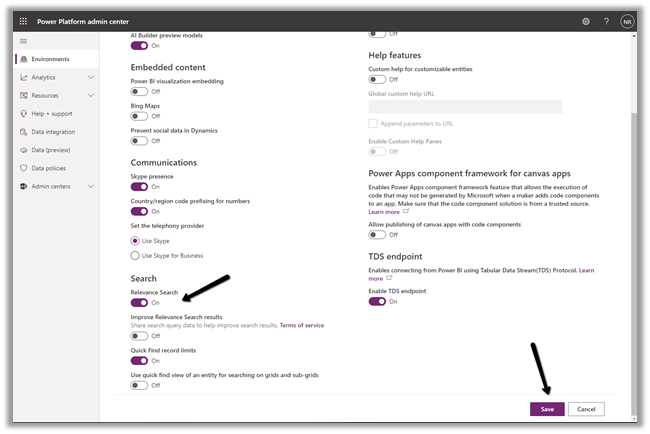
To enable the new search experience, we need to turn on the relevance search on that environment.
Login to the admin portal and environments section
https://admin.powerplatform.microsoft.com/environments
Navigate to Settings -> Features and turn on the Relevance Search
This places the search bar in the header, making it easy to access while navigating across different pages.
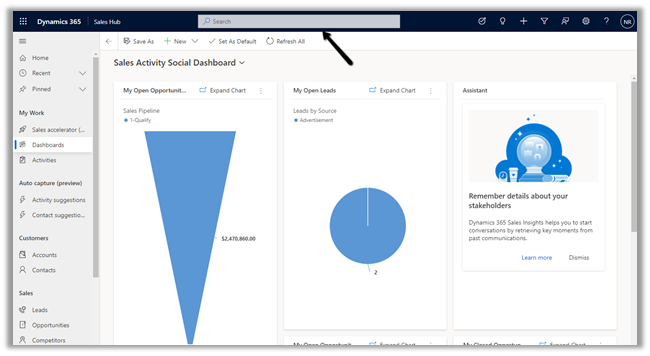
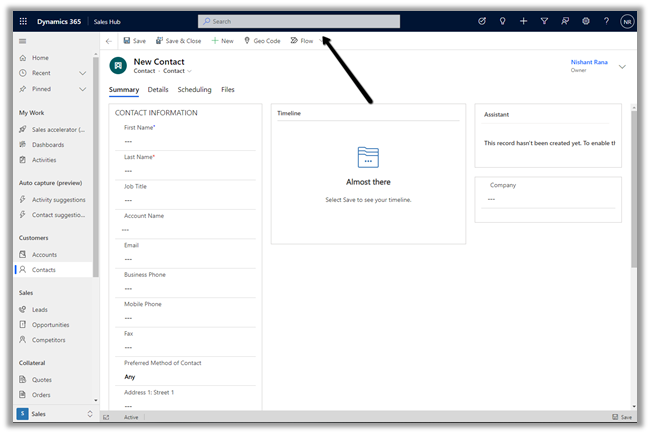
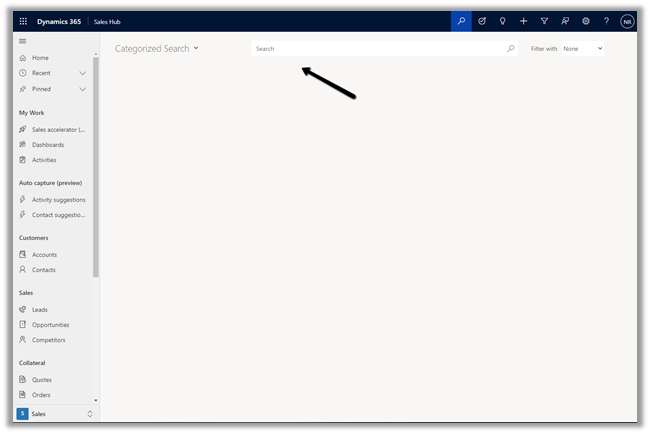
With Relevance search turned off à
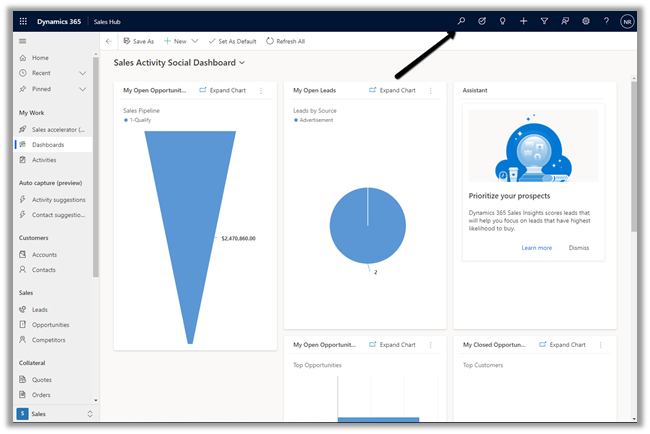
On clicking the search icon à we are navigated to the categorized search page.
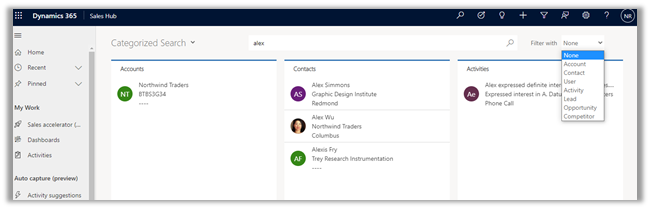
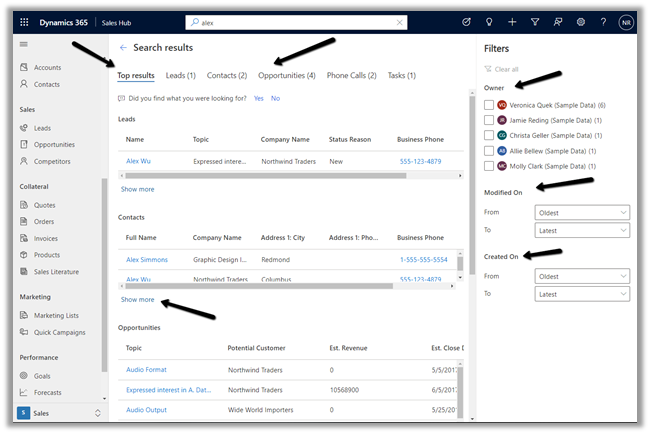
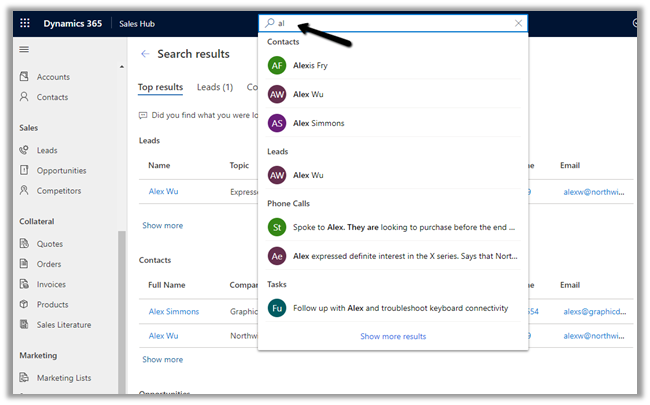
The search result for the term “alex” with Relevance Search on–
Even before we can enter our query in the search box, the search box displays the recent terms (seems like max 3) used for search along with recent records (seems like max 6) accessed.
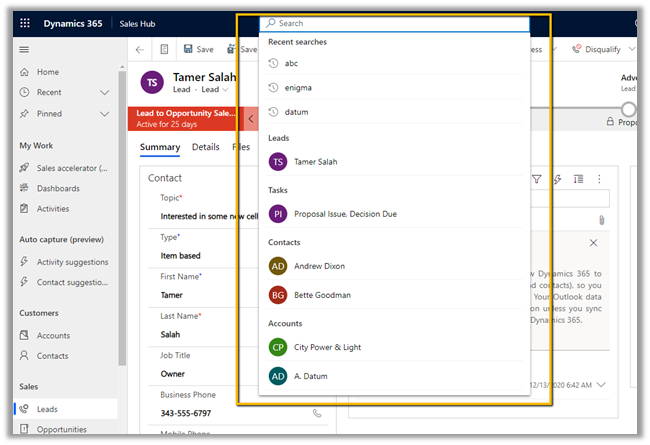
Provides increment search or real-time suggestions while we are tying the search term
Get all the details here
And must-read article on the new search experience à
https://jukkaniiranen.com/2020/11/make-your-power-apps-search-experience-more-relevant/
Blog posts on 2021 Release Wave 1 – Dynamics 365
Hope it helps..
- Preserving ‘modifiedon’ During Data Migration in Dynamics 365 / Dataverse
 We were working on a data migration requirement where we needed to preserve system fields like created on and modified on. For Created On, things are straightforward. We can use the overriddencreatedon … Continue reading “Preserving ‘modifiedon’ During Data Migration in Dynamics 365 / Dataverse”
 - Reset / Restore the standard (OOTB) button in Dynamics 365 / Dataverse
 We recently worked on a requirement where we customized an out-of-the-box ribbon button in Dynamics 365 — specifically, the Reactivate Lead button. We had renamed it to ‘Reactivate’ as part of an … Continue reading “Reset / Restore the standard (OOTB) button in Dynamics 365 / Dataverse”
 - The Attribute with id does not exist — and Staged Metadata is still being processed (Dataverse / Dynamics 365 Issue)
 Last week, we came across a strange issue while working with Dataverse metadata. We had created a new attribute as part of our solution changes. Everything looked fine initially, and the attribute … Continue reading “The Attribute with id does not exist — and Staged Metadata is still being processed (Dataverse / Dynamics 365 Issue)”
 - Multiple Active Business Process Flow Instances for a record in Dynamics 365 / Dataverse
 We recently worked on a requirement where we had to sync Business Process Flow (BPF) data between two different Dataverse environments for the Case (Incident) table. At first glance, the requirement looked … Continue reading “Multiple Active Business Process Flow Instances for a record in Dynamics 365 / Dataverse”
 - “Transaction not started. There is no active transaction” error (Dynamics 365 / Dataverse)
 We recently ran into an interesting and slightly frustrating issue while trying to mark an activity (Appointment/Phone Call/ Task) as Completed in Dynamics 365. Whenever we tried to mark the activity as … Continue reading ““Transaction not started. There is no active transaction” error (Dynamics 365 / Dataverse)”
 - Plugin Registration Tool Login with Multi-Factor Authentication (MFA) – Uncheck “Show Advanced”
 If we’re logging into the Plugin Registration Tool using an account protected with Multi-Factor Authentication (MFA), there’s one small setting that can cause login failures — Show Advanced. We need to make … Continue reading “Plugin Registration Tool Login with Multi-Factor Authentication (MFA) – Uncheck “Show Advanced””
 - No Dependencies Shown… But still can’t delete the component? Check Your Cloud Flows (Dataverse / Dynamics 365)
 Recently, while performing cleanup in one of our environments, we were removing unused components to reduce clutter and technical debt. As part of this activity, we attempted to delete an old Business … Continue reading “No Dependencies Shown… But still can’t delete the component? Check Your Cloud Flows (Dataverse / Dynamics 365)”
 - Solution Failed to Import – Missing Lookup View Dependency in Dataverse / Dynamics 365
 Recently, while trying to import a solution, we got the below dependencies error. Solution ” Configuration” failed to import: The dependent component SavedQuery (Id=50658a7f-473b-ec11-8c64-000d3a8ead20) does not exist. Failure trying to associate it … Continue reading “Solution Failed to Import – Missing Lookup View Dependency in Dataverse / Dynamics 365”
 - Renaming Sitemap Display Name in Dataverse / Dynamics 365
 While working with a model-driven app in Dataverse, we needed to change the display name of the sitemap. What made this interesting was that there is no option in the UI to … Continue reading “Renaming Sitemap Display Name in Dataverse / Dynamics 365”
 - Fixed: Audit History Page Not Loading (Dataverse / Dynamics 365)
 Recently, we ran into an issue where the Audit History page stopped loading on the form. Interestingly, the problem was limited only to the Account forms. Whenever we tried to open Audit … Continue reading “Fixed: Audit History Page Not Loading (Dataverse / Dynamics 365)”
 - Why We Switched Our Plugin from PreOperation to PreValidation – Dataverse / Dynamics 365
 We had a business requirement to block the closing of a Quote as Lost under certain conditions. Instead of leaving the quote in an Active state, we wanted the system to explicitly … Continue reading “Why We Switched Our Plugin from PreOperation to PreValidation – Dataverse / Dynamics 365”
 - Using the Restore Message to Recover Deleted Records in Dataverse
 Accidental data deletion in Dataverse happens more often than we expect. A bulk delete job, an incorrect Power Automate flow, or incorrect manual delete can remove important records in seconds. Instead of … Continue reading “Using the Restore Message to Recover Deleted Records in Dataverse”
Discover more from Nishant Rana's Weblog
Subscribe to get the latest posts sent to your email.
Share It -


 Nishant Rana's Weblog
Hi, after enable relevance search, would it be better to configure quick find view of each entity you would like to be searched for more columns? Otherwise it might only search the name column?
Thanks,
Junbin Duan
LikeLiked by 1 person
Yes Junbin https://docs.microsoft.com/en-us/power-platform/admin/configure-relevance-search-organization#configure-searchable-fields-for-relevance-search
LikeLike