
A couple of months back I had written my first PCF Control to display GUID of the record, it was more of a hello world kind of thing.
https://pcf.gallery/guid-control/
Well, the code was using Xrm.Page client API which as we know is deprecated.
So, it was time to update it to use context instead.
More on context
So, thought of using the wonderful PCF Custom Control Builder tool to do that by Danish (which got a new update today – 22- Oct-2019)
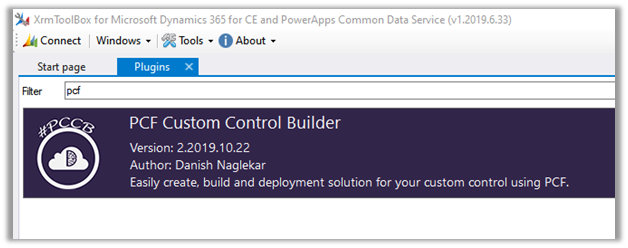
Connect to the organization, select Edit existing PCF Control option
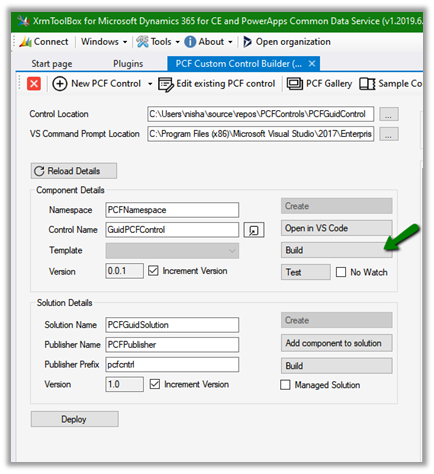
Specify the Control Location and VS Command Prompt Location (VsDevCmd.bat)


And click on Reload Details which will list down the details of the component and the solution as shown above.
Click on Open in VS Code to open the project in Visual Studio Code and start making the required update.

It opens the project in Visual Studio Code.
i.e.
 Here let us update the index.ts file to use context to fetch the GUID.

Save the changes. And click on Build
i.e.

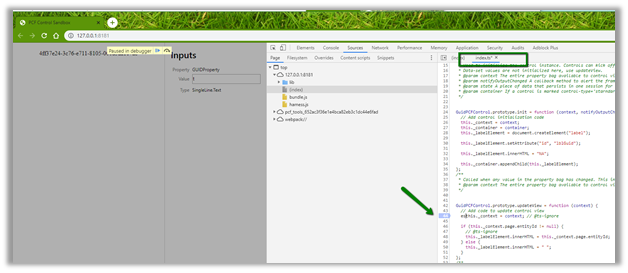
Now click on Test to see it in action or to debug.

We can see it populating the GUID
To debug it à we can use the developer tools (F12) and put the breakpoint in the index.ts file.
Now let us deploy it to our organization

Deployment in action

After successful deployment, we can see the solution added to our organization

Now let us use it for the single line of the text control.
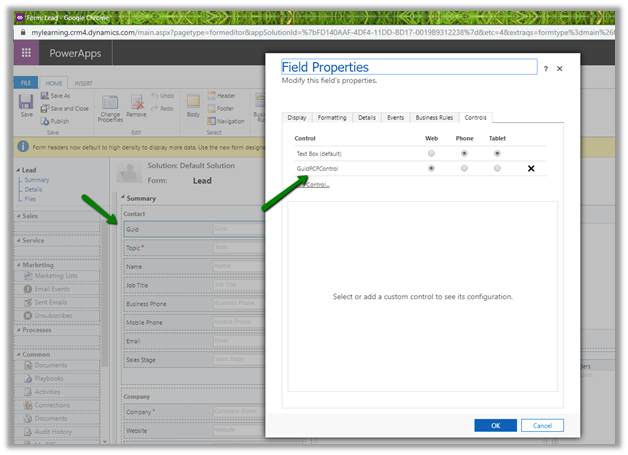
Publish the changes.
Create the new lead record and we can see the GUID of the record created in the control

Thus, the wonderful PCF Custom Control Builder plugin of XrmToolBox makes it so easy to update the existing PCF Control and also to create new PCF Control.
Hope it helps..
Discover more from Nishant Rana's Weblog
Subscribe to get the latest posts sent to your email.
Share It -


Agreed. Am using this tool extensively
LikeLike
Thanks Nishant – just an addendum in case it helps anyone else….. for me, using
this._labelElement.innerHTML = this._context.page.entityId;
throws a compile time error “TS2339: Property ‘page’ does not exist on type ‘Context'”.
If I cast the object to “any” – then the compiler is satisfied, and the entityId is returned at runtime. e.g.
this._labelElement.innerHTML = (this._context).page.entityId;
LikeLike
Ooophs – the e.g is supposed to read:
this._labelElement.innerHTML = (this._context).page.entityId;
LikeLike
hmm the comment section is stripping the code example I think 😦
this._labelElement.innerHTML = ( this._context ).page.entityId;
LikeLike
Thanks Paul 👍
LikeLike
Hi, i did change to this code
this._labelElement.innerHTML =(this.context).page.entityId;
but at compile says
TS2339: Property ‘page’ does not exist on type ‘Context’.
how to solve it
LikeLike