Just sharing a HTML Web resource code to show Country location inside the map using name of the country.
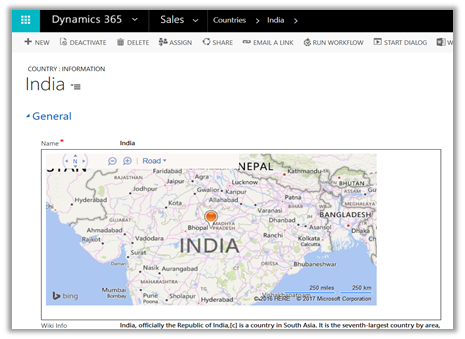
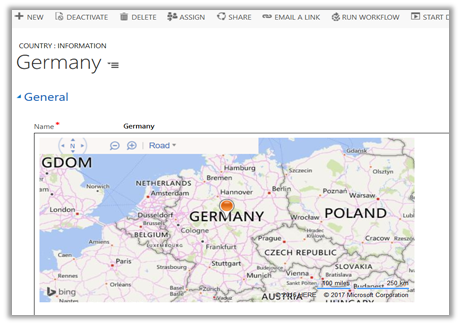
Source Code: –
<!DOCTYPE HTML PUBLIC "-//W3C//DTD XHTML 1.0 Transitional//EN" "http://www.w3.org/TR/xhtml1/DTD/xhtml1-transitional.dtd">
<html>
<head>
<title>My Bing Map</title>
<script charset="UTF-8" type="text/javascript" src="https://ecn.dev.virtualearth.net/mapcontrol/mapcontrol.ashx?v=7.0&s=1"></script>
<script type="text/javascript">
var map = null;

// get the bing map key https://msdn.microsoft.com/en-us/library/ff428642.aspx
var credentials = "AvYH87t36Tv3ybyYagU9HUZKjsrWO2Hcup3nu1fmNhpenHKO_xxxxx";

function GetMap() {

// countryName - name of the country from the CRM's form
var countryName = parent.Xrm.Page.getAttribute("new_name").getValue();

// calling virtual earth api
var geocodeRequest = "https://dev.virtualearth.net/REST/v1/Locations?countryRegion=" + countryName + "&key=" + credentials + "&jsonp=GeocodeCallback";

CallRestService(geocodeRequest);
}

function GeocodeCallback(result) {

if (result && result.resourceSets && result.resourceSets.length > 0 && result.resourceSets[0].resources && result.resourceSets[0].resources.length > 0) {

var coordinates = result.resourceSets[0].resources[0].point.coordinates;
var centerPoint = new Microsoft.Maps.Location(coordinates[0], coordinates[1]);

map = new Microsoft.Maps.Map(document.getElementById("mapDiv"),
{
credentials: credentials,
center: centerPoint,
mapTypeId: Microsoft.Maps.MapTypeId.road,
zoom: 5
});

var pushpin = new Microsoft.Maps.Pushpin(map.getCenter());
map.entities.push(pushpin);
}
}

function CallRestService(request) {
var script = document.createElement("script");
script.setAttribute("type", "text/javascript");
script.setAttribute("src", request);
document.body.appendChild(script);
}
</script>
</head>
<body onload="GetMap();">
<div id='mapDiv' style="position: relative; width: 600px; height: 300px;"></div>
</body>
</html>
Check this helpful post as well
https://blogs.bing.com/maps/2015/03/05/accessing-the-bing-maps-rest-services-from-various-javascript-frameworks/
Hope it helps..














 Nishant Rana's Weblog