Deployment Manager – To create a new organization, the wizard must remove the current organization in Dynamics 365 message.


While creating a new organization using Deployment Manager we got the below message

It was because we had entered the Workgroup Product key which restricts it to only organization.

https://technet.microsoft.com/en-us/library/hh699677.aspx

Changing the product key to the server one, allowed creating the new organizations.

Hope it helps..

Not able to register Image for Plugin in Microsoft Dynamics 365 Developer Toolkit (Public Beta 1)


Hi,

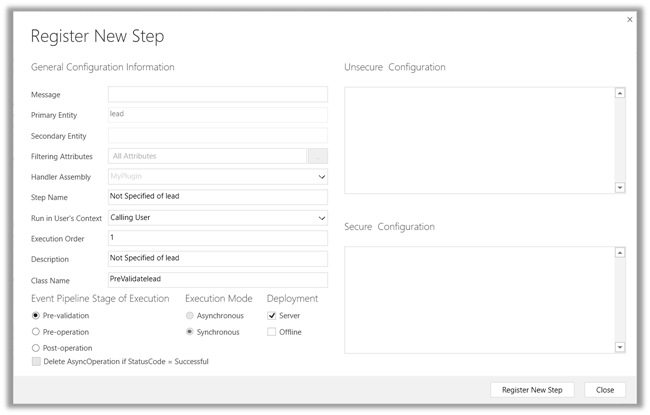
While using Developer Toolkit for Dynamics 365 we got strange issue today, the Images were not getting registered for Plugins.

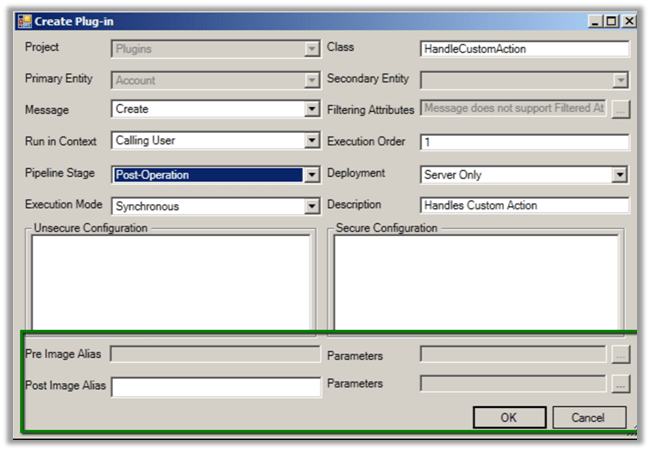
In fact, in the Create New Plugin dialog box we couldn’t see the option of adding images like previous version.

Previous version –

To get more details on the new toolkit refer the below article

http://butenko.pro/2016/11/developer-toolkit-dynamics-365-public-beta-1-whats-new/

Hope it helps..

Cannot update a report from a template if the report was not created from a template error while trying to import solution in Dynamics 365


While trying to import a managed solution to our test environment we got the below error

“Cannot update a report from a template if the report was not created from a template”. We got this error on one specific report.

Removing that particular report from the solution and trying the import again fixed the issue for us.

https://community.dynamics.com/crm/f/117/t/150777

Hope it helps..

SQL Timeout Issue while trying to Apply Solution Upgrade in Dynamics 365


Recently in our project we tried implementing solution upgrade to delete some of the components from the existing managed solution.

https://nishantrana.wordpress.com/2016/10/16/how-to-delete-components-from-managed-solution-in-dynamics-crm-2016-without-using-holding-solution/

However, we kept running into SQL time out issue and it didn’t work for us. Finally we raised product support ticket for it and eventually the product support team increased the SQLCommandTimeout to 5 minutes, which helped us to fix the issue.

Crm Exception: Message: Customer lookup [CustomerId] is invalid. Customer lookups can only be associated with 1 Account and 1 Contact error while importing solution in CRM


While trying to import solution to our test environment from our dev environment we got the below error

 “Crm Exception: Message: Customer lookup [CustomerId] is invalid. Customer lookups can only be associated with 1 Account and 1 Contact”

The way we got it fixed

  • Unzip the solution and open customizations.xml file
  • Remove all attributes with name “CustomerId” (Lead, Invoice, Opportunity entity)

g1

  • Find all entity relationships with ReferencingAttributeName equals CustomerId and add to EntityRelationship new attribute: unmodified=”1″

g2

  • Zip solution back and import it.

https://community.dynamics.com/crm/f/117/t/198818

Hope it helps..

How to – Get the list of all the dirty fields in the form in Dynamics 365


Hi,

Recently on opening our opportunity entity records we were getting unsaved changes message.

To quickly get the list of all the fields

Open the debugger tool and put the following script in the console window

frames[0].Xrm.Page.data.entity.getDataXml();

Check this thread

http://stackoverflow.com/questions/32735019/dirty-form-with-no-dirty-fields-on-crm-2015-online

Hope it helps..

Advertisements