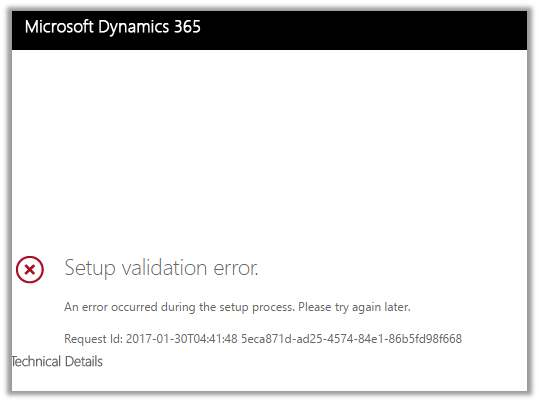
Setup validation error while creating trial instance of Microsoft Dynamics 365.


At times we have got the below error while setting up trial for Dynamics 365.

We tried out different options and tried creating few new trial instances but we got the same error in all of them.

Eventually tried it again after 2 hours or so and then the setup was successful, so might be some issue at the platform level.

Others have also faced similar issue before

https://community.dynamics.com/crm/f/117/t/137752

Hope it helps.
Managed solution cannot update reports which are not present in solution package. Report 98b86a45-1dbb-e411-b283-d89d6765a2e4 is not part of current solution.


We got this error while trying to import a managed solution to our TEST. The error was because of one error during import we had removed the parent solution from the solution, but we forgot to remove the child report. So this child report during import was trying to update or lookup for the parent report which caused this error.

Removing the child report from the solution and importing it back fixed the issue for us.
Hope it helps..

Invalid Operation: Trying to update an attribute in Live, which is not allowed while importing solution in Dynamics 365


We got this error recently while trying to import a managed solution. As it turned out the we had few OOB reports in our managed solution that was getting imported to TEST.

Removing those OOB reports from the solution, exporting it and importing it again fixed the issue for us and we were able to import the solution successfully.

Helpful post: http://vjcity.blogspot.in/2016/09/trying-to-update-attribute-in-live.html

Hope it helps..

Solution with ID doesn’t not exist error while using “Applying Solution Upgrade” in Dynamics 365 (CRM 2016 Update 1)


We had a requirement to delete few of the components from the solution and we followed the new feature that is now available for this in product, starting from CRM 2016 Update 1.

https://nishantrana.me/2016/10/16/how-to-delete-components-from-managed-solution-in-dynamics-crm-2016-without-using-holding-solution/

However, we ran into the following error while trying to apply solution upgrade i.e. Solution with ID does not exist.

First time it worked properly and deleted the components from the TEST environment. Then we removed few more components and tried applying this updated solution again to remove those remaining components from our TEST environment, that is when we got this issue.

The issue happens because of certain orphan records which still exist in the database and references the old deleted solution.

Below is the fix for this issue (i.e. update those records in the database).

http://ronaldlemmen.blogspot.de/2015/11/solution-with-id-86ac16ec-41d7-4685.html

http://code2life.blogspot.in/2016/09/crm-2016-sp1-solution-import-failed.html

However as in our case, as it was online we ended up creating the product support ticket to do the same

Other issues that we faced in CRM 2016 Update 1 

Hope it helps..

Few more interesting issues in New Form Rendering in CRM 2016 Update 1


We recently upgraded to CRM 2016 Update 1 and there seems to be noend to the different product issues that we are facing.

The latest ones are missing scroll bar in BPF when a particular stage has large number of fields in it and the other one being “Click to enter” info appearing at wrong place in BPF for fields.

Legacy Form Rendering

The same form in New Form Rendering

Below are the other issues that we have faced in New Form Rendering till now

https://nishantrana.me/2016/12/09/bug-in-new-form-rendering-crm-2016-update-1-add-new-button-not-working-for-opportunity-product-sub-grid-in-opportunity-form/

https://nishantrana.me/2016/11/28/onchange-event-getting-fired-on-setvalue-in-crm-2016-update-1-new-form-rendering/

https://nishantrana.me/2016/11/25/recommended-field-showing-up-as-required-field-issue-in-dynamics-365/

Well it seems like in Dynamics 365 we do not have the issue with scroll bar for new form rendering but the click to enter bug still seems to exist

bug

Hope it helps..

How to – Add hyperlink (and button) in Form Notification in Dynamics 365 (CRM 2016 and earlier)


Recently we were working on a requirement wherein we wanted to add a hyperlink to the Notification that we were showing on the form.

For this we can use the following Jscript library

https://notifyjs.codeplex.com/

The JScript code:

Output:

Clicking on Details opens the page specified in the callback function.

The other option is to show hyperlink within a web resource and putting it inside the form.

https://nishantrana.me/2012/02/09/showing-related-entity-information-in-header-as-hyperlink-crm-2011/

Hope it helps..

Advertisements