Missing RemoveListMembersListRequest in CRM.


In one of our recent implementations, we were working with Marketing List which could be in millions.

So we had the recent request wherein we split the marketing list into groups.

For adding members to a marketing list we have the following request

AddListMembersListRequest 

https://msdn.microsoft.com/en-us/library/microsoft.crm.sdk.messages.addlistmemberslistrequest.aspx

which is quite efficient as we can add multiple members in a single request.

However, when it comes to removing a member from marketing, we do not have a corresponding Remove request like RemoveListMembersListRequest.

https://msdn.microsoft.com/en-us/library/microsoft.crm.sdk.messages.removememberlistrequest.aspx

We only have RemoveMemberListRequest, which only removes 1 member at a time, which is highly inefficient when we are taking in consideration large number of records.

Kindly vote up for this idea !!

https://ideas.dynamics.com/ideas/dynamics-crm/ID0002529

More details

https://social.microsoft.com/Forums/en-US/5d700a43-0c57-4a47-9c8e-192c70d30a2d/removememberlistrequest-causes-sql-timeout-error?forum=crmdevelopment

System.Security.SecurityException: That assembly does not allow partially trusted callers while using HttpUtility.UrlEncode in CRM


Hi,

We got the below error in one of our Sandboxed Plugins

“System.Security.SecurityException: That assembly does not allow partially trusted callers”.

We realised it was because of using System.Web.HttpUtility class


We replaced it with EscapeDataString method and this fixed the issue.

System.Uri.EscapeDataString()

Helpful thread

https://stackoverflow.com/questions/3840762/how-do-you-urlencode-without-using-system-web

Hope it helps..

Status not getting updated using SetStateRequest in Dynamics 365.


Hi,

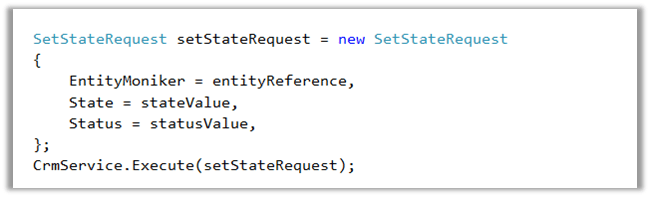
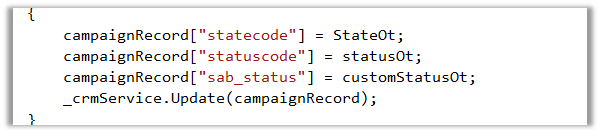
We were recently facing issue while trying to update status for Campaign Entity using SetStateRequest in Dynamics 365. The value for were not getting updated.

Eventually we realized that it could be because of SetStateRequest being deprecated now in Dynamics 365 (online).

Updating the code to use UpdateRequest fixed the issue.

Hope it helps..

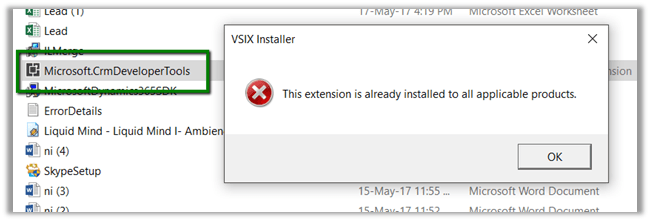
Dynamics 365 Developer Toolkit – The extension is already installed to all applicable products.


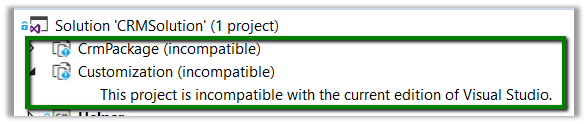
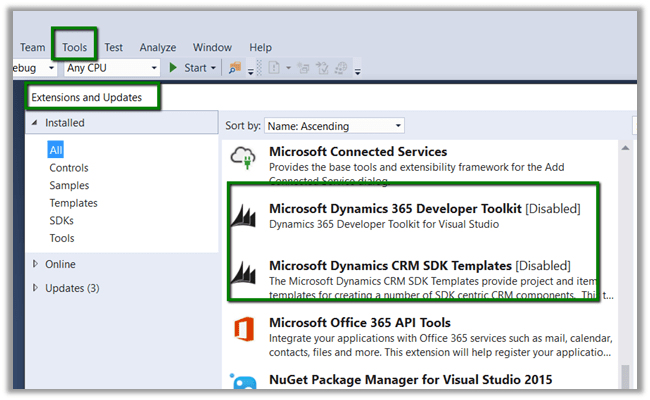
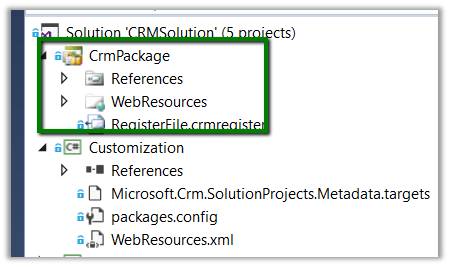
We were getting the below error for projects inside our Dynamics 365 Developer toolkit solution template.

Trying to run the setup brought the following message

The fix was to go to Tools à Extensions and Updates and enable the extension.

Fixed à

Hope it helps..

LINQ: GroupBy, Sum and EntityCollection in CRM


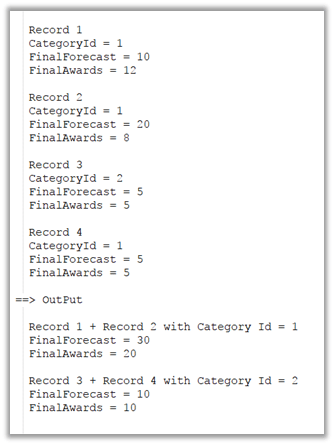
Just sharing a sample code that could be used for group by and sum operation on EntityCollection.

Suppose below is the output that we want

We can use the below code for that.


// select categoryid, final forecast, final awards from SubCategory Entity
// category id is lookup in SubCategory Entity

EntityCollection result = orgProxy.RetrieveMultiple(new FetchExpression(fetch));

var details = from r in result.Entities.AsEnumerable()
group r by new
{
groupByCategoryID = ((EntityReference)r.Attributes["categoryId"]).Id.ToString()
}
into g
select new
{
sumFinalForecast = g.Sum(x => Convert.ToInt32(x.Attributes["finalforecast"])),
sumFinalAwards = g.Sum(x => Convert.ToInt32(x.Attributes["finalawards"])),
categoryId = g.Key.groupByCategoryID
};

// update the parent record
foreach(var detail in details)
{
Entity entityUpdate = new Entity("category");
entityUpdate.Id = new Guid(detail.categoryId);
entityUpdate.Attributes["totalfinalforecast"] = detail.sumFinalForecast;
entityUpdate.Attributes["totalfinalawards"] = detail.sumFinalAwards;
orgProxy.Update(entityUpdate);
}

Hope it helps..

Sample code to call Action using Web API in CRM


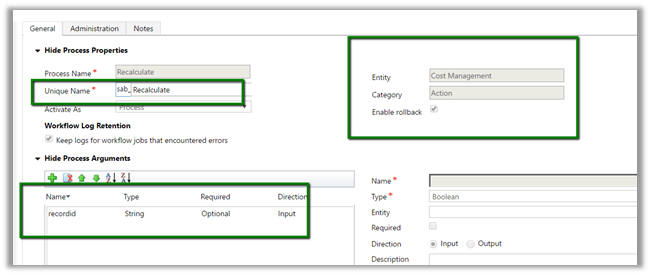
Just sharing a sample code to call an Action through Web API.

Suppose below is our Action with one input parameter.

JavaScript code :-


function CallAction() {

// get the id of the record and remove the curly bracket part
// id will be used in Web API url
var Id = Xrm.Page.data.entity.getId().replace('{', '').replace('}', '');

var serverURL = Xrm.Page.context.getClientUrl();

// pass the id as inpurt parameter
var data = {

"recordid": Id
};

var req = new XMLHttpRequest();

// specify name of the entity, record id and name of the action in the Wen API Url
req.open("POST", serverURL + "/api/data/v8.2/sab_costmanagements(" + Id + ")/Microsoft.Dynamics.CRM.sab_Recalculate", true);

req.setRequestHeader("Accept", "application/json");
req.setRequestHeader("Content-Type", "application/json; charset=utf-8");
req.setRequestHeader("OData-MaxVersion", "4.0");
req.setRequestHeader("OData-Version", "4.0");
req.onreadystatechange = function () {
if (this.readyState == 4 /* complete */) {
req.onreadystatechange = null;
if (this.status == 200) {
var data = JSON.parse(this.response);
alert(data);
} else {
var error = JSON.parse(this.response).error;
alert(error.message);
}
}
};

// send the request with the data for the input parameter
req.send(window.JSON.stringify(data));
}

Basically we need to pass name of the Entity Set with id of the record followed by name of the action appended with Microsoft.Dynamics.CRM.

In case of global action, we just need the Microsoft.Dynamics.CRM.<<ActionName>>.

More details here

https://www.inogic.com/blog/2016/10/execute-the-global-action-using-web-api-in-dynamics-crm/

Hope it helps..