Fixed – DTS_E_PROCESSINPUTFAILED. The Process input method on component “Script Component” failed with error code 0x80131501 in SSIS


Recently I had written an article for Nigel Frank that list down step by step process of using XML Source Component of KingswaySoft for integration with Dynamics 365 CE

https://www.nigelfrank.com/blog/integrate-dynamics-365-for-customer-engagement-with-xml/

We have used XML Source Component to read the XML files.

The packages that we developed were running fine from Visual Studio SSDT but on deployment for one of our package that was using Script Component we were getting the below error while running from within SQL.

After a lot of debugging and spending a good amount of time to figure out the issue, we realized that the value of one of the input columns was not being passed to Script Component from XML Source component i.e. _ParentKeyField

This is a special column which XML Source Component adds for the child records through which we can associate it to the parent record.

This happens when we are running it from SQL and only for the Script Component. This worked fine while running it from within SSDT and in other packages even from SQL when we weren’t using Script Component.

As a quick fix, we applied XLST Transformation to put the same tag for the child records also and to refer that instead of _ParentKeyField

In parallel, we also asked the same question to the KingswaySoft Support team (info@kingswaysoft.com)

One thing I would like to explicitly mention is that KingswaySoft support team is one of the best out there, not only you will get the response immediately, but also their team is very knowledgeable.

Below is the response we got

As suggested after setting the RunInOptimizedMode property to False for the Data Flow components the issue got fixed.

This property indicates whether the Data Flow task runs in optimized mode (RunInOptimizedMode property). Optimized mode improves performance by removing unused columns, outputs, and components from the data flow.

Hope it helps..

Advertisements

Fixed – The Script Task uses version 15.0 script that is not supported in this release of Integration Services


Recently after deploying the SSIS packages, on one of the packages that uses Script Component, we started getting below error message

This happened because SSIS packages had target version SQL 2017 and the SQL Server version was 2016 (select @@VERSION)

The fix is to update the target version that matches the SQL Server Version.

Right click and go to project properties and update the Target Version to match and redeploy the project.

Hope this helps..

Advertisements

Fixed – Script Component has encountered an exception in user code. Value cannot be null. Parameter name: keyword in SSIS


Recently while trying to use KingswaySoft’ s CRM Connection Manager in the Script Component we got the below error

error

Turned out the issue was because of the wrong version of KingswaySoft.IntegrationToolkit.DynamicsCrm assembly being referred.

C:\Windows\Microsoft.NET\assembly\GAC_MSIL\KingswaySoft.IntegrationToolkit.DynamicsCrm

Referencing the correct one fixed it.

Hope it helps..
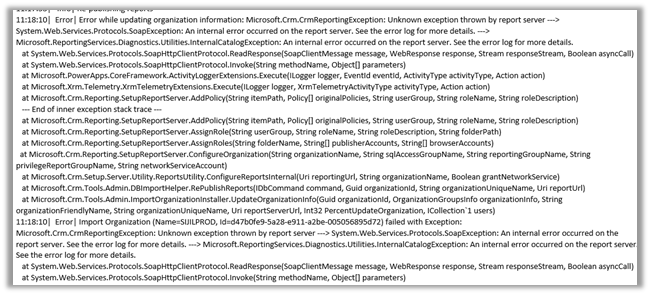
Error while updating organization information: Microsoft.Crm.CrmReportingException: Unknown exception thrown by report server —> System.Web.Services.Protocols.SoapException: An internal error occurred on the report server while trying to import organization in Dynamics 365 On-Premise


Recently while after restoring the database while trying to import the organization we got the below error

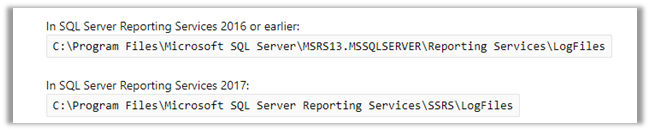
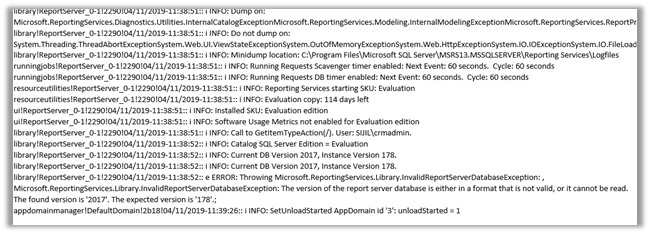
Checking the Report Server log,

we found the below detail

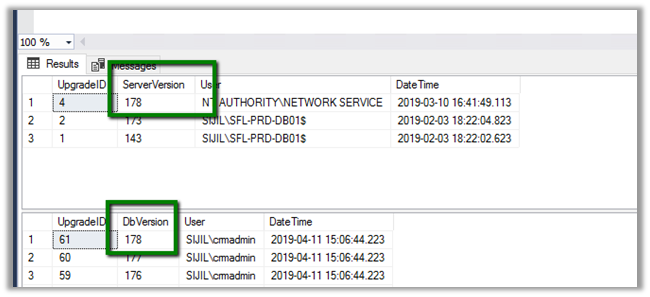
Throwing Microsoft.ReportingServices.Library.InvalidReportServerDatabaseException: , Microsoft.ReportingServices.Library.InvalidReportServerDatabaseException: The version of the report server database is either in a format that is not valid, or it cannot be read. The found version is ‘2017’. The expected version is ‘178’.;

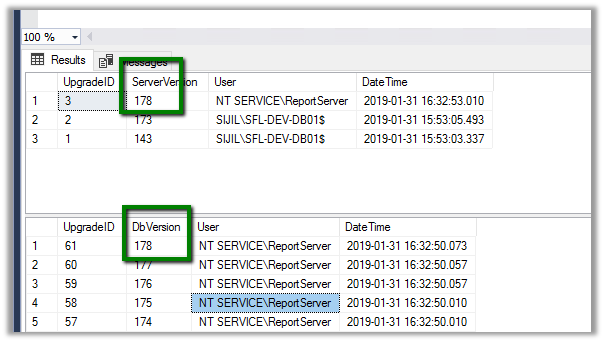
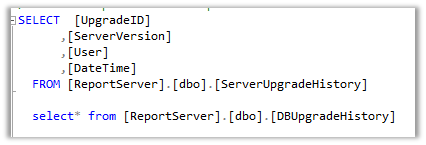
We can use the below commands to check the DB Version


The Database that we were restoring had the following version 178 as mentioned in the error


And in our destination server where we were had restored and imported the organization, it was 2017.

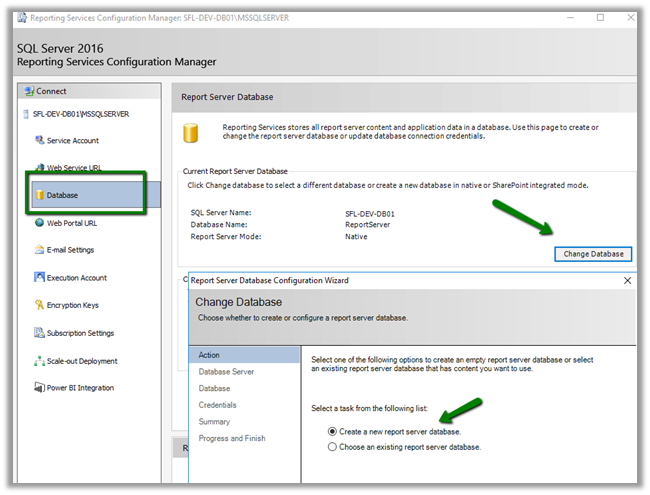
We tried out a few of the things mentioned in the forums, eventually what worked for us was to create a new Report Server database in the Destination server.

https://social.technet.microsoft.com/wiki/contents/articles/32360.sspr-troubleshooting-the-version-of-the-report-server-database-is-either-in-a-format-that-is-not-valid-or-it-cannot-be-read.aspx

https://www.sqlservercentral.com/forums/topic/the-version-of-the-report-server-database-is-either-in-a-format-that-is-not-valid-or-it-cannot-be-read-the-found-version-is-164-the-expected-version-i

This created the database with the version expected and our import was successful.

Also, refer the below blog posts

https://www.magnetismsolutions.com/blog/paulnieuwelaar/2014/10/08/data-encryption-errors-after-restoring-microsoft-dynamics-crm-database

http://rafaeldontalgoncalez.com/2018/11/the-version-of-the-report-server-database-is-either-in-a-format-that-is-not-valid-or-it-cannot-be-read-the-found-version-is-164-the-expected-version-is-165-rsinvalidreportserverdatabase

https://www.crmviking.com/2016/02/backup-and-restore-strategies-for-crm.html

Hope it helps..

Fixed – ExecuteMultiple Request batch size exceeds the maximum batch size allowed error while deleting records in Dynamics 365 On-Premise


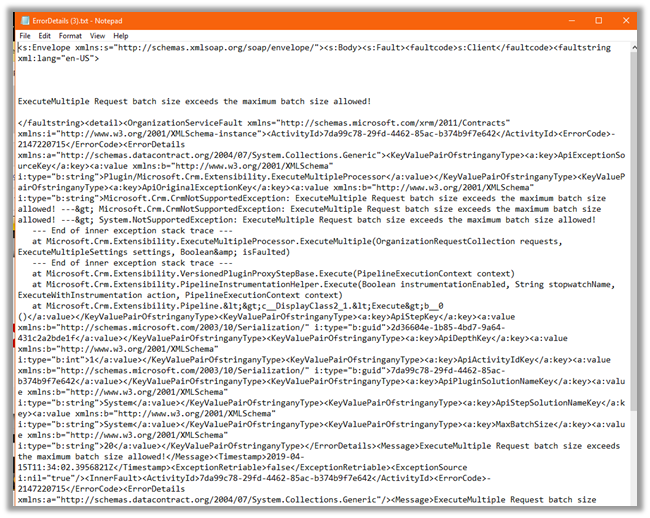
Recently while trying to delete records we were getting the below error

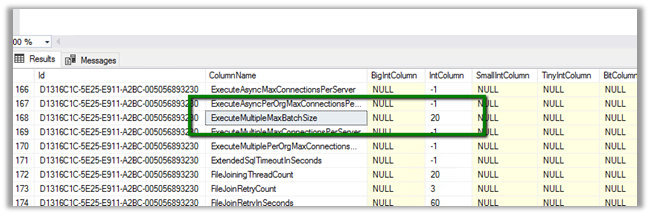
It was occurring when we were selecting more than 20 records for deletion.

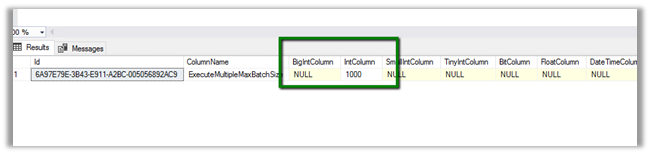
Turned out in the MSCRM_CONFIG database, somebody had updated the value to 20 of ExecuteMultipleMaxBatchSize column in the DeploymentProperties table

We updated it to its default value 1000 to get this fixed.

Hope it helps..
Advertisements

Check out my Step-by-Step guide to integrating Dynamics 365 for Customer Engagement with XML @NigelFrank


Here’s an article I wrote for @NigelFrank detailing how Dynamics 365 for Customer Service users can integrate their solution with XML. I hope you find it useful! #MSDyn365 #MsDynCRM

Integration with XML for Dynamics 365 for Customer Service users: my illustrated guide for @NigelFrank

Follow the link here

https://www.nigelfrank.com/blog/integrate-dynamics-365-for-customer-engagement-with-xml/