Sample HttpModule for CRM 2013 on premise.


Suppose we have to redirect user belonging to a specific group to some specific page, while they try to access CRM 2013.

For this we can implement an HttpModule

Sample code


public class Class1 : IHttpModule
{
public void Dispose()
{

}
public delegate void MyEventHandler(Object s, EventArgs e);
private MyEventHandler _eventHandler = null;

public event MyEventHandler MyEvent
{
add { _eventHandler += value; }
remove { _eventHandler -= value; }
}
public void Init(HttpApplication context)
{
context.AuthenticateRequest += new EventHandler(ContextOnAuthenticateRequest);
}

private void ContextOnAuthenticateRequest(object sender, EventArgs eventArgs)
{
HttpApplication app = sender as HttpApplication;
HttpContext context = app.Context;

// if the user belongs to adminsitrators role or reporting group
// redirect the user to bing.com
if (context.User.IsInRole(@"BUILTIN\Administrators") &&
context.User.IsInRole(@"LSS\ReportingGroup {0993772e-cfb6-47ba-8b88-2129bfc97f89}"))
{
app.Context.Response.Redirect("http://www.bing.com");
}

if (_eventHandler != null)
_eventHandler(this, null);
}
}


Put the dll in the bin of the CRMWeb

..\Microsoft Dynamics CRM\CRMWeb\bin

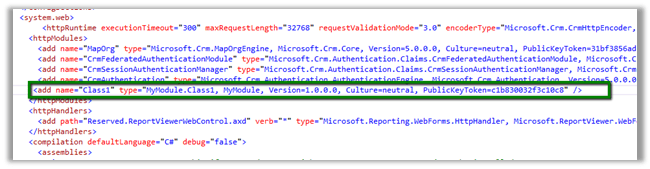
And register the http module in the web.config

(use sn –T MyModule.dll to get the public key token)

Moreover this can be implemented using URLRewrite as it runs before the authentication so we wont be able to get the username

http://www.iis.net/downloads/microsoft/url-rewrite

Hope it helps


How to – Use Pre-Filtering in Fetch XML based report in CRM 2013 online.


Hi,

We recently had a requirement to run a report on the form of a custom entity named incident.

It should show incident data and its related entity data i.e. contact and account.

Incident is having n: n relationship with Contact and Account here.

Here we will create three data sets one for showing the incident data and other two for the related entities.

Create a DataSet for Incident to fetch the incident record information (using Advanced Find View).

Make sure to set enableprefiltering as 1

This will create a report parameter in the report

Next we will create a DataSet for Contact entity which is n: n (many to many) related to Incident.

Download the fetch xml and add enableprefiletering attribute

Follow the same step for the DataSet for account entity related to Incident.

While uploading the select Display in value as “Forms for related record types” to run the report in the context of the form.

Report will start appearing in the Incident Form

Sample screenshot


Hope it helps

Advertisements

Debugging online plugin in CRM 2013.


Hi,

Let us take a simple plugin to understand the debugging process. We need the profile which we will use for debugging.

Register the plugin (debug version) and corresponding step using plugin registration tool.

Select Install Profiler in Plugin Registration tool and wait till the installation is complete.


Select the Step in Plugin and Click Profile in the tool

Select Ok in the dialog box

Open CRM and perform the step that will run the plugin.

Download the log file.

Open Visual Studio and attach debugger to PluginRegistrationTool.exe

Go back to Plugin Registration tool, select the step and select Debug from the tool bar.


Specfiy the log file in the Profile location and plugin assembly that is in debug folder.

Click on Start Execution to start debugging

Hope it helps.

Sample code to get label and value for OptionSet in CRM


Hi,

Just sharing a sample code that retrieves optionset data from CRM and also sorts it. We are using it to bind drop down in one of our custom SharePoint Application Page.


/// <summary>
/// The get global option sets.
/// </summary>
/// <param name="config">
/// The config.
/// </param>
/// <param name="globalOptionSetName">
/// The _global option set name.
/// </param>
/// <returns>
/// The <see cref="List"/>.
/// </returns>
public static List<XrmOptionSet> GetGlobalOptionSets(IOrganizationService config, string globalOptionSetName)
{
using (
XrmServiceContext context = SDKHelper.GetXrmServiceContext(
config.OrganizationServiceUrl,
config.Credentials))
{
RetrieveOptionSetRequest retrieveOptionSetRequest = new RetrieveOptionSetRequest
{
Name =
globalOptionSetName
};

// Execute the request.
RetrieveOptionSetResponse retrieveOptionSetResponse =
(RetrieveOptionSetResponse)context.Execute(retrieveOptionSetRequest);

OptionSetMetadata retrievedOptionSetMetadata =
(OptionSetMetadata)retrieveOptionSetResponse.OptionSetMetadata;

OptionMetadata[] optionList = retrievedOptionSetMetadata.Options.ToArray();

List<XrmOptionSet> optionSetItems = new List<XrmOptionSet>();

// Add each item in OptionMetadata array to the ListItemCollection object.
foreach (OptionMetadata o in optionList)
{
XrmOptionSet xrmOptionSet = new XrmOptionSet();
xrmOptionSet.Label = o.Label.LocalizedLabels[0].Label;
xrmOptionSet.Value = o.Value.Value.ToString(CultureInfo.InvariantCulture);
optionSetItems.Add(xrmOptionSet);
}

optionSetItems.Sort(
delegate(XrmOptionSet thisItem, XrmOptionSet otherItem)
{
return thisItem.Label.CompareTo(otherItem.Label);
});

return optionSetItems;
}
}

/// <summary>
/// The get local option sets.
/// </summary>
/// <param name="config">
/// The config.
/// </param>
/// <param name="entityName">
/// The entity name.
/// </param>
/// <param name="optionSetAttributeName">
/// The option set attribute name.
/// </param>
/// <returns>
/// The <see cref="List"/>.
/// </returns>
public static List<XrmOptionSet> GetLocalOptionSets(
IOrganizationService config,
string entityName,
string optionSetAttributeName)
{
using (
XrmServiceContext context = SDKHelper.GetXrmServiceContext(
config.OrganizationServiceUrl,
config.Credentials))
{
// Create the Attribute Request.
RetrieveAttributeRequest retrieveAttributeRequest = new RetrieveAttributeRequest
{
EntityLogicalName =
entityName,
LogicalName =
optionSetAttributeName,
RetrieveAsIfPublished
= true
};

// Get the Response and MetaData. Then convert to Option MetaData Array.
RetrieveAttributeResponse retrieveAttributeResponse =
(RetrieveAttributeResponse)context.Execute(retrieveAttributeRequest);
PicklistAttributeMetadata retrievedPicklistAttributeMetadata =
(PicklistAttributeMetadata)retrieveAttributeResponse.AttributeMetadata;
OptionMetadata[] optionList = retrievedPicklistAttributeMetadata.OptionSet.Options.ToArray();

List<XrmOptionSet> optionSetItems = new List<XrmOptionSet>();

// Add each item in OptionMetadata array to the ListItemCollection object.
foreach (OptionMetadata o in optionList)
{
XrmOptionSet xrmOptionSet = new XrmOptionSet();
xrmOptionSet.Label = o.Label.LocalizedLabels[0].Label;
xrmOptionSet.Value = o.Value.Value.ToString(CultureInfo.InvariantCulture);
optionSetItems.Add(xrmOptionSet);
}

optionSetItems.Sort(
delegate(XrmOptionSet thisItem, XrmOptionSet otherItem)
{
return thisItem.Label.CompareTo(otherItem.Label);
});

return optionSetItems;
}
}
}

&nbsp;


Hope it helps.

Issue while using SDK.MetaData.js in Chrome in CRM 2013.


Recently was writing a jscript function to populate optionset value using SDK.MetaData.js helper class.

https://nishantrana.wordpress.com/2014/02/05/retrieve-optionset-label-using-sdk-metadata-rertrieveattribute-method-in-javascript-crm-2011/

It was working fine in IE, however I was getting error in Chrome.

It turned out the following condition was always evaluating as true

And as selectSingleNode is not supported in Chrome we were getting error.

Added the following condition fixed the issue


if (typeof(window.chrome) != ‘undefined’) {


var xpe = new XPathEvaluator();


var xPathNode = xpe.evaluate(xpathExpr, node, _NSResolver, XPathResult.FIRST_ORDERED_NODE_TYPE, null);


return (xPathNode != null) ? xPathNode.singleNodeValue : null;


}


Hope it helps..

attributeName error while using join in LINQ in CRM.


I recently wrote a LINQ using joins, all seemed fine, but was still getting the attributeName exception. Finally this post came to rescue.

http://www.develop1.net/public/post/e2809cValue-cannot-be-nullParameter-name-attributeNamee2809d-when-running-Linq-query-with-join.aspx

Hope it helps.