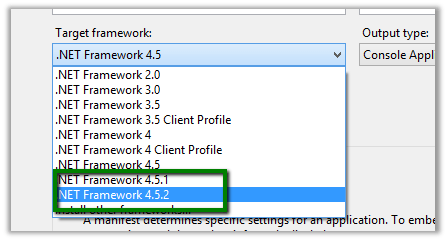
.NET Framework 4.5.2 missing in Visual Studio 2013.


Hi even after installing .NET Framework 4.5.2, it was missing from Visual Studio 2013’s Target framework.

Had to download and install it from the following location

http://www.microsoft.com/en-us/download/details.aspx?id=42637

Hope it helps..

Using Action to trigger Plugin in CRM 2013\2015


Hi,

We recently had a requirement to call Plugin on execute of an Action.

To implement this,

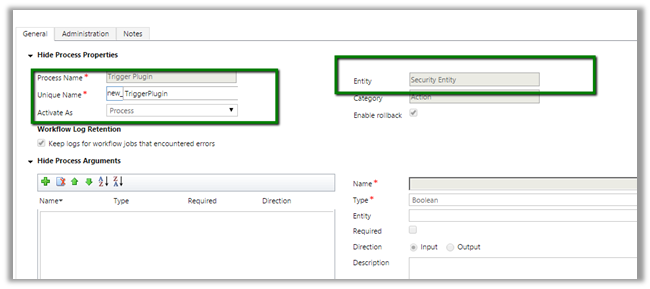
We created a blank Action named Trigger Plugin for custom entity named Security Entity.

Open Plugin Registration Tool and connect to the Org and we will have our action available there as message for our Plugin Step

We can execute our Action from C# and Jscript which in turns will call our Plugin.

C# Code:

Jscript Code:

</p>
<p>var xml = "" +<br />
"&lt;s:Envelope xmlns:s=\"http://schemas.xmlsoap.org/soap/envelope/\"&gt;&lt;s:Body&gt;&lt;Execute xmlns=\"http://schemas.microsoft.com/xrm/2011/Contracts/Services\" xmlns:i=\"http://www.w3.org/2001/XMLSchema-instance\"&gt;&lt;request xmlns:a=\"http://schemas.microsoft.com/xrm/2011/Contracts\"&gt;&lt;a:Parameters xmlns:b=\"http://schemas.datacontract.org/2004/07/System.Collections.Generic\"&gt;&lt;a:KeyValuePairOfstringanyType&gt;&lt;b:key&gt;Target&lt;/b:key&gt;&lt;b:value i:type=\"a:EntityReference\"&gt;&lt;a:Id&gt;1c54dadd-f91b-e511-a5ca-c4346bacae20&lt;/a:Id&gt;&lt;a:LogicalName&gt;tk_securityentity&lt;/a:LogicalName&gt;&lt;a:Name i:nil=\"true\"/&gt;&lt;/b:value&gt;&lt;/a:KeyValuePairOfstringanyType&gt;&lt;/a:Parameters&gt;&lt;a:RequestId i:nil=\"true\"/&gt;&lt;a:RequestName&gt;new_TriggerPlugin&lt;/a:RequestName&gt;&lt;/request&gt;&lt;/Execute&gt;&lt;/s:Body&gt;&lt;/s:Envelope&gt;" +<br />
"";</p>
<p>var xmlHttpRequest = new XMLHttpRequest();</p>
<p>xmlHttpRequest.open("POST", Xrm.Page.context.getClientUrl() +"/XRMServices/2011/Organization.svc/web", false);<br />
xmlHttpRequest.setRequestHeader("SOAPAction","http://schemas.microsoft.com/xrm/2011/Contracts/Services/IOrganizationService/Execute");<br />
xmlHttpRequest.setRequestHeader("Content-Type", "text/xml; charset=utf-8");<br />
xmlHttpRequest.setRequestHeader("Accept", "application/xml, text/xml, */*");<br />
xmlHttpRequest.setRequestHeader("Content-Length", xml.length);<br />
xmlHttpRequest.send(xml);</p>
<p>var resultXml = xmlHttpRequest.responseText;<br />
alert(resultXml);</p>
<p>

Use the SoapLogger tool to get the Soap request

https://nishantrana.me/2014/08/27/updated-soaplogger-for-crm-2013-to-generate-javascript/

Hope it helps..


Advertisements

Fixed: Action not appearing in available Message in Plugin Registration tool CRM 2013\ CRM 2015


Hi,

We created a new Action and wanted to trigger a plugin on call of the Action.

However that Action was not appearing in available messages while registering step for Plugin.

Finally got to know that in case of Online need to restart the plugin registration tool for that action to appear in message.


Simple Refresh or Reloading of the organization will not work.

Hope it helps..

How to – Use Xrm.Internal.openDialog as an alternate to showModalDialog in CRM


New version of Chrome doesn’t showModalDialog method.

g

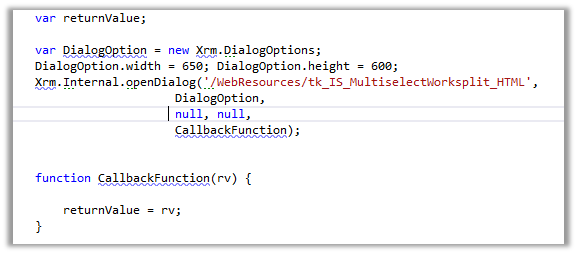
As an alternate we can use Xrm.Internal.openDialog method

  • And in the HTML Web Resource page

We need to refer ClientGlobalContext.js.aspx

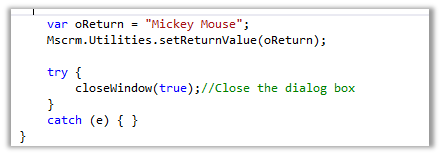
To return value to the parent window and close the current window

Helpful links

https://debajitcrm.wordpress.com/2014/04/29/exploring-the-xrm-internal-namespace-in-crm-2013/

https://dynamicsofdynamicscrm.wordpress.com/2014/04/28/call-crm-2013-modal-window-for-webresources/

https://mscrmmindfire.wordpress.com/2014/04/23/open-dialog-box-like-crm-2013/

MOST IMP – It is unsupported

Hope it helps!!

Advertisements

Step by Step – Configure CRM Plugin and Azure Service Bus in CRM 2015.


Run Microsoft Azure PowerShell

  • Add-AzureAccount


Sign in using your Azure Account.

  • Get-AzureSubscription

  • Select-Azuresubscription <name of the subscription you need>
  • New-Azuresbnamespace <name for the service bus> “North Europe” -CreateACSNamespace $true -NamespaceType Messaging


Open Azure Management Portal

https://manage.windowsazure.com/

Click on the Service Bus à Queues and Create a Queue using Quick Create


Now open Plugin Registration Tool.

Solution Namespace – Name Space we gave to our Service Bus.

Path – Name of the Queue.

Cick Save & Configure ACS

Management Key è Default Key


Click Save.

Now register a new Step. (Post Lead Create Asynchronous)


Create a new Lead record in CRM.

Check the System Job.

Hope it helps..

Missing Posts tab in Social Pane in CRM 2013.


Hi,

Recently we added Social Pane to one of our custom entity form in CRM 2013. It was only showing Notes and Activities tab. Posts tab was missing.

To get the Posts tab we need to activate Post for that custom entity, which can be done through Post Configurations page.

However the Post Configuration area was missing in our CRM’s site map navigation.

To add it back, we need to follow the steps mentioned this post

http://www.crmcodex.com/2013/11/mscrm-2013-missing-posts-tab-on-the-new-activity-feeds/

i.e. to add the following SubArea

<SubArea Id=”nav_administration” ResourceId=”Homepage_Administration” DescriptionResourceId=”Administration_SubArea_Description” Icon=”/_imgs/ico_18_administration.gif” Url=”/tools/Admin/admin.aspx” AvailableOffline=”false” />

<SubArea Id=”nav_social” ResourceId=”Social_SubArea_Title” DescriptionResourceId=”Social_SubArea_Description” Icon=”/_imgs/area/16_social.png” Url=”/tools/social/social_area.aspx” AvailableOffline=”false” />

<SubArea Id=”msdyn_postconfig” ResourceId=”Activity_Feed_Configuration” Entity=”msdyn_postconfig” />


Add Email and Post Configuration to SiteMap

https://technet.microsoft.com/en-us/library/dn486920%28v=crm.6%29.aspx

Hope it helps..