The workflow cannot be published or unpublished by someone who is not its owner error while importing solution in Dynamics 365 CE


Recently after upgrade of our Dynamics 365 CE from 8.2 to 9.1, when the System Administrator tried importing the solution (managed), he got the below error

The workflow cannot be published or unpublished by someone who is not its owner.

Error while importing workflow {ec05f40d-fd14-46ab-96b3-be1f5b108ef3} type Workflow name Marketing List – Update CT Relationship: The workflow cannot be published or unpublished by someone who is not its owner.

What the error says is that the user who is importing the solution needs to be the owner of the workflow that is there in that solution.

http://gonzaloruizcrm.blogspot.com/2011/05/processesworkflow-ownership-faqs.html

https://stackoverflow.com/questions/17159920/crm-2011-ru13-the-workflow-cannot-be-published-or-unpublished-by-someone-who-is

The thing was that we have never got this issue earlier for that System Admin user and we would have imported the solution at least 10 times earlier as well. This time the only thing different was that it was in the newer version 9.1

Changing the owner of the workflow and assigning it to the one who is importing will fix this issue. However interestingly and as expected when we tried importing the same solution using a different system administrator (again not the owner of the workflow in the target system), the import was successful with warning.

“The original workflow definition has been deactivated and replaced”

Read the below post to understand how workflows are managed internally

https://www.inogic.com/blog/2010/11/workflows-behind-the-scene/

Please share your thoughts, if someone has faced this issue recently and how they managed to fix this?

And what caused the issue to the first system admin and worked for the other.

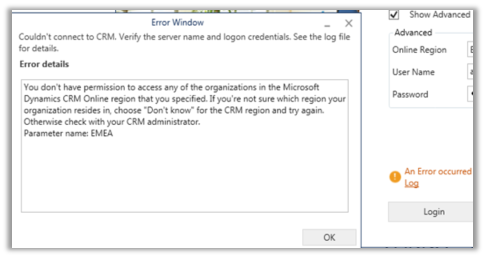
Fixed – You don’t have permission to access any of the organizations in the Microsoft Dynamics CRM Online region that you specified error in USD Client Application


Recently after upgrade to version 9.1 and USD 4.0, some of the users started getting the below error while trying to login into the USD Client Application.

You don’t have permission to access any of the organizations in the Microsoft Dynamics CRM Online region that you specified. If you’re not sure which region your organization resides in, choose “Don’t know” for the CRM region and try again. Otherwise check with your CRM administrator.

They were able to login to Dynamics 365 CE through browser though.

Eventually turned out that few of the sites (url(s)) were getting blocked because of the network policy on the agent’s machine. Allowing those sites resolved the issue.

Hope it helps..

Advertisements

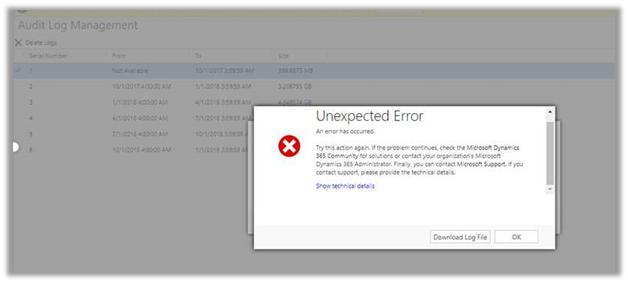
Unexpected error (SQL Timeout error) while trying to delete Audit Log


Unexpected error (SQL Timeout error) while trying to delete Audit Log

We had around 200 GB of Audit Log data in our Production Environment (Online), but while trying to delete it through Audit Log Management resulted into unexpected error.

The only option is to raise the support ticket with Microsoft. We also raised the same but it unfortunately resulted in our Production Server being down for brief period of time because of time out issue while performing the operation in Audit Base.

So, in short if we are facing issue while deleting log ourselves, we need to raise the support ticket and also the plan the same during downtime or weekends when users are not using the system.

Hope it helps..

Requesting the backup of Microsoft Dynamics 365 Online Database


In theory, requesting the backup of the online database seems very easy and straightforward. We basically need to raise a support ticket with Microsoft and provide the following details.

  • SQL Version – Standard or Enterprise
  • SQL Year of the version. In our case it was (Microsoft SQL Server 2016 (SP1) (KB3182545) – 13.0.4001.0 (X64) Oct 28 2016 18:17:30 Copyright (c) Microsoft Corporation Standard Edition (64-bit) on Windows Server 2016 Datacenter 6.3 <X64> (Build 14393)
  • Global Admin E-mail Address – to who the backup will be shared.

We had requested the same, some 3 weeks back. In our case, the Database size of our production was around 600 GB out of which 200 GB were occupied by Audit Data. For some business-specific reason, we wanted to have the backup of Audit Data with us before we delete it. Now, this Audit has a separate story with it, when we tried deleting it from UI we got the SQL Time Out issue and on raising the support ticket when Support Team tried the same through back end it, resulted in our Production Server being down briefly for few minutes. We also tried to take the back up through 3rd party tools using SSIS, however again we ran into some issue where the tool was not able to pull the Audit Data for few of the entities.

Well to cut the story short, it is around 21 days after we raised the request, and we are yet to receive the backup of our production database, we have been told that support team is actively working on it and it is because of the large size of the organization.

Will keep posting the update on the backup and the Audit deletion.

The purpose of this blog post was to share that certain things might seem straightforward and would have taken maximum few hours, could still run into issues and challenges causing delays. So, when we plan for it we need to aware of these factors as well.

Hope it helps..

Power BI and Microsoft Dynamics 365


Listing down the posts on Power BI and Microsoft Dynamics 365 for quick reference


Above and Under operator to query hierarchical data in Dynamics 365


above and under were the 2 new operators introduced with Dynamic CRM 2015.

Let us see some of the examples.

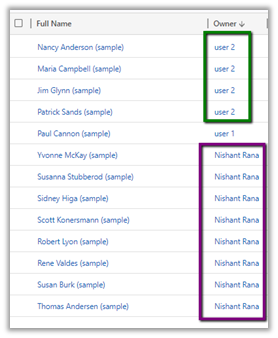
Suppose I have the following hierarchy defined, wherein User 2 is manager of user Nishant Rana who in turn is manager of User 1.

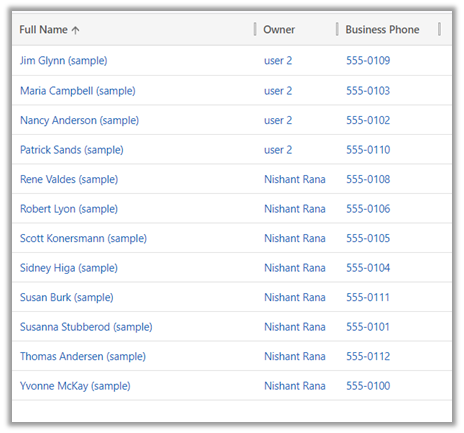
And following are the contacts record owned by them.

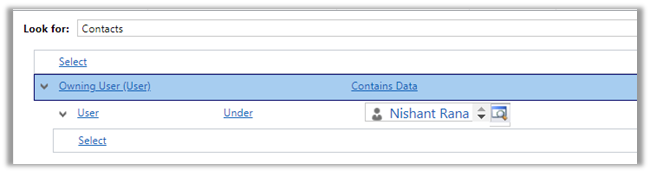
In context of user Nishant Rana, if I apply Under operator, we’d get the following result

Only the records owned by child

And for Not Under

All the records owned by the user and its manager(s) or parent.

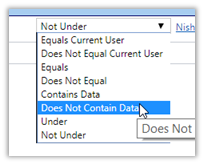
Now we do not have the Above operator in Advanced Find

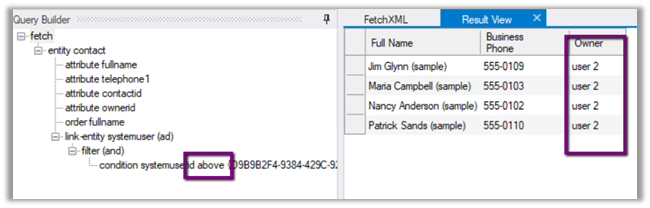
So, using our favorite tool Fetch XML Builder, the above operator shows only the records owned by the parent(s) of current user.

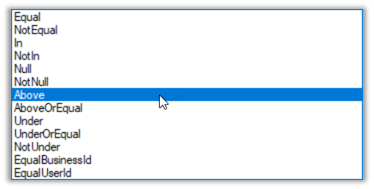
We also have Above or equal, Under or equal operator which aren’t there in Advanced Find.

Hope it helps..