Reduce log storage: Delete audit logs – Power Platform Admin Center


Recently we had to copy our production environment to one of our sandbox environments for some analysis and testing.

But before we copied we made sure we deleted the data/attachments/ logs that are not required to save some storage space.

Get more information – https://nishantrana.me/2024/10/15/free-up-storage-space-activitypointerbase-and-workflowlogbase-dataverse-dynamics-365/

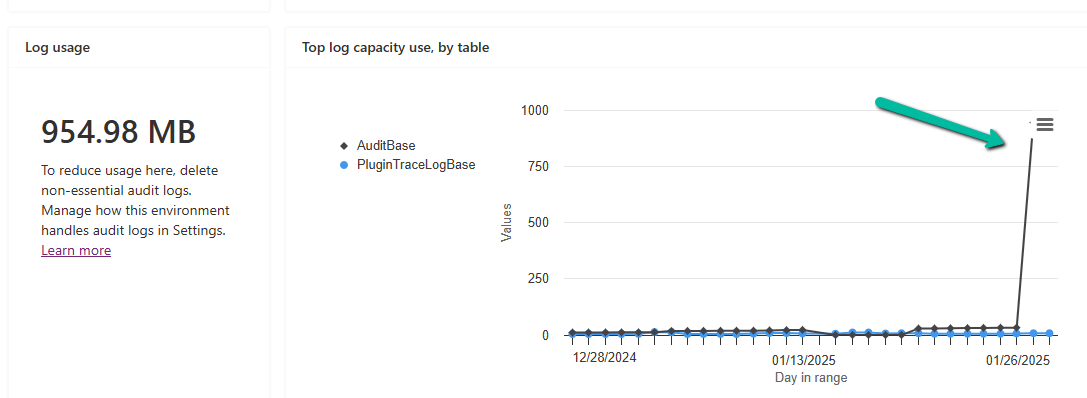
We had around 950 MB of Log data in it.

Below are the steps for deleting the audit logs –

Go to the Power Platform Admin Center, and sign in with the appropriate credentials.

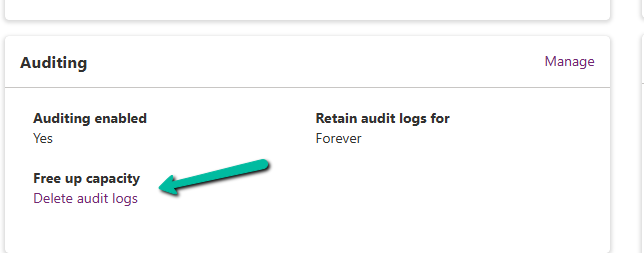
Select the Environment, and select Manage Audit Logs in the Auditing section.

A screenshot of a computer

Description automatically generated

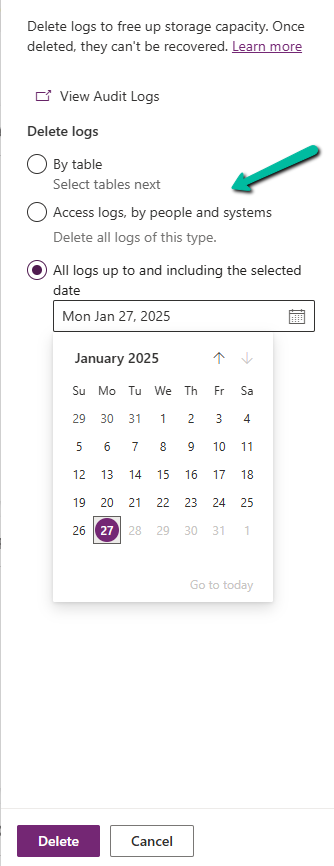
Click on Delete Audit Logs. We will be prompted to filter the logs to delete. Filter options may include:

  • By Table (e.g., logs related to a specific table or entity).
  • Delete logs, by people and systems.
  • Time (e.g., logs older than a specific date).
A screenshot of a calendar

Description automatically generated

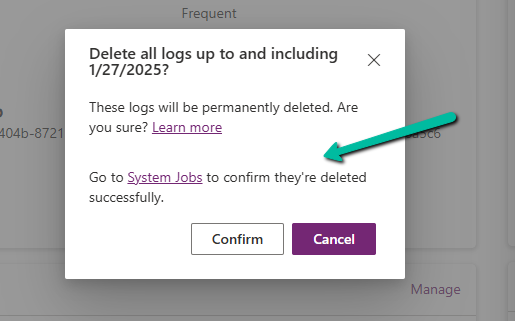
Confirm Deletion.

A screenshot of a computer

Description automatically generated

Review the summary of logs to be deleted. Click Delete to proceed. This action is irreversible.

Once the deletion is complete, the audit logs are permanently removed.

The storage won’t reflect it immediately.

A screen shot of a message

Description automatically generated
A screenshot of a computer

Description automatically generated
A screenshot of a computer

Description automatically generated

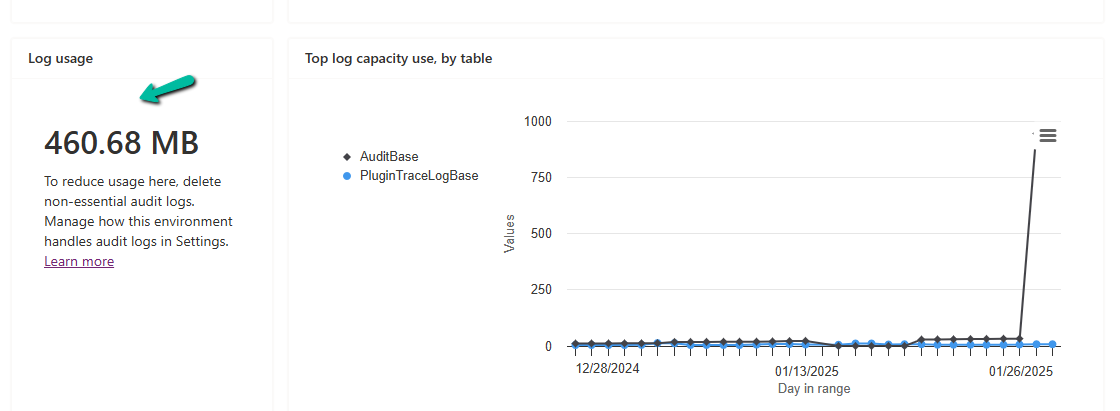
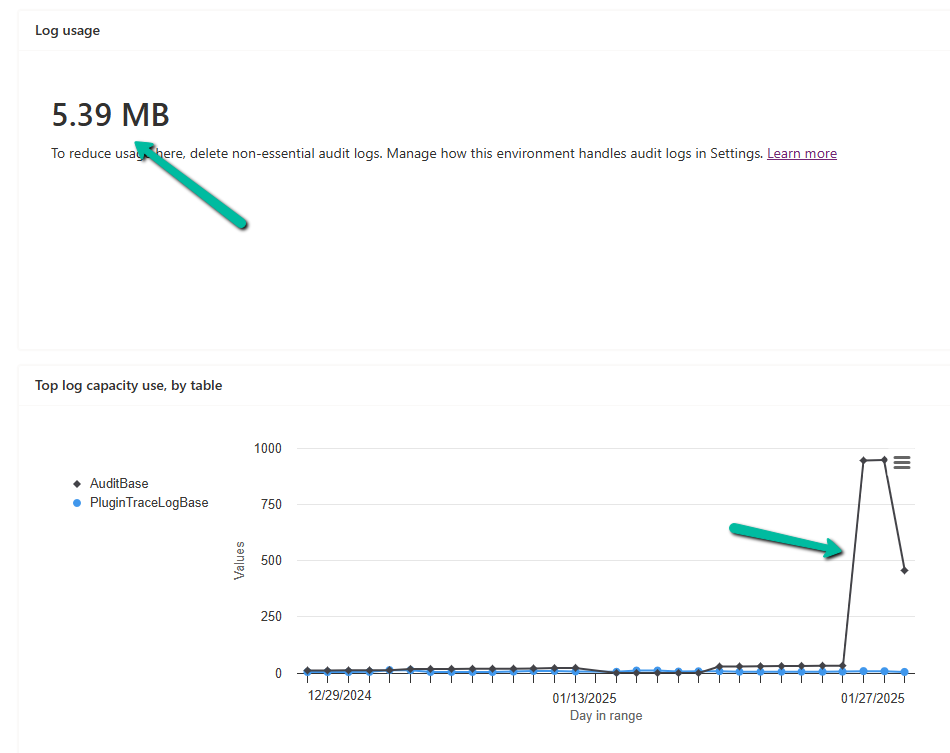
In our case, after 2 hours we could see log usage reduced to 460 MB from 954 MB.

And almost after 24 hours, we could see it reduced to 5 MB.

A screenshot of a computer

Description automatically generated

Get all the details

Hope it helps..

Advertisements

Customizing Business Process Flows: Stage Validation Using JavaScript (Dynamics 365 / Dataverse)


Business Process Flows (BPF) in Dynamics 365 offer a structured way to guide users through a defined process. However, there are scenarios where progression to the next stage must be validated against specific business rules. In this blog, we see how to implement custom validations on stage progression using JavaScript.

Let us take a simple scenario where a Lead can only progress to the next stage of a BPF if

Lead Quality = Hot and Lead Source = Web

If these conditions are not met, users will receive a notification, and the stage change will be prevented.

Below is the sample code


function OnLoad(executionContext)
{
 var formContext = executionContext.getFormContext();
 formContext.data.process.addOnPreStageChange(validateStageProgression);
}


function validateStageProgression(executionContext)
{
	    var bpfSampleStage = "6e2b5d9e-da30-4a47-8ca9-d75c24fd51f4";
        var formContext = executionContext.getFormContext();
		var rating = formContext.getControl('header_process_leadqualitycode').getAttribute().getValue();
		var leadSource = formContext.getControl('header_process_leadsourcecode').getAttribute().getValue();
		var stageObj = formContext.data.process.getActiveStage();
        var stageId = stageObj.getId();
		var requiredFieldErrorId = "contractValidationNotificationId";
        formContext.ui.clearFormNotification(requiredFieldErrorId);
		
		if(stageId)
		{
			 if (stageId.toLowerCase() === bpfSampleStage)
			 {
				  if (executionContext.getEventArgs().getDirection() === "Next") 				  
				{
                    executionContext.getEventArgs().preventDefault();
					if(rating == 1 && leadSource == 8) // rating = Hot and Source = Web
					{
						formContext.data.process.removeOnPreStageChange(validateStageProgression);
                        formContext.data.process.moveNext();
					}	
					else
					{
						notificationMessage = "Cannot move to the next stage until conditions are met !";
						formContext.ui.setFormNotification(notificationMessage, "ERROR", requiredFieldErrorId)
					}
				}
			 }
		}
}

The addOnPreStageChange method registers the validation function on the form’s load event to monitor stage changes.

The preventDefault() method stops the stage transition if the conditions are not met, ensuring data integrity.

If the validation fails, an error notification is displayed using the setFormNotification() method, guiding users to correct the data.

Upon satisfying the conditions, moveNext() is invoked programmatically to move the process to the next stage.

As shown below, clicking on Next as rating and lead source values do not satisfy the condition, we can see the notification on the form and the user is not able to move to the next stage.

Also check – https://nishantrana.me/2024/10/09/use-javascript-to-enable-a-field-only-if-the-stage-is-active-in-business-process-flow-dynamics-365-dataverse/

https://nishantrana.me/2024/10/10/use-javascript-to-add-onchange-event-to-a-field-in-the-business-process-flow/

https://nishantrana.me/2024/10/23/javascript-for-fields-in-business-process-flow-few-key-points-dataverse-dynamics-365/

Hope it helps..

Advertisements

Check Out the Natural Language Grid and View search


The new Smart Grid Preview feature allows us to find, filter, and sort data with natural language.

To enable it navigate to Environment >> Settings >> Features inside Power Platform Admin Center and turn on Natural Language Grid and View Search.

A screenshot of a computer

Description automatically generated

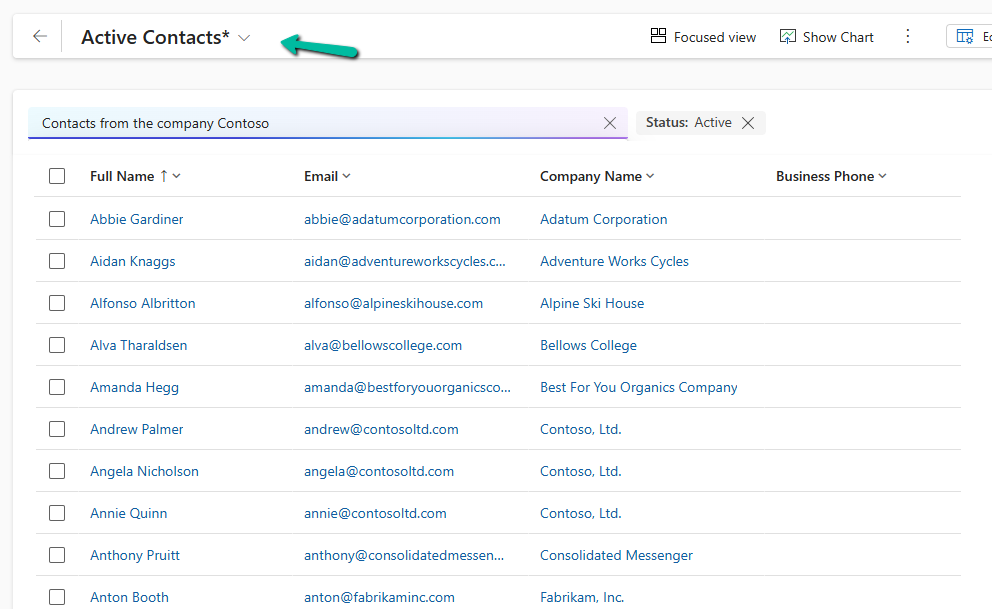
After enabling it we will see a search box on the grid page where we can type in questions about our data in plain English.

A screenshot of a computer

Description automatically generated

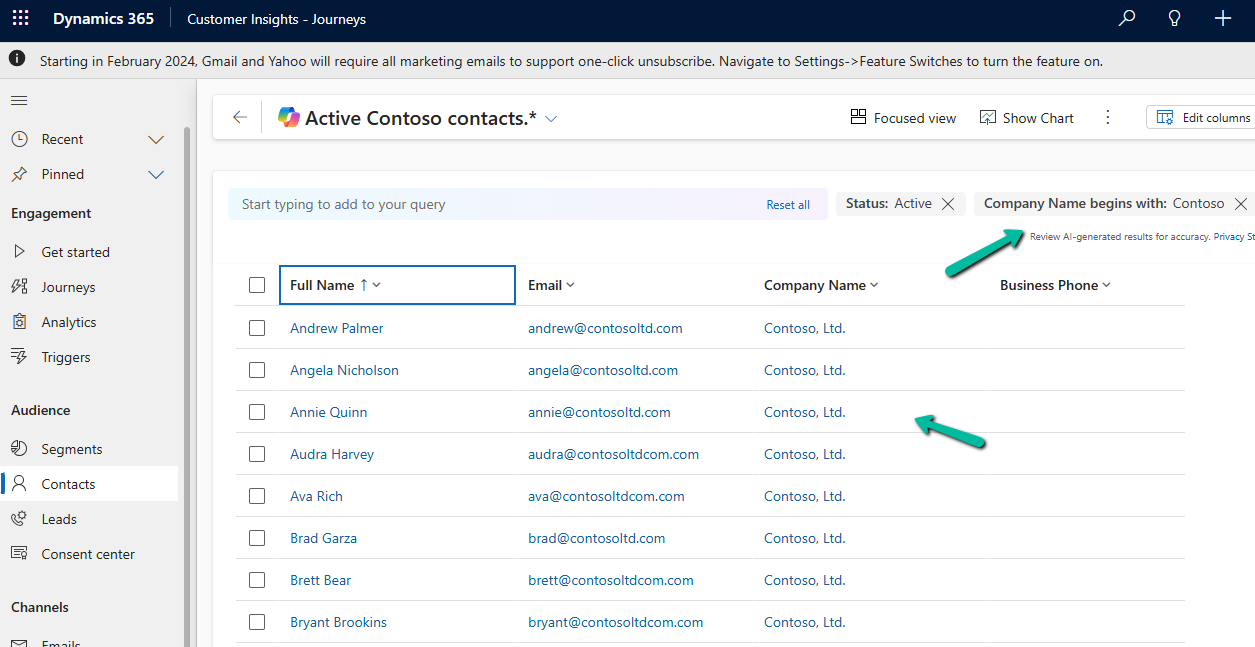
Let’s say we need to find “Contacts from the company Contoso”. Normally, this would mean defining the filters/query. But with the Smart Grid’s natural language search, we just type the request, and the system filters the view accordingly.

A screenshot of a computer

Description automatically generated

The result –

A screenshot of a computer

Description automatically generated

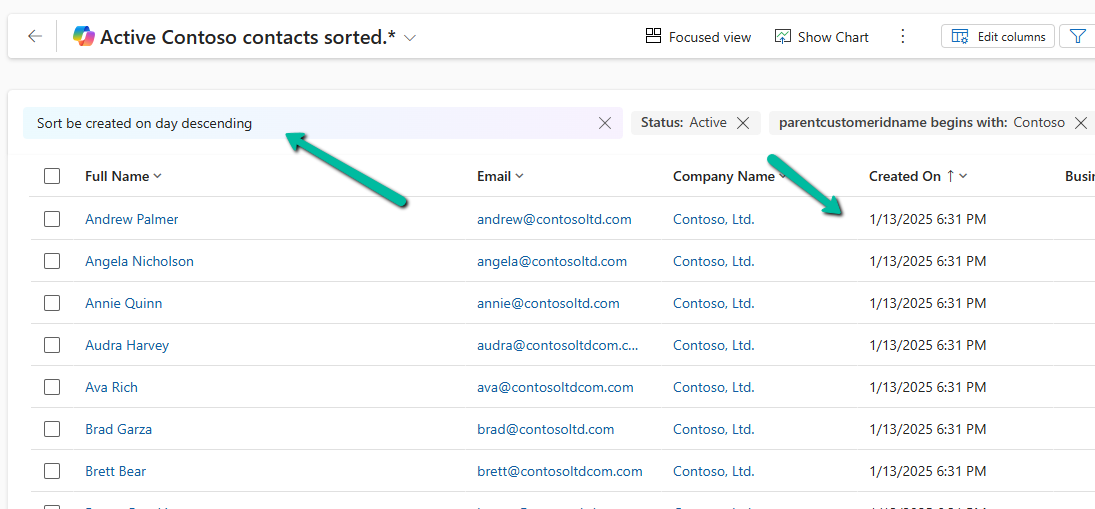
We can also use it to sort data.

A screenshot of a computer

Description automatically generated

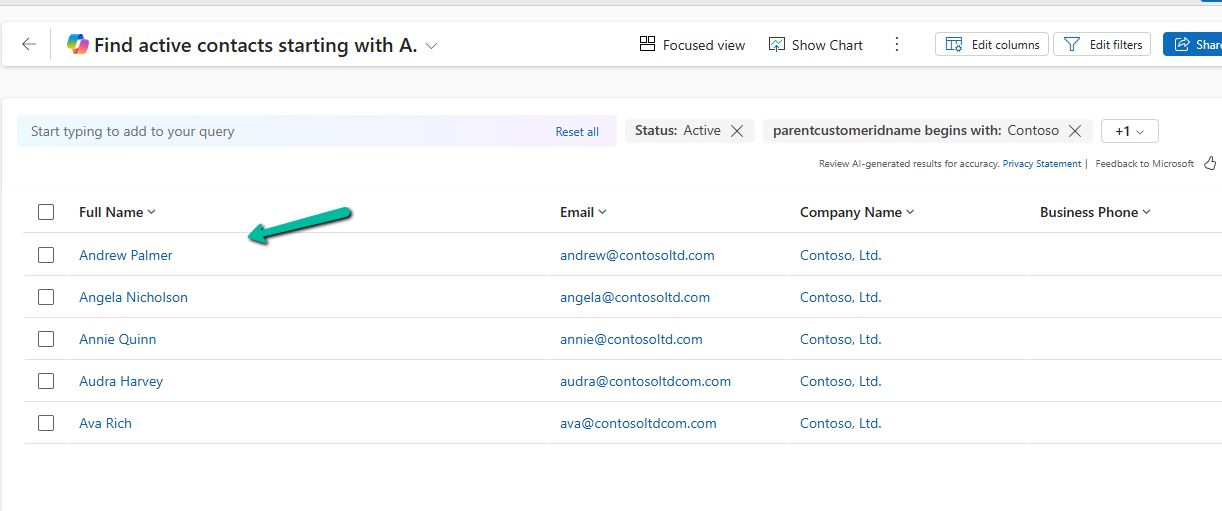
Another example

A screenshot of a computer

Description automatically generated

The result –

A screenshot of a computer

Description automatically generated

Using natural language search has loads of benefits:

  • Ease of Use: Do complex searches without needing to be tech-savvy.
  • Speed: Find what you need quickly without navigating through multiple filters.
  • Accessibility: Makes data interaction easy for everyone, even if you’re not a tech pro.

As it’s still in preview, there are a few things the Smart Grid Preview doesn’t support yet:

  • Query Aggregation
  • Query Grouping
  • Adding Columns

Remember, it’s still a work in progress and not ready for full production use.

Get more details here

Hope it helps ..

Advertisements

Fixed – The method ‘GroupJoin’ cannot follow the method ‘SelectMany’ or is not supported while using LINQ query (Dataverse / Dynamics 365)


We might get the below error while using LINQ to query Dataverse –

System.NotSupportedException: ‘The method ‘GroupJoin’ cannot follow the method ‘SelectMany’ or is not supported. Try writing the query in terms of supported methods or call the ‘AsEnumerable’ or ‘ToList’ method before calling unsupported methods.’

A screenshot of a computer

Description automatically generated

This error occurs because the GroupJoin method, which is essentially what happens during the into … syntax in LINQ, is not supported in the Dataverse/LINQ provider for Dynamics CRM. The issue is related to how the LINQ provider translates queries into FetchXML or SQL that the Dataverse understands. Specifically, nested joins or SelectMany (used by DefaultIfEmpty() in left joins) are not fully supported by the LINQ provider for Dataverse.

The GroupJoin and DefaultIfEmpty methods (used for left joins) result in queries that cannot be translated directly into FetchXML. The LINQ provider for Dataverse does not support all LINQ-to-Entities features, such as nested joins or advanced grouping logic. When you perform nested joins with DefaultIfEmpty() for left joins, the LINQ provider struggles to translate it into the underlying Dataverse query format, which is why the exception is thrown.

To fix it we can break the query into multiple steps as shown below.

A screenshot of a computer

Description automatically generated

However, here as we are fetching partial data into memory and combining it, it increases transfer and processing overhead and can take a long time to process based on the number of records.

The better alternative from a performance perspective would be to use FetchXML or QueryExpression here.

Also check writing complex LINQ queries

Hope it helps..
Advertisements

Fixed – ‘Invalid ‘where’ condition. An entity member is invoking an invalid property or method’ while using LINQ query (Dataverse / Dynamics 365)


We might get the below error while using LINQ to query Dataverse – “System.NotSupportedException: ‘Invalid ‘where’ condition. An entity member is invoking an invalid property or method.’” Here we got the below error because we used the HasValue property.

A screenshot of a computer

Description automatically generated

Here the issue with HasValue arises because FetchXML doesn’t have a direct equivalent for nullable checks like HasValue in LINQ. In FetchXML, null checks are handled explicitly through conditions like neq (not equal) or eq (equal) with the null value. Therefore, instead of using HasValue, we need to manually check for null using != null or GetValueOrDefault().

A computer screen shot of a code

Description automatically generated

We will also get the same error on below query.

A screenshot of a computer

Description automatically generated

Here we get this error because OriginatingLeadId is a LookUp referencing Lead table, and we are trying to access the Name property of it in the where clause, which cannot be directly translated into FetchXML. To fix it we can perform a join between the Contact and Lead table.

A computer screen shot of a program

Description automatically generated

Let us see one more example.

A green arrow pointing to a green object

Description automatically generated

The query, c.Attributes[“firstname”].ToString() is trying to access the firstname attribute and convert it to a string. However, the LINQ provider doesn’t know how to translate.ToString() into a valid FetchXML query.

To fix it we can use GetAttributeValue method.

A green arrow pointing to a computer code

Description automatically generated

Or doing the casting

A computer screen shot of a computer code

Description automatically generated

However, we will get the same not supported error if we try to use Attributes Collection.

A computer screen shot of a computer code

Description automatically generated

The error occurs because of the syntax c.Attributes[“firstname”] directly accesses the internal Attributes dictionary of the Entity object. The LINQ provider in Dataverse (Dynamics 365) cannot translate this access pattern into a FetchXML

Check more about the LINQ limitations

Hope it helps..

Advertisements

Fixed – Real-time marketing form’s Standalone page submitting to a different environment – (Dynamics 365 Customer Insights – Journeys)


Recently we migrated the Real-time marketing forms from our Dev environment to UAT environment using the Configuration Migration Tool. Here what we noticed was on submitting the form using the standalone page in UAT, the submissions were going back to the Dev environment instead of UAT.

A screenshot of a computer

Description automatically generated

This was because the data-form-api-url and data-cached-form-url property of msdynmkt_standalonehtml field of msdynmkt_marketingform record was still referencing the organization id of the Dev environment instead of UAT.

A computer screen shot of a computer screen

Description automatically generated
<div data-form-id='167fce01-b674-ef11-a671-002248e36298'
data-form-api-url='https://public-oce.mkt.dynamics.com/api/v1.0/orgs/f69f1cea-23d9-446f-9130-ed45ce666b28/landingpageforms'
data-cached-form-url='https://assets-oce.mkt.dynamics.com/f69f1cea-23d9-446f-9130-ed45ce666b28/digitalassets/forms/xxxfce01-b674-ef11-a671-002248e36298' ></div>

The f69f1cea-23d9-446f-9130-ed45ce666b28 is the development environment’s organization ID.

This information is stored in the msdynmkt_standalonehtml field of msdynmkt_marketingform record.

select msdynmkt_marketingformid,msdynmkt_standalonehtml,* from msdynmkt_marketingform where msdynmkt_marketingformid = ‘formGUID’

A screen shot of a computer

Description automatically generated

A screenshot of a computer
Description automatically generated

To fix we replaced the Dev’s Organization ID = f69f1cea-23d9-446f-9130-ed45ce666b28 with UAT’s Organization ID = dd628e4e-ffd7-ed11-aecf-002248932ace

<div data-form-id='167fce01-b674-ef11-a671-002248e36298'
data-form-api-url='https://public-oce.mkt.dynamics.com/api/v1.0/orgs/dd628e4e-ffd7-ed11-aecf-002248932ace/landingpageforms'
data-cached-form-url='https://assets-oce.mkt.dynamics.com/dd628e4e-ffd7-ed11-aecf-002248932ace/digitalassets/forms/xxxfce01-b674-ef11-a671-002248e36298' >

And updated the marketing form record.

Red text on a white background

Description automatically generated
update msdynmkt_marketingform
set msdynmkt_standalonehtml = '<div data-form-id=''067fce01-b674-ef11-a671-002248e36298''
 data-form-api-url=''https://public-oce.mkt.dynamics.com/api/v1.0/orgs/dd628e4e-ffd7-ed11-aecf-002248932ace/landingpageforms'' 
 data-cached-form-url=''https://assets-oce.mkt.dynamics.com/dd628e4e-ffd7-ed11-aecf-002248932ace/digitalassets/forms/067fce01-b674-ef11-a671-002248e36298'' >
 </div><script src = ''https://cxppusa1formui01cdnsa01-endpoint.azureedge.net/oce/FormLoader/FormLoader.bundle.js''></script>'
where msdynmkt_marketingformid = '067fce01-b674-ef11-a671-002248e36298'

After the update we can see submission reflecting back to the correct UAT environment.

A screenshot of a computer

Description automatically generated

The query we used to update all the forms with UAT’s Id

-- replace Dev Org ID with UAT Org ID in all the marketing forms 
UPDATE msdynmkt_marketingform
SET msdynmkt_standalonehtml = REPLACE(msdynmkt_standalonehtml, 'dd628e4e-ffd7-ed11-aecf-002248932ace', '2deea9c2-77e5-ed11-a809-0022489424c2')
where msdynmkt_standalonehtml LIKE '%dd628e4e-ffd7-ed11-aecf-002248932ace%' 

Hope it helps..

Advertisements