Refreshing the Web Resource in CRM 2013.


In one of our Entity’s Form we were using HTML Web Resource and this HTML web resource was showing values of the attributes in that form.

Now in CRM 2011, after we save the record the form reloads and so our web resource was picking up the new values saved.

However in CRM 2013, on save, as the form doesn’t reload, the values were not getting updated in the HTML Web Resource.

So the solution was to refresh the Web Resource using Jscript on the On Save event of the form.


function refreshWebResArea() {

var webResArea = Xrm.Page.ui.controls.get("WebResource_Name");

webResArea.setSrc(webResArea.getSrc());
}

Hope it helps.

Getting back the Mail Merge button in CRM 2013


After upgrading to CRM 2013, we found out that mail merge button was missing in the command bar.

The solution was to customize the command for the existing mail merge button on the form.

For this open the solution containing the entity in Ribbon Work Bench and select Form of the Entity.

Right click the Mail Merge button and select Customize Command


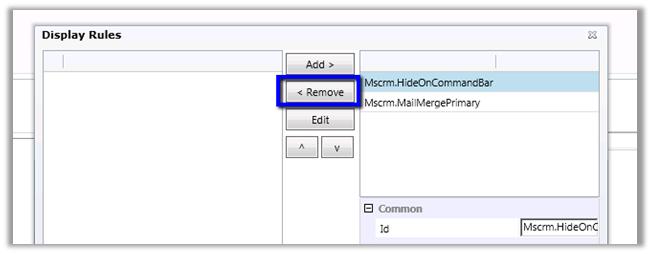
Select commands and select Edit Display Rules


Remove Mscrm.HideOnCommandBar rule

Refresh the xml generated and publish the solution.

Helpful post

http://www.develop1.net/public/post/How-to-restore-a-hidden-button-on-the-CRM-2013-Command-Bar.aspx

Hope it helps.


Hide Quick Create Form in CRM 2013.


After upgrading to CRM 2013, we wanted to hide the quick create form from the end users. This can be done through the entity customization’s Data Services section

Bye.

CRM 2013: Dude, Where’s My Radio Button?!


Nice post !

dynamicscrmgirl's avatardynamicscrmgirl

Seriously. Where have the radio buttons gone for “Two Options” type bit fields in CRM 2013?!

View original post 307 more words

Full Label not getting displayed in CRM 2013.


Recently we upgraded our CRM 2011 solution to CRM 2013.

After upgrade labels for few of the attributes were not displaying properly.

Changing the section’s width for the label area resolved this.

After publishing the change à

Helpful post :-

http://www.powerobjects.com/blog/2014/03/05/adjusting-crm-2013-field-label-sizes/

Bye.

Disabling all fields in CRM 2013


Hi,

We were using the below function in CRM 2011 for disabling all the fields in the form.

function makeAllAttributesReadOnly() {

var attributes = Xrm.Page.data.entity.attributes.get();

for (var i in attributes) {
var myattribute = Xrm.Page.data.entity.attributes.get(attributes[i].getName());
var myname = myattribute.getName();
Xrm.Page.getControl(myname).setDisabled(true);
}
}

However this function in CRM 2013 was giving us setDisabled field is undefined JavaScript error.

As it turned out it was because of the StateCode (Status) field in CRM 2013.

Modifying the above code to leave this particular field resolved the issue.

function makeAllAttributesReadOnly() {
var attributes = Xrm.Page.data.entity.attributes.get();
for (var i in attributes) {

var myattribute = Xrm.Page.data.entity.attributes.get(attributes[i].getName());
var myname = myattribute.getName();
if(myname == "statecode")
{
return;
}
Xrm.Page.getControl(myname).setDisabled(true);
}
}

Hope it helps.

Nishant Rana's Weblog

Everything related to Microsoft .NET Technology

Skip to content ↓