My Notes on Business Process Flow in CRM 2015


  • In CRM 2013 we were restricted to only those Entities that were 1: n related.
  • In CRM 2015 we can select any entity on which Business Process Flow is enabled.
  • Here test is an entity which has business process flow enabled, however it is not related to Contact record i.e. our primary entity

  • The same restriction of having only 5 entities applies to CRM 2015 also.


  • The entity relationships supported are of type 1: n only and it is optional.
  • Each process can have maximum 30 stages.
  • And each stage can have maximum 30 steps.
  • There can only be one active process at a time.
  • No closed entity loop, the entity used earlier can be referenced again.


Branching in Business Process Flows in CRM 2015


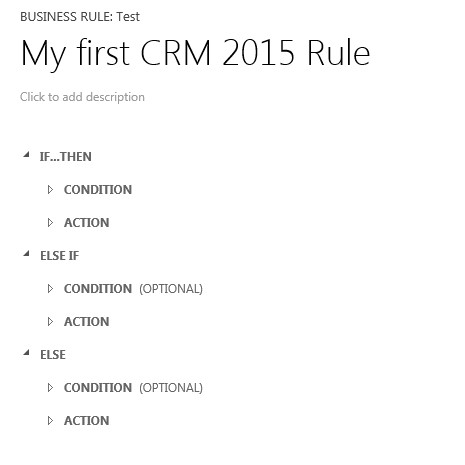
CRM 2015 now provides rule based branching support for Business Process Flow.

In CRM 2013

In CRM 2015
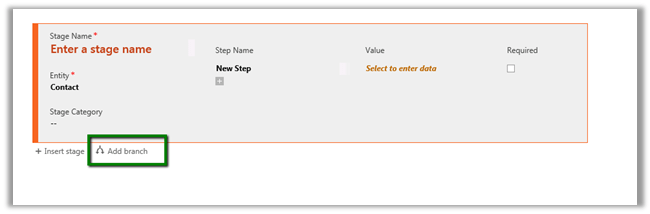
Using Add branch we can add conditions (rules)

Rule can govern the next stage in the business process flow.

For. e.g.

Based on the value specified for Address 1: Country field we can change the next Stage dynamically in the Business Process Flow.

Here if Country specified is India or China we change the Stage to “Stage Asia” and specify the Address1: Street 2 field to be mandatory.

If not then next Stage is set to “Stage ROW”, which expects value for Address 1: Street 3.

Inside the form, the next Stage changes dynamically based on value specified for country field.


We can combine multiple if and else conditions, however each branch cannot be more than 5 level deep i.e. cannot add more than 5 conditions for a particular  branch.

Hope it helps..

Fix – Hypervisor is not running


Hi,

While starting one of the Virtual Machine got the error that Hypervisor is not running.

It was running perfectly few days back so it couldn’t have been hardware issue and i hadn’t made any change in BIOS Setting.

Running the following command fixed the issue

bcdedit /set hypervisorlaunchtype auto

Followed by restart.

http://blogs.technet.com/b/gmarchetti/archive/2008/12/07/turning-hyper-v-on-and-off.aspx

Hope it helps..

Removing SharePoint Ribbon (Top Navigation) from SharePoint 2013.


Hi,

We recently had the requirement to show the SharePoint ribbon to only the Admin user.

The best possible way of implementing this using SharePoint Security Trimmed Control.

We need to wrap the div with id ms-designer-ribbon inside that control.

http://blog.crsw.com/2007/11/05/spsecuritytrimmedcontrol-conditionally-display-contents-by-security/

Hope it helps ..

Cannot retrieve the URL specified in the Content Link property. For more assistance, contact your site administrator error in SharePoint.


We were getting this error in one of our pages in SharePoint.

Just verify the Content Link it might not be pointing to correct url in the Content Editor Web Part.

Hope it helps..

{Learning} All you might need to know on CRM 2013 App for Tablets


deepeshsomani2013's avatarMSDYNAMICSBLOG BY DEEPESH

I spent last week or so discovering things on CRM 2013 tablet application and to be honest, it is pretty good. There are limitations but it is a good start for Dynamics CRM in tab and mobile market with having an out of box app.

Here are the series of blogs which pretty much sum all I could find on CRM 2013 Tablet application configuration, what can be done what cannot be done etc. For installation it is available in Google store for Android tabs, Windows store for Windows tabs and Apple store for IPAD tabs.

· Want to know how to configure multi entity search for CRM 2013 App. Here you go: Click here

· Want to know how to reconfigure IPAD app and options: Reconfigure vs Sign out for CRM 2013 App. Here you go: Click here

· Want to know Security Privileges required to access CRM 2013…

View original post 50 more words

Nishant Rana's Weblog

Everything related to Microsoft .NET Technology

Skip to content ↓