Using the Capacity page in the Power Platform Admin Center we can extract the details of size occupied by table (in MB) within a particular environment.
Login to the admin portal and navigate to Capacity
We were getting the below error while trying to set the Items property of the Gallery control and were using Filters in the formula.
“The requested operation is invalid. Server Response: Sectors failed: No function signature for the function with name ‘contains’ matches the specified arguments. The function signatures considered are: contains(Edm.String Nullable=True, Edm.String Nullable=true).”
We were sure that the formula used was correct.
After trying for a couple of minutes more, we simply saved the app, and later when we again opened the app for edit, the error was no more there.
For creating multi-table lookup we already have an XrmToolBox plugin Polymorphic Lookup Creator which we should be using ideally, but in case somebody wants to try it out, the below shared sample code can be referred.
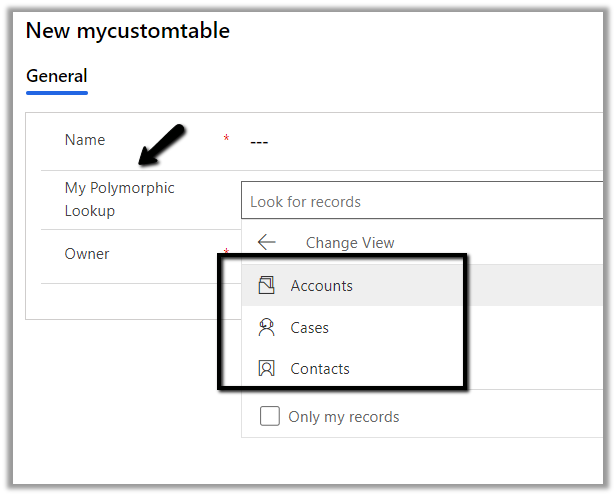
Below is our custom table named mycustomtable to which we’d add a multi-table lookup which references case, contact and account entity.
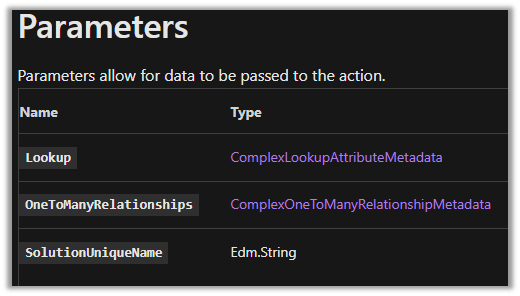
Below is the sample code to create the polymorphic lookup.
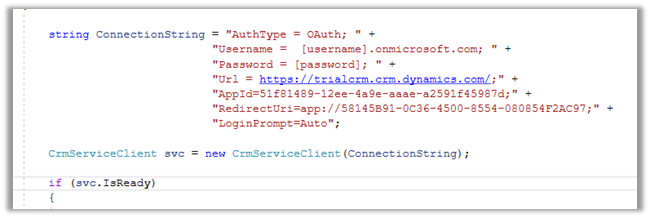
string ConnectionString = "AuthType = OAuth; " +
                  "AppId=51f81489-12ee-4a9e-aaae-a2591f45987d; " +
                  "Username=user@domain.onmicrosoft.com; " +
                  "Password=pwd; " +
                  "RedirectUri=app://58145B91-0C36-4500-8554-080854F2AC97;" +
                  "Url = https://orgname.crm4.dynamics.com/;";


 CrmServiceClient svc = new CrmServiceClient(ConnectionString);

            if (svc.IsReady)
            {
                // Create PolymorphicLookupAttribute
                // with mycustomtable custom entity / table
                // referencing case, contact and account entity
                var varOrgRequest = new OrganizationRequest();

                // specify the request name
                varOrgRequest.RequestName = "CreatePolymorphicLookupAttribute";

                // specify lookup attribute details
                varOrgRequest.Parameters["Lookup"] = new LookupAttributeMetadata()
                {
                    SchemaName = "crf82_mypolymorphiclookup",
                    DisplayName = new Label("My Polymorphic Lookup", 1033)
                };

                // referencing entity is our custom entity named my custom table
                // referenced entity is incident
                var oneToManyRelation1 = new OneToManyRelationshipMetadata();
                oneToManyRelation1.ReferencingEntity = "crf82_mycustomtable";
                oneToManyRelation1.ReferencedEntity = "incident";
                oneToManyRelation1.SchemaName = "crf82_mycustomtable_crf82_incident";

                // referencing entity is our custom entity named my custom table
                // referenced entity is contact
                var oneToManyRelation2 = new OneToManyRelationshipMetadata();
                oneToManyRelation2.ReferencingEntity = "crf82_mycustomtable";
                oneToManyRelation2.ReferencedEntity = "contact";
                oneToManyRelation2.SchemaName = "crf82_mycustomtable_crf82_contact";


                // referencing entity is our custom entity named my custom table
                // referenced entity is account
                var oneToManyRelation3 = new OneToManyRelationshipMetadata();
                oneToManyRelation3.ReferencingEntity = "crf82_mycustomtable";
                oneToManyRelation3.ReferencedEntity = "account";
                oneToManyRelation3.SchemaName = "crf82_mycustomtable_crf82_account";

                // populate OneToManyRelationships parameter of CreatePolymorphicLookupAttribute request
                varOrgRequest.Parameters["OneToManyRelationships"] = new OneToManyRelationshipMetadata[]
                {
                    oneToManyRelation1, oneToManyRelation2, oneToManyRelation3
                };

                // specify the existing solution name
                varOrgRequest.Parameters["SolutionUniqueName"] = "MySolution";

                var response = svc.Execute(varOrgRequest);
            }
The lookup à
Sample code to add a new relationship to an existing lookup.
                var createOneToManyRelationshipRequest = new CreateOneToManyRequest();

                // referencing entity is our custom entity named mycustomtable
                // referenced entity is contact - add the entity to be added
                var oneToManyRelationAdd = new OneToManyRelationshipMetadata();
                oneToManyRelationAdd.ReferencingEntity = "crf82_mycustomtable";
                oneToManyRelationAdd.ReferencedEntity = "contact";
                oneToManyRelationAdd.SchemaName = "crf82_mycustomtable_crf82_contact";

                createOneToManyRelationshipRequest.OneToManyRelationship = oneToManyRelationAdd;


                // specify lookup attribute details to which new relationship is to be added
                createOneToManyRelationshipRequest.Parameters["Lookup"] = new LookupAttributeMetadata()
                {
                    SchemaName = "crf82_mypolymorphiclookup",
                    DisplayName = new Label("My Polymorphic Lookup", 1033)
                };


                var createOneToManyRelationshipResponse = svc.Execute(createOneToManyRelationshipRequest);
Sample code to remove relationship from an existing lookup.
 var deleteRelationShip = new DeleteRelationshipRequest();
                // specify schema name of the relationship
                deleteRelationShip.Name = "crf82_mycustomtable_crf82_contact1";
                svc.Execute(deleteRelationShip);
Sample code to delete the lookup
  // User delete attribute request
                DeleteAttributeRequest varDelRequest = new DeleteAttributeRequest();

                // specify the entity name
                varDelRequest.EntityLogicalName = "crf82_mycustomtable";

                // specify the schema name of the entity
                varDelRequest.LogicalName = "crf82_mymultitablelookup";
                svc.Execute(varDelRequest);
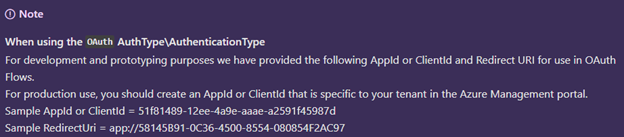
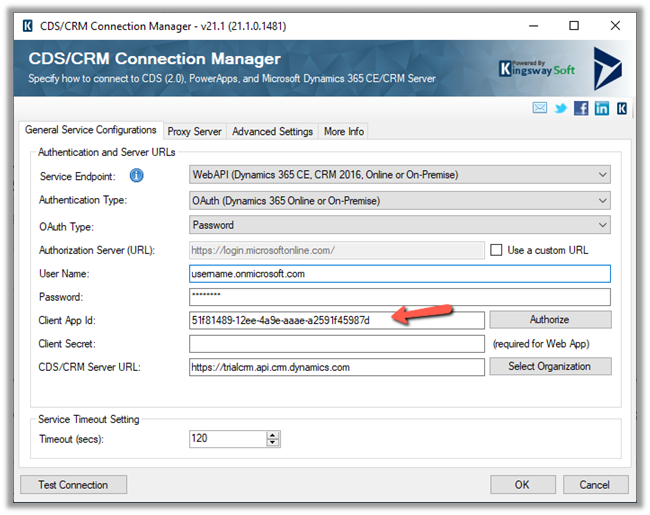
At times we want to quickly try out few things (PoC) by writing a console application or running an SSIS package etc., there we can use the sample ClientId and RedirectUri provided by Microsoft, instead of registering the application in Azure AD / creating Application User
Sample AppId or ClientId = 51f81489-12ee-4a9e-aaae-a2591f45987d




















 Nishant Rana's Weblog