Fixed- Flow not getting triggered (Callback Registration)– Power Automate / Dataverse


Recently in one of our test environments, the out the box flow – “Deserialization of Inspection Definition” wasn’t getting triggered even when it was in the On state.

This was because the “CallbackRegistrationExpanderFilter” operation was failing with the below error.

Unexpected failure during ValidateUserAccessCached. Ex: System.ServiceModel.FaultException`1[Microsoft.Xrm.Sdk.OrganizationServiceFault]: The specified user(Id) is disabled. Consider enabling this user. Additional Details: User IsDisabled=True, IsLicensed=True. ImpersonatingSystemUserId. (Fault Detail is equal to Exception details:

ErrorCode: 0x80040225

Message: The specified user(Id = xxxx-xxxx-xxxx-xxx-xxxxxx) is disabled. Consider enabling this user. Additional Details: User IsDisabled=True, IsLicensed=True. ImpersonatingSystemUserId=xxxx-xxxx-xxxx-xxx-xxxxxx)

TimeStamp: 2024-05-20T21:50:42.6724270Z

More on Callback Registration Expander Job – https://rajeevpentyala.com/2021/01/30/callback-registration-expander-system-jobs-waiting-for-resources/

This was because the flow’s corresponding Callback Registration record’s Owner was a user whose account was now disabled in CRM.

So the option to fix was to Turn off and Turn On the flow, which will delete the old callback registration record and will create a new one with the user who is turning off / on the flow. Updating the owner of the flow will not work here, as it won’t update the existing callback registration record.

Also we had another observation, if a callback registration is owned by a user who is a proper / enabled user in CRM, simply turning off and on the flow using a different user account will not delete the existing callback registration record and create a new one with that particular user as the owner. In this case we will have to explicitly delete the existing callback registration record.

Hope it helps..

Advertisements

Fixed – Resource not found for the segment action error – Power Automate / Dataverse


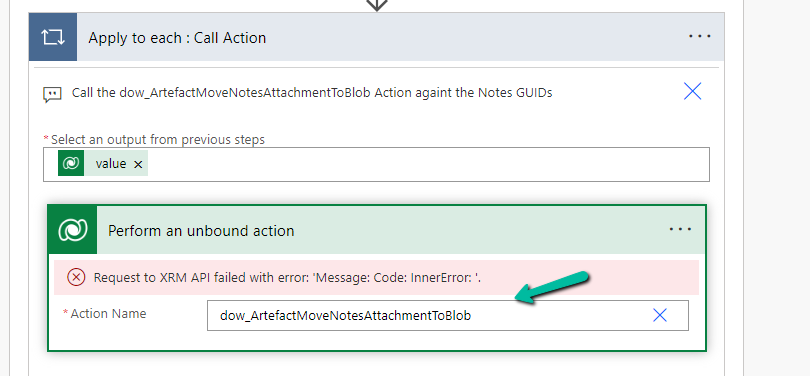
Recently we got the error for one of our flows – Resource not found for the segment ‘dow_ArtefactMoveNotesAttacmentToBlob’.

The flow was running fine with no errors a couple of days back.

On trying to edit the flow we can see it not listing the action in the Perform an unbound action step, instead giving “Request to XRM API failed with error: ‘ Message:Code:InnerError:’.

A screenshot of a computer

Description automatically generated

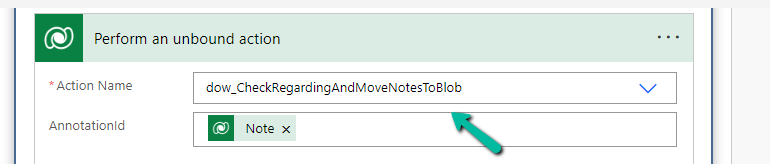
Eventually, as the error message suggests, we realized that the dev team had unregistered the action and registered a new action in its place. Updating the action to use the correct / new action fixed the issue for us.

A computer screen shot of a computer screen

Description automatically generated

The error could also show up if the action is in the disabled state.

https://community.dynamics.com/forums/thread/details/?threadid=1069c036-683b-4178-a592-6deae37002eb

https://community.dynamics.com/forums/thread/details/?threadid=1069c036-683b-4178-a592-6deae37002eb

Hope it helps..

Advertisements

Flow Error – It hasn’t been triggered successfully in the last 28 days (Power Automate / Dataverse)


For one of our flows while testing we realized it was not getting triggered.

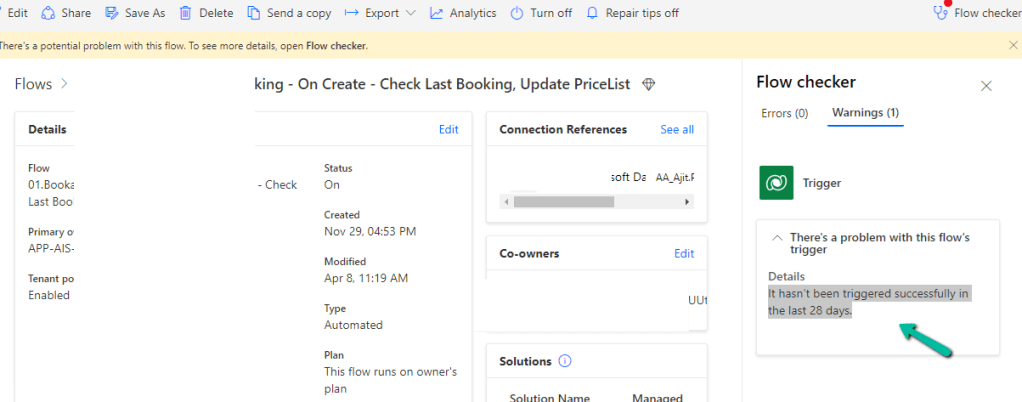
We could see it giving below error –

There’s a problem that needs to be fixed to trigger this flow – It hasn’t been triggered successfully in the last 28 days.

We tried a couple of things and I think either switching it on and off and/or updating the trigger condition and saving it temporarily seems to have fixed the issue. Either of these would have created the correct corresponding Callback registration records.

Also check – https://nishantrana.me/2023/08/08/fixed-power-automate-flow-not-getting-triggered/

https://powerusers.microsoft.com/t5/General-Power-Automate/There-s-a-problem-that-needs-to-be-fixed-to-trigger-this-flow-It/td-p/1128820

Hope it helps..

Advertisements

Use Filter Array action to remove values from an array variable – Power Automate


Suppose we have below array variable – varTestVariable having a list of GUIDs in it.

A screenshot of a computer

Description automatically generated

And we have another array variable varWorkOrderGuidToBeRemoved which has the list of GUIDs we want to remove from our first variable varTestVariable

A screenshot of a computer

Description automatically generated

For this, we can make use of the Filter array action

A screenshot of a computer

Description automatically generated

In From, first we have specified the array variable from which we want to remove the values, followed by the variable that holds the values to be removed. Next, we have specified the “does not contain” operator and finally specified the item()

We can also click on Edit in advanced mode to see or edit the expression.

We can use the Body of the Filter array action that will hold the result in subsequent actions.

A screenshot of a computer

Description automatically generated

On running the flow, we can see that the values that existed in the second array variable were removed from the first array variable.

A screenshot of a computer

Description automatically generated

Get more details – https://www.damobird365.com/efficien-union-except-and-intersect-great-method/

Hope it helps..

Advertisements

Fix the trigger – Microsoft.OData.ODataException: A binary operator with incompatible types was detected. Found operand types ‘Edm.Guid’ and ‘Edm.String’ for operator kind ‘Equal’ (Power Automate / Dataverse)


Recently in one of our flow triggers – When a row is modified (Dataverse), we got the below error

Exception parsing _msdyn_billingaccount_value eq ‘a84c5028-ecdf-ed11-a7c7-00224893b2b0’ submitted for attribute filterexpression of callback registration. Target entity: msdyn_workorder. Exception: Microsoft.OData.ODataException: A binary operator with incompatible types was detected. Found operand types ‘Edm.Guid’ and ‘Edm.String’ for operator kind ‘Equal’.

This is because we were using single quotes around the GUID value in the Filter rows property.

We need to remove the single quotes around the GUID

GUIDs are considered a primitive data type in OData and should be represented as raw values without quotes. By removing the single quotes, we’ll ensure that the GUID is treated as a valid identifier in our filter condition.

Hope it helps..

Advertisements

Versioning and Drafts for Solution-based Cloud Flows – Power Automate


We now have the version support for Cloud Flows in Power Automate.

This feature is only available in the new editor.

Let us start by creating a simple flow, the creation part will happen in the existing editor.

A screenshot of a computer

Description automatically generated

Let us save the flow, and select Edit >> Details in a new tab to open it in the new designer inside Power Automate Maker Portal

A screenshot of a computer
Description automatically generated
We can see the below different commands in the new designer

  • Version History
  • Save Draft
  • Publish

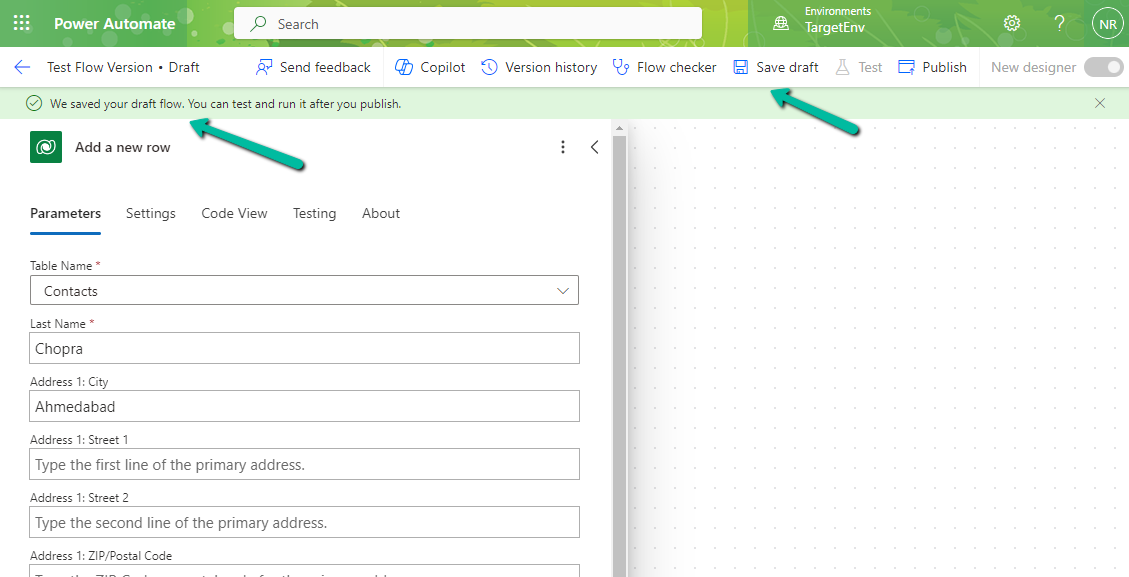
Below we have made changes to the flow and clicked on Save Draft.

Clicking on Save Draft changes the flow to Draft and shows the message “We saved your draft flow. You can test and run it after you publish

From the Version History, we can see the Latest Version, Published Version, and the Past Published version, with the option to Restore it.

A screenshot of a computer

Description automatically generated

We can save a draft of a flow even with errors now.

A screenshot of a computer

Description automatically generated

Check for more details – Draft and Versioning for Cloud Flows

Hope it helps..

Advertisements