Dynamics 365 and Office 365 in different tenants – How to consolidate !!


very insightful !!

Beth B - MCT, MCSE , MCSA, MSCP's avatarBethB-D365.com

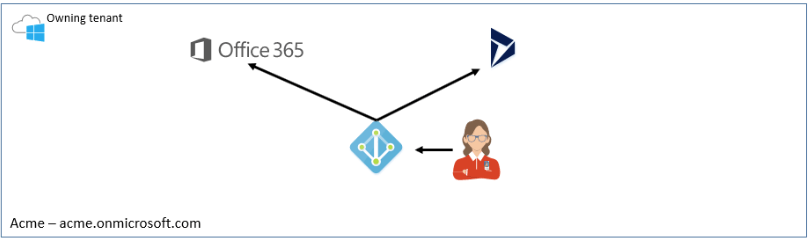
tenantWe have run into many scenarios where a company has Office 365 and then orders Dynamic 365 from a CSP (Cloud Service Provider) and their systems end up different tenants.  As Microsoft moves to the model where there can be more than one partner of record and various flavors of Dynamics 365 (Finance and Operations, Business Central, Customer Engagement, etc..),  I can see this problem getting more prevalent over time.

When your Office 365 and Dynamics 365 are in different tenants it becomes quite the challenge and inconvenience.   A few major issues are as follows

  1. Server-Side Sync – only supports single tenant.
  2. Single sign-on – need to log into two systems.
  3. Two systems to manage
    1. Users
    2. Licensing
    3. Notifications
    4. Double the security concerns
    5. Double the competencies efforts
    6. etc… 

You say, heck this is easy, let’s just move our Dynamics 365 to the other tenant.  If it were on Premise it would…

View original post 2,241 more words

Dynamics 365 Saturday – Dynamics 365 Top 20 Tips & Tricks


Awesome tips and tricks. A must read 🙂

Microsoft adds two more Dynamics 365 AI apps to its roadmap


Techie.Buzz's avatarTechie.Buzz

Microsoft is adding more AI-infused Dynamics 365 applications to its line-up. In addition toe the previously announced Dynamics 365 AI for Sales app, Microsoft also is introducing a Dynamics 365 AI for Customer Service app and a Dynamics 365 AI for Market Insights app this fall, officials said on September 18.

Link: Microsoft adds two more Dynamics 365 AI apps to its roadmap
via http://www.zdnet.com

View original post

Vote on Dynamics 365 ideas


Kurt Hatlevik's avatarKurt Hatlevik - Dynamics 365 Blog

Do you know that you can influence the direction of Dynamics 365? But you may be unsure as to whether it really will make a difference. Microsoft have a site where the community can add ideas and vote on them. Go to https://experience.dynamics.com/ideas/ and create your ideas. If the idea is valid and they get enough votes, Microsoft will act and include them in their product backlog. But equally important is the ability to vote on other’s ideas.

  • Voting is the most important way to make the community voice heard on the issues that concerns the roadmap for Dynamics 365.
  • Voting gives you an opportunity to be part of the priority that affects Dynamics 365.
  • If YOU don’t Vote Others will make the decisions for YOU!

As we speak, there are 1673 ideas for Microsoft Dynamics 365 for Finance and Operations and 212 ideas for Microsoft Dynamics 365 for Retail

View original post 159 more words

Mobile-first indexing enabled for the blog


Today I saw this message in my inbox

Below is the official announcement from Google from March 26, 2018.

https://webmasters.googleblog.com/2018/03/rolling-out-mobile-first-indexing.html

The below article nicely explains Mobile First Indexing

https://moz.com/blog/mobile-first-indexing-seo

Let us see how it impacts the number of views \ visitors in the blog.

Hope it helps..

How to – Easily map OptionSet using CRM OptionSet Mapping Editor in SSIS


Just want to share my experience of using KingswaySoft’s OptionSet Mapping Editor and how easy and efficient it makes to migrate data in Microsoft Dynamics 365 CE.

Here our SQL (OLE DB Source) was having following values for Phone Code field. Here we are doing upsert for the Contact entity.

However inside CRM, we were only maintaining or dealing with few of the values as shown below for the corresponding field.

To deal with this situation, inside SSIS Package, drag the Dynamics CRM OptionSet Mapping component.

In General page, specify the input column of the table and for target properties, specify the CRM Connection Manager, Entity and the field to which we are mapping the input to.

Here we need to explicitly define input value and option set value mapping, for each of the option set values for the field inside CRM, because the source doesn’t have the “+” appended to it i.e. unmatched values only.

Here we have defined the mapping

Now for the extra values that source have, we want it to map it to Others option set value inside CRM.

For this in Action Drop-Down select “Replace as an existing option” and in “Replace as” select the Others option set value.

If we want to create the missing input value as an option set value we can use Create Option Action

  • Set as empty will simply ignore the unmatched input values and would pass blank for them.
  • Leave it as is will not do any manipulation and will pass the input values as it is.
  • Raise an error as the name suggests will throw an exception.

Get all the details here

https://www.kingswaysoft.com/products/ssis-integration-toolkit-for-microsoft-dynamics-365/help-manual/crm/optionset-mapping

Hope it helps..

Advertisements