Dynamics CRM 2015 – Interact with the Business Process Flow controls in the form


adisys's avatarAdisys Technology Corner

With Microsoft Dynamics CRM 2015, the Xrm.Page.data.process namespace provides events, methods, and objects to interact with the business process flow data in a form.

This sample demonstrates how to switch to different stage using the new Xrm.Page.data.process methods.

Followings are the API used in the sample code:

getActiveProcess() – retrieve information about the active process

setActiveProcess()- Set different process as the active process.

getActiveStage()- retrieve information about the active stage

setActiveStage() – set a different stage as the active stage.

getActivePath() – get a collection of stages currently in the active path with methods to interact with the stages displayed in the business process flow control.

addOnStageChange(),removeOnStageChange() – add or remove event handlers for the business process flow control.

addOnStageSelected() – add a function as an event handler for the OnStageSelected event so that it will be called when a…

View original post 453 more words

CRM 2011 Parental Relationship Behaviour (the Reparent action) in Practise


James Wood's avatarWOODSWORKBLOG

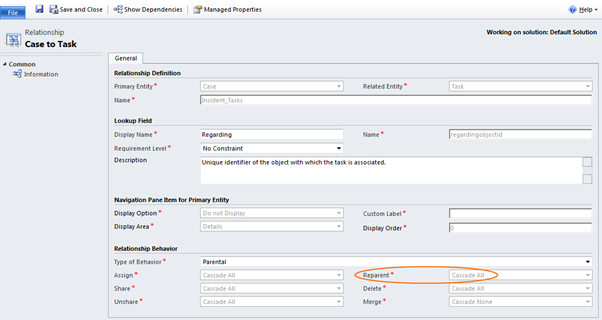
Parental relationships in Mscrm do a couple of things, in this post I’m going to focus on the reparent action.

(As a side note, reparent isn’t exclusively used in the parental behaviour, but is where it is most commonly used).

View original post 333 more words

FetchXML Formatter Tool


Arun Potti's avatarArun Potti's Power Platform blog

It is a Light weight windows application and this tool will be helpful when you are extensively working with FetchXML in Javascript / C# code to get desired result.

Functionality:

It will take FetchXML from Advance Find as an input and convert that into desired format, which can be used into Javascript / C# for further coding.

Pros:

  1. No Need to spend time for FetchXML formatting
  2. It is easy to use.
  3. Works for both Javascript and C# code

Example:

Let us take a simple example of the below FetchXML,

 <fetch version="1.0" output-format="xml-platform" mapping="logical" distinct="false">
  <entity name="contact">
    <attribute name="fullname" />
    <attribute name="telephone1" />
    <attribute name="emailaddress1" />
    <attribute name="contactid" />
    <order attribute="fullname" descending="false" />
    <filter type="and">
      <condition attribute="ownerid" operator="eq-userid" />
      <condition attribute="statecode" operator="eq" value="0" />
    </filter>
  </entity>
</fetch>

Provide this as an input to FetchXML formatter Tool, 1. Check Javascript radio…

View original post 140 more words

SSRS Extension Installation does not display SSRS Instances – CRM 2011


Rajeev Pentyala's avatarRajeev Pentyala – Technical Blog on Power Platform, Azure and AI

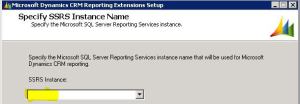
The other day to configure CRM environment, we were installing “Microsoft Dynamics CRM 2011 Reporting Extension” and to our surprise

“SSRS Instance” dropdown was blank and we could not proceed further

Reporting Extensions Setup Reporting Extensions Setup

Reason

  • We had 2 machines one with CRM application server and another with both “SQL server” & “SSRS Reporting services”
  • The reason in our case was, we were trying to install “Microsoft Dynamics CRM 2011 Reporting Extension” on the CRM application server machine

Fix

  • You must run CRM Reporting Extensions Setup on a computer that has Microsoft SQL Server 2008 Reporting Services or Microsoft SQL Server 2008 R2 Reporting Services installed

Here is the MSDN’s  CRM 2011 Reporting Extensions Installation Guide

🙂

View original post

Using Action to trigger Plugin in CRM 2013\2015


Hi,

We recently had a requirement to call Plugin on execute of an Action.

To implement this,

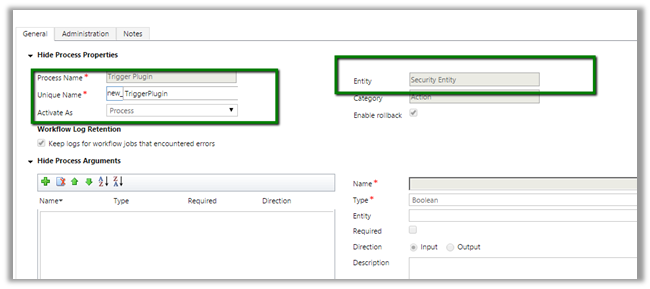
We created a blank Action named Trigger Plugin for custom entity named Security Entity.

Open Plugin Registration Tool and connect to the Org and we will have our action available there as message for our Plugin Step

We can execute our Action from C# and Jscript which in turns will call our Plugin.

C# Code:

Jscript Code:

</p>
<p>var xml = "" +<br />
"&lt;s:Envelope xmlns:s=\"http://schemas.xmlsoap.org/soap/envelope/\"&gt;&lt;s:Body&gt;&lt;Execute xmlns=\"http://schemas.microsoft.com/xrm/2011/Contracts/Services\" xmlns:i=\"http://www.w3.org/2001/XMLSchema-instance\"&gt;&lt;request xmlns:a=\"http://schemas.microsoft.com/xrm/2011/Contracts\"&gt;&lt;a:Parameters xmlns:b=\"http://schemas.datacontract.org/2004/07/System.Collections.Generic\"&gt;&lt;a:KeyValuePairOfstringanyType&gt;&lt;b:key&gt;Target&lt;/b:key&gt;&lt;b:value i:type=\"a:EntityReference\"&gt;&lt;a:Id&gt;1c54dadd-f91b-e511-a5ca-c4346bacae20&lt;/a:Id&gt;&lt;a:LogicalName&gt;tk_securityentity&lt;/a:LogicalName&gt;&lt;a:Name i:nil=\"true\"/&gt;&lt;/b:value&gt;&lt;/a:KeyValuePairOfstringanyType&gt;&lt;/a:Parameters&gt;&lt;a:RequestId i:nil=\"true\"/&gt;&lt;a:RequestName&gt;new_TriggerPlugin&lt;/a:RequestName&gt;&lt;/request&gt;&lt;/Execute&gt;&lt;/s:Body&gt;&lt;/s:Envelope&gt;" +<br />
"";</p>
<p>var xmlHttpRequest = new XMLHttpRequest();</p>
<p>xmlHttpRequest.open("POST", Xrm.Page.context.getClientUrl() +"/XRMServices/2011/Organization.svc/web", false);<br />
xmlHttpRequest.setRequestHeader("SOAPAction","http://schemas.microsoft.com/xrm/2011/Contracts/Services/IOrganizationService/Execute");<br />
xmlHttpRequest.setRequestHeader("Content-Type", "text/xml; charset=utf-8");<br />
xmlHttpRequest.setRequestHeader("Accept", "application/xml, text/xml, */*");<br />
xmlHttpRequest.setRequestHeader("Content-Length", xml.length);<br />
xmlHttpRequest.send(xml);</p>
<p>var resultXml = xmlHttpRequest.responseText;<br />
alert(resultXml);</p>
<p>

Use the SoapLogger tool to get the Soap request

https://nishantrana.me/2014/08/27/updated-soaplogger-for-crm-2013-to-generate-javascript/

Hope it helps..


Advertisements

Fixed: Action not appearing in available Message in Plugin Registration tool CRM 2013\ CRM 2015


Hi,

We created a new Action and wanted to trigger a plugin on call of the Action.

However that Action was not appearing in available messages while registering step for Plugin.

Finally got to know that in case of Online need to restart the plugin registration tool for that action to appear in message.


Simple Refresh or Reloading of the organization will not work.

Hope it helps..