Simple Bing Map HTML Web Resource to show Country location in Dynamics 365


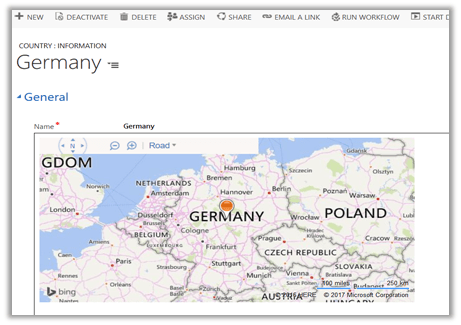
Just sharing a HTML Web resource code to show Country location inside the map using name of the country.

Source Code: –


<!DOCTYPE HTML PUBLIC "-//W3C//DTD XHTML 1.0 Transitional//EN" "http://www.w3.org/TR/xhtml1/DTD/xhtml1-transitional.dtd">
<html>
<head>
<title>My Bing Map</title>
<script charset="UTF-8" type="text/javascript" src="https://ecn.dev.virtualearth.net/mapcontrol/mapcontrol.ashx?v=7.0&s=1"></script>
<script type="text/javascript">
var map = null;

// get the bing map key https://msdn.microsoft.com/en-us/library/ff428642.aspx
var credentials = "AvYH87t36Tv3ybyYagU9HUZKjsrWO2Hcup3nu1fmNhpenHKO_xxxxx";

function GetMap() {

// countryName - name of the country from the CRM's form
var countryName = parent.Xrm.Page.getAttribute("new_name").getValue();

// calling virtual earth api
var geocodeRequest = "https://dev.virtualearth.net/REST/v1/Locations?countryRegion=" + countryName + "&key=" + credentials + "&jsonp=GeocodeCallback";

CallRestService(geocodeRequest);
}

function GeocodeCallback(result) {

if (result && result.resourceSets && result.resourceSets.length > 0 && result.resourceSets[0].resources && result.resourceSets[0].resources.length > 0) {

var coordinates = result.resourceSets[0].resources[0].point.coordinates;
var centerPoint = new Microsoft.Maps.Location(coordinates[0], coordinates[1]);

map = new Microsoft.Maps.Map(document.getElementById("mapDiv"),
{
credentials: credentials,
center: centerPoint,
mapTypeId: Microsoft.Maps.MapTypeId.road,
zoom: 5
});

var pushpin = new Microsoft.Maps.Pushpin(map.getCenter());
map.entities.push(pushpin);
}
}

function CallRestService(request) {
var script = document.createElement("script");
script.setAttribute("type", "text/javascript");
script.setAttribute("src", request);
document.body.appendChild(script);
}
</script>
</head>
<body onload="GetMap();">
<div id='mapDiv' style="position: relative; width: 600px; height: 300px;"></div>
</body>
</html>

Check this helpful post as well

https://blogs.bing.com/maps/2015/03/05/accessing-the-bing-maps-rest-services-from-various-javascript-frameworks/

Hope it helps..

Deployment Manager – To create a new organization, the wizard must remove the current organization in Dynamics 365 message.


While creating a new organization using Deployment Manager we got the below message

It was because we had entered the Workgroup Product key which restricts it to only organization.

https://technet.microsoft.com/en-us/library/hh699677.aspx

Changing the product key to the server one, allowed creating the new organizations.

Hope it helps..

2015 (not 2016) in review


Sharing Annual report of 2015.   (sad to know that there will be no annual report this year for WordPress blog – https://en.forums.wordpress.com/topic/annual-year-in-review-for-2016-for-my-blog?replies=30)

The WordPress.com stats helper monkeys prepared a 2015 annual report for this blog.

Here’s an excerpt:

The Louvre Museum has 8.5 million visitors per year. This blog was viewed about 260,000 times in 2015. If it were an exhibit at the Louvre Museum, it would take about 11 days for that many people to see it.

Click here to see the complete report.

Your Blog’s Year in Review


As there will be no Year in Review this year for our wordpress blog we can follow these great suggestions.

Plugin on Retrieve and Retrieve Multiple – How bad is it?


Nice article

salimadamon's avatarSalim Adamon - Dynamics 365 Blog

I have managed to be in the Dynamics CRM/365 world for over 7 years without having to write a single plugin on Retrieve and Retrieve Multiple. The recommendation that I give is to stay away from those. The reason is simple, it sounds horrible from a performance standpoint, and even people from Microsoft have recommended against it in many scenarios. Faced with an issue recently where we had to really consider it, I did some research and testing to try to measure the impact of such plugins on system performance. This article provides some background as to why we recommend against these types of plugins, and it also provides some of our finding after we tested for performance.

Why are Plugins on Retrieve Multiple scary?

When looking at the event execution pipeline for Dynamics CRM/365, we need to consider that there are a lot of steps involved as part of…

View original post 776 more words

Not able to register Image for Plugin in Microsoft Dynamics 365 Developer Toolkit (Public Beta 1)


Hi,

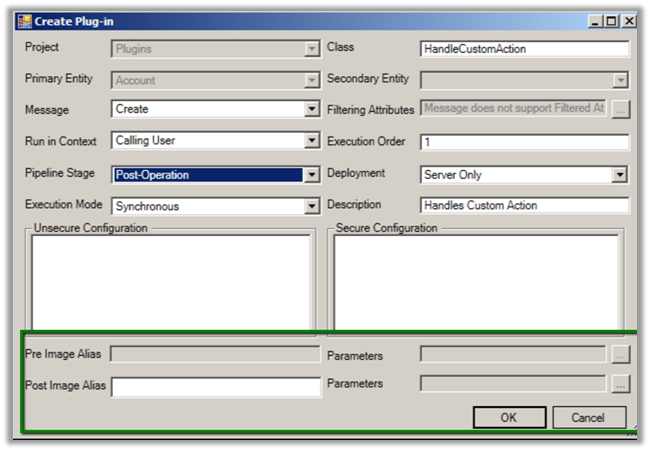
While using Developer Toolkit for Dynamics 365 we got strange issue today, the Images were not getting registered for Plugins.

In fact, in the Create New Plugin dialog box we couldn’t see the option of adding images like previous version.

Previous version –

To get more details on the new toolkit refer the below article

http://butenko.pro/2016/11/developer-toolkit-dynamics-365-public-beta-1-whats-new/

Hope it helps..