

Sharing a sample code which we can use to download the file from the File Column
Also read –
https://nishantrana.me/2021/10/01/using-file-and-image-data-type-in-dataverse-dynamics-365/
Here we would download the below file uploaded to one of the contact records.

The sample code –
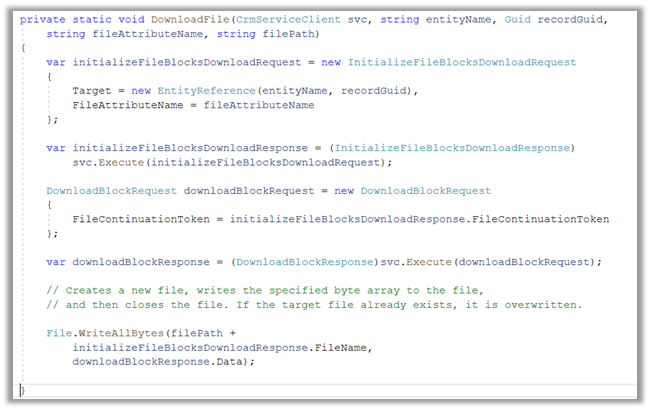
On calling the method –

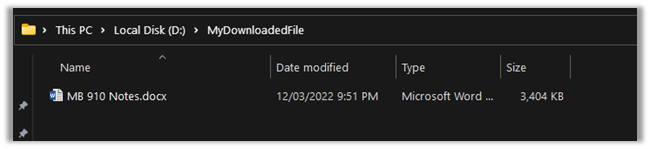
We can see the file downloaded at the location specified
Here the file transfers are limited to a maximum of 16 MB in a single call. In case of more than 16 MB, we need to divide the data into 4 MB or smaller chunks, combine or join the downloaded data to form the complete file.
Get more details – Retrieve File Data
*interestingly enough we didn't get any error while trying to download files with size more than 16 GB by using the DownloadBlockRequest
Hope it helps..
private static void DownloadFile(CrmServiceClient svc, string *interestingly enough we didn't get any error while trying to download files with size entityName, Guid recordGuid,
            string fileAttributeName, string filePath)
        {
            var initializeFileBlocksDownloadRequest = new InitializeFileBlocksDownloadRequest
            {
                Target = new EntityReference(entityName, recordGuid),
                FileAttributeName = fileAttributeName
            };

            var initializeFileBlocksDownloadResponse = (InitializeFileBlocksDownloadResponse)
                svc.Execute(initializeFileBlocksDownloadRequest);

            DownloadBlockRequest downloadBlockRequest = new DownloadBlockRequest
            {
                FileContinuationToken = initializeFileBlocksDownloadResponse.FileContinuationToken
            };

            var downloadBlockResponse = (DownloadBlockResponse)svc.Execute(downloadBlockRequest);

            // Creates a new file, writes the specified byte array to the file,
            // and then closes the file. If the target file already exists, it is overwritten.

            File.WriteAllBytes(filePath +
                initializeFileBlocksDownloadResponse.FileName,
                downloadBlockResponse.Data);

        }
Advertisements
Discover more from Nishant Rana's Weblog
Subscribe to get the latest posts sent to your email.
Share It -


 Nishant Rana's Weblog
Is it possible to use these fields types on power portal front end?
LikeLiked by 1 person
Thanks Marcel for the question. I think these are not available for the portals – https://powerusers.microsoft.com/t5/Power-Apps-Ideas/Image-file-columns-in-portals-Web-API/idi-p/884280
LikeLike
Thanks. It is amazing how Microsoft can’t provide a simple example like this. I was staring at their documentation for 30 min. Meanwhile I read your post and get it up and running in 5 minutes. U rule
LikeLiked by 1 person
Thanks for your comment and appreciation Derek !!
LikeLike
Can we preview the image/pdf file from the file data type through javascript
LikeLike
I got this error:
Downloading in multiple chunks is not supported for the files stored in the database.
How can I solve this?
LikeLike