Added support for Images for Plugin in Developer Toolkit for Dynamics 365 (CRM)


The old version of Dynamics 365 Development toolkit was not supporting registration of images, unlike previous versions of Developer Toolkit.

https://nishantrana.me/2016/12/21/not-able-to-register-image-for-plugin-in-microsoft-dynamics-365-developer-toolkit-public-beta-1/

However, in the new version of Developer Toolkit the support has been added.

https://marketplace.visualstudio.com/items?itemName=DynamicsCRMPG.MicrosoftDynamicsCRMDeveloperToolkit

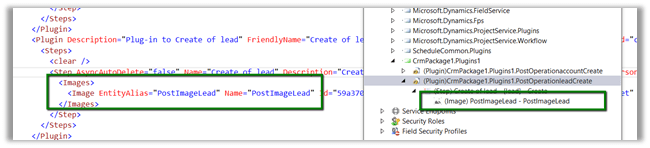
In our CRM Explorer, once we have created a plugin, we can go Plug-In assemblies option in the navigation, select our plugin’s step and can add image.

This as expected updates the RegisterFile.crmregister file as well.

Hope it helps..

Sample code to retrieve more than 5000 records using FetchXML in CRM


Hi,

Sharing a sample code to retrieve more than 5000 records using the Fetch XML.

Version 1 :

private List<Entity> GetTotalRecordsfromFetch(string fetchXML, IOrganizationService orgService)
{
List<Entity> lstEntity = new List<Entity>();

int fetchCount = 5000;
int pageNumber = 1;
string pagingCookie = null;

while (true)
{
// Build fetchXml string with the placeholders.
string xml = this.CreateXml(fetchXML, pagingCookie, pageNumber, fetchCount);
RetrieveMultipleRequest fetchRequest = new RetrieveMultipleRequest
{
Query = new FetchExpression(xml)
};

var returnCollections = ((RetrieveMultipleResponse)orgService.Execute(fetchRequest)).EntityCollection;

if (returnCollections.Entities.Count >= 1)
{
lstEntity.AddRange(returnCollections.Entities);
}

if (returnCollections.MoreRecords)
{
pageNumber++;

results.pagingCookie = returnCollections.PagingCookie;
}
else
{
// If no more records in the result nodes, exit the loop.
break;
}
}

return lstEntity;
}

public string CreateXml(string xml, string cookie, int page, int count)
{
StringReader stringReader = new StringReader(xml);
XmlTextReader reader = new XmlTextReader(stringReader);

XmlDocument doc = new XmlDocument();
doc.Load(reader);

XmlAttributeCollection attrs = doc.DocumentElement.Attributes;

if (cookie != null)
{
XmlAttribute pagingAttr = doc.CreateAttribute("paging-cookie");
pagingAttr.Value = cookie;
attrs.Append(pagingAttr);
}

XmlAttribute pageAttr = doc.CreateAttribute("page");
pageAttr.Value = System.Convert.ToString(page);
attrs.Append(pageAttr);

XmlAttribute countAttr = doc.CreateAttribute("count");
countAttr.Value = System.Convert.ToString(count);
attrs.Append(countAttr);

StringBuilder sb = new StringBuilder(1024);
StringWriter stringWriter = new StringWriter(sb);

XmlTextWriter writer = new XmlTextWriter(stringWriter);
doc.WriteTo(writer);
writer.Close();

return sb.ToString();
}

Version 2 –

private static List&lt;Entity&gt; GetTotalRecordsFetchXML(OrganizationServiceProxy orgProxy, string fetchXML)
{
XDocument xDocument = XDocument.Parse(fetchXML);
var fetchXmlEntity = xDocument.Root.Element("entity").ToString();

EntityCollection entityColl = new EntityCollection();
List&lt;Entity&gt; lstEntity = new List&lt;Entity&gt;();
int page = 1;
do
{

entityColl = orgProxy.RetrieveMultiple(new FetchExpression(
string.Format("&lt;fetch version='1.0' page='{1}' paging-cookie='{0}'&gt;" + fetchXmlEntity + "&lt;/fetch&gt;",
SecurityElement.Escape(entityColl.PagingCookie), page++)));

lstEntity.AddRange(entityColl.Entities);
}
while (entityColl.MoreRecords);

return lstEntity;
}


Hope it helps..

Advertisements

List is Locked. Cannot perform this action error while trying to remove marketing list member using RemoveMemberListRequest in Dynamics 365 (CRM)


Recently we got the below error while trying to remove the marketing list member from a marketing list.

This occurs if the marketing list is locked. The marketing list gets locked if it is Dynamic Marketing List. However, we are getting this issue on our Static marketing lists. Later we realized that those static marketing lists were created using Copy To Static ribbon button. When a Dynamic Marketing List is created the locked field value is false. However it gets set as true when we convert it to Static using Copy To Static functionality.

Changing the Locked field value as No fixed the issue.

Hope this helps..

Key not valid for use in specified state while using Configuration Manager in Dynamics 365


While trying to login in Configuration Migration (DataMigrationUtility.exe), we were getting the below error in the log file.

CM

The tool was working fine from one machine but giving an error in other. As suggested in some forum, deleting the LiveDeviceId.xml also didn’t fix the issue.

The way we got it working was to download the latest version of SDK and running the tool from there.

Missing RemoveListMembersListRequest in CRM.


In one of our recent implementations, we were working with Marketing List which could be in millions.

So we had the recent request wherein we split the marketing list into groups.

For adding members to a marketing list we have the following request

AddListMembersListRequest 

https://msdn.microsoft.com/en-us/library/microsoft.crm.sdk.messages.addlistmemberslistrequest.aspx

which is quite efficient as we can add multiple members in a single request.

However, when it comes to removing a member from marketing, we do not have a corresponding Remove request like RemoveListMembersListRequest.

https://msdn.microsoft.com/en-us/library/microsoft.crm.sdk.messages.removememberlistrequest.aspx

We only have RemoveMemberListRequest, which only removes 1 member at a time, which is highly inefficient when we are taking in consideration large number of records.

Kindly vote up for this idea !!

https://ideas.dynamics.com/ideas/dynamics-crm/ID0002529

More details

https://social.microsoft.com/Forums/en-US/5d700a43-0c57-4a47-9c8e-192c70d30a2d/removememberlistrequest-causes-sql-timeout-error?forum=crmdevelopment

Top 100 CRM Blogs and Websites for Small and Large Businesses


Happy to see my blog listed there 🙂

http://blog.feedspot.com/crm_blogs/

myBlog