What will happen on changing the password of the user account used as the Owner of Cloud Flow and for Connection – Power Automate


Recently we had to change the password of the user account being used as an owner of the cloud flows as well as the used for connection/connection reference.

So we tried it on a trial environment first, below is our flow that runs every 5 minutes and creates a contact record (Dataverse), sends an email (Office 365 Outlook), and creates a file (SharePoint) owned by the same account along with the connection reference.

Below is our cloud flow

We can see the details around Connection References and Owner. We can also see it running successfully getting triggered after every 5 minutes.

A screenshot of a computer

Description automatically generated

Now let us update the password of the account that is being used in the flow.

Interestingly after password change our Flow kept running successfully without any errors.

A screenshot of a computer

Description automatically generated

Contact records are created in the Dataverse.

Mail sent using the Send an email action.

A screenshot of a computer

Description automatically generated

Files getting uploaded using the Create file action of SharePoint.

A screenshot of a computer

Description automatically generated

Also, we see the status of the connections showing as Connected.

It could be because Power Automate might be using cached credentials for a certain period after the password change, and/or the connections that use the refresh tokens to maintain authentication, have their tokens still valid.

https://www.itaintboring.com/powerapps/why-is-that-flow-still-working-after-i-have-changed-my-password/

Here what we can do immediately after changing the password is open the connections and click on Switch Account, sign in again using that account. That will referesh the connection.

That is exactly what we did for our Prod and other environments after we updated the password and we didn’t face connection failed issues or any other error for all our exiting flows.

A screenshot of a phone

Description automatically generated

Below is an example where we didn’t refresh the connection and got the below reconnect / failure message after the password was changed.
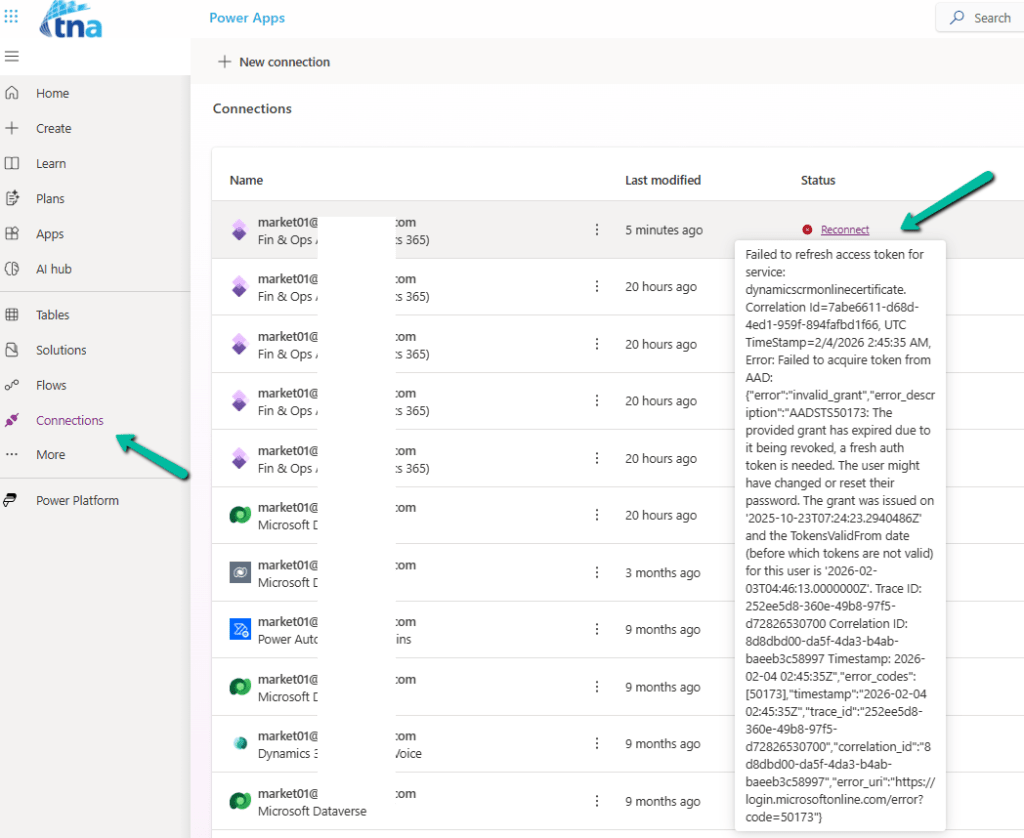
Also, check – https://sharepoint.stackexchange.com/questions/290700/what-will-happen-to-the-ms-flow-connectors-if-their-usernames-password-got-reset

Using Service Principal in Power Automate – https://benediktbergmann.eu/2022/01/04/setup-a-service-principal-in-power-automate/

https://www.dynamicpeople.nl/en/news/service-principals-power-automate/

Hope it helps..

Advertisements

Associate activities (Email) with multiple related records – Dataverse / Dynamics 365


This new feature allows associating an activity record with multiple related records or related parties.

For E.g. we might want to associate an email with multiple cases, or with case as well as account and contact records.

It is still in the public preview (April 24) and is only available for Email Activity.

To see it in action, first, we need to add the Related field of type Party List to the form.

We can see the option to add related records of type Account, Case, Contact, Knowledge Articles, Queue, and User to it.

A screenshot of a computer

Description automatically generated

Below we can see multiple records of different tables added to it.

Also, we can see the email record showing up in the timeline of the corresponding related records.

A screenshot of a computer

Description automatically generated

Check more details

Hope it helps..

New Attachment features for Email – Dataverse / Dynamics 365


We can see a few new features added to attachments for email activity as part of 2024 Release Wave 1.

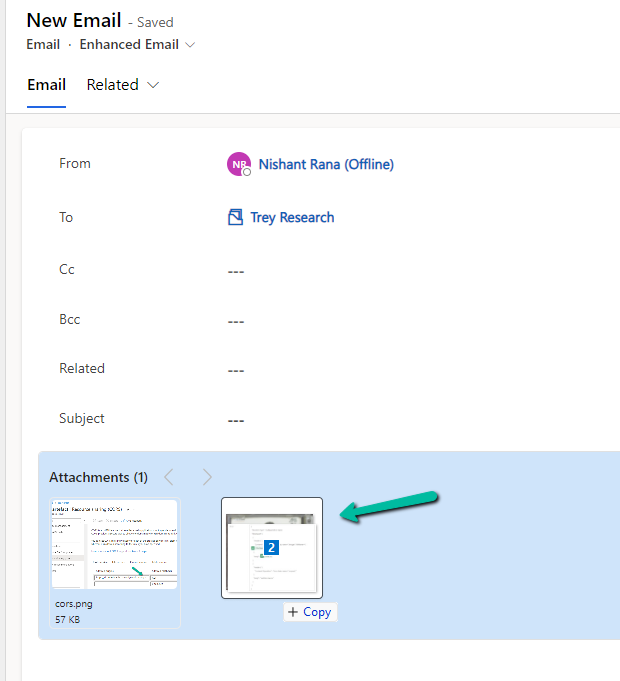
  • We can use drag and drop to add attachments.
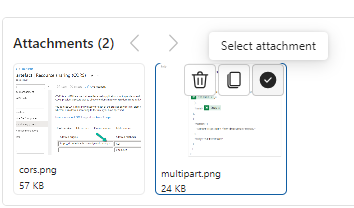
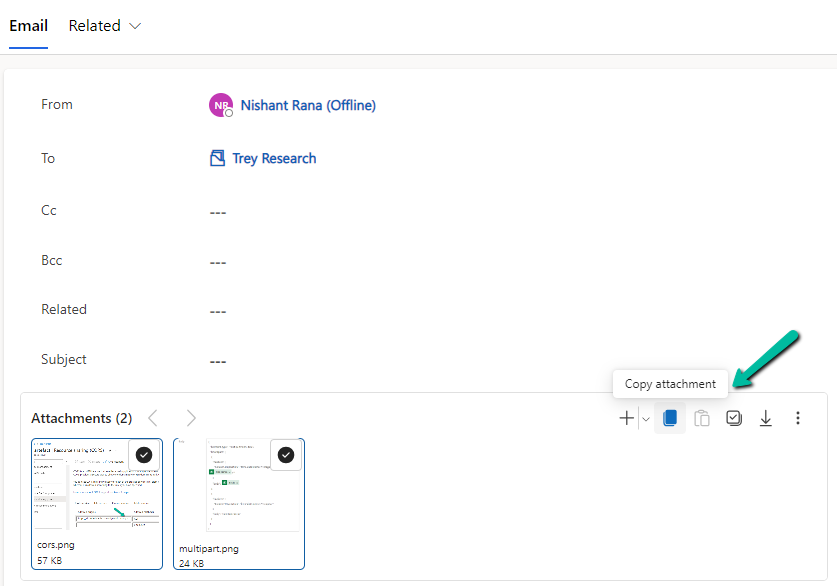
  • Select (Select All) and copy the attachment(s)
A screenshot of a computer

Description automatically generated
A screenshot of a computer

Description automatically generated
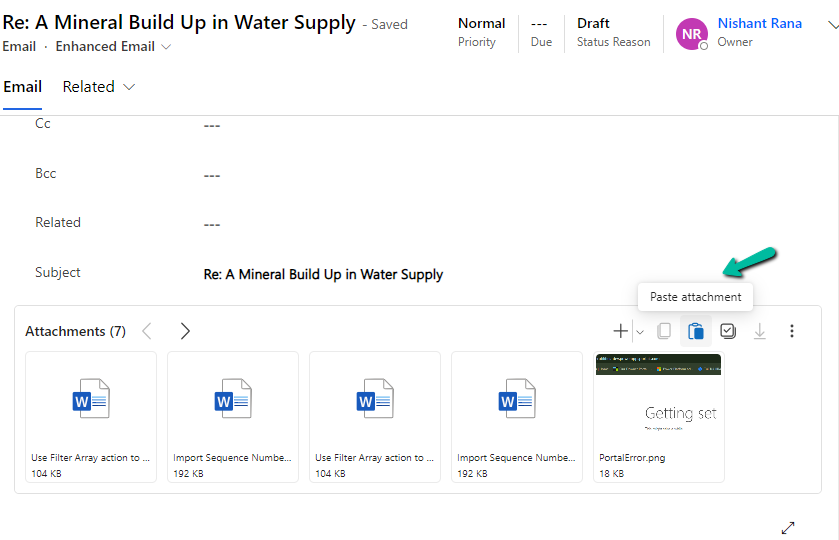
  • And can paste it to another email
A screenshot of a computer

Description automatically generated
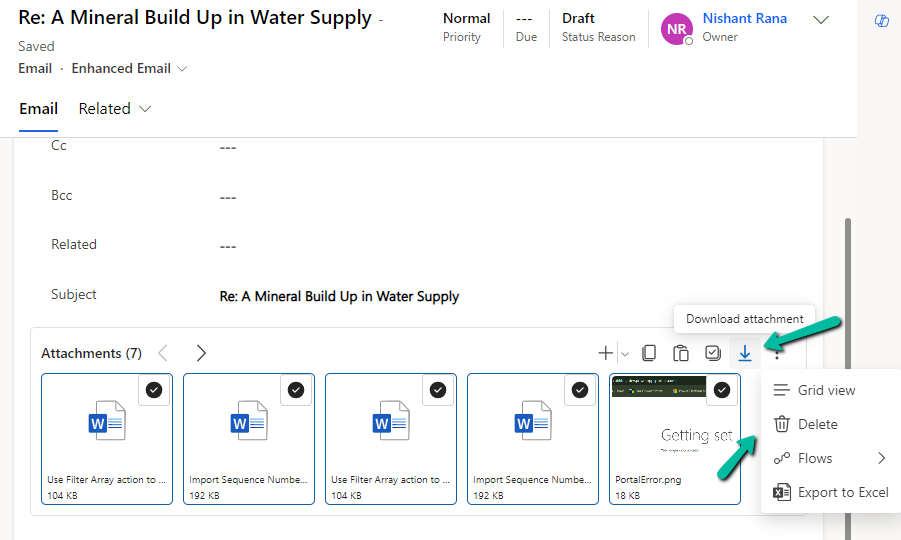
  • Bulk download and delete the attachment(s)
A screenshot of a computer

Description automatically generated
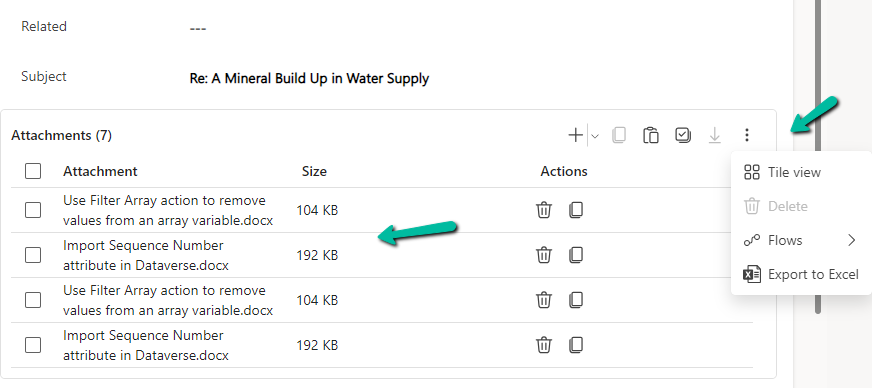
  • We can switch between Tile and Grid view which also shows the size of the attachments.
A screenshot of a computer

Description automatically generated
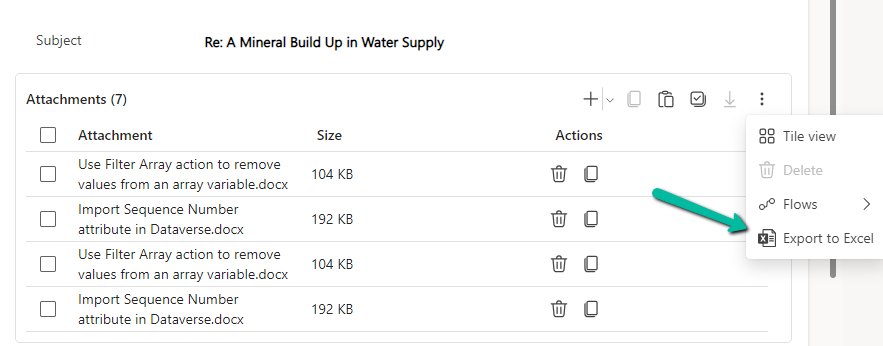
  • We can export attachments to Excel.
A screenshot of a computer

Description automatically generated
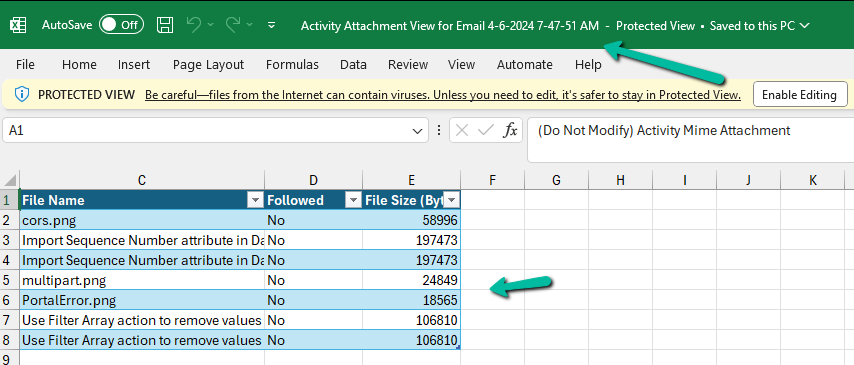
  • The exported Excel file will have the following details
A screenshot of a computer

Description automatically generated

Get all the details here

Hope it helps..

Advertisements

Fixed – The plug-in execution failed because no Sandbox Hosts are currently available. Please check that you have a Sandbox server configured and that it is running – Dataverse / Dynamics 365


Recently we were bulk updating our records, which would trigger an asynchronous plugin registered on its update. We were using the wonderful Bulk Data Updater (XrmToolBox) plugin for it. We realized if we are updating too many records at once say e.g. 100 Batch Size (total 5K records to be processed), we are getting below exception.

The plug-in execution failed because no Sandbox Hosts are currently available. Please check that you have a Sandbox server configured and that it is running.System.ServiceModel.FaultException`1[Microsoft.Xrm.Sdk.OrganizationServiceFault]: The plug-in execution failed because no Sandbox Hosts are currently available. Please check that you have a Sandbox server configured and that it is running. Microsoft.Xrm.RemotePlugin.Grpc.ExceptionHandlers.SandboxFabricHostCommunicationException: Error communicating with Sandbox Host

We than updated the Execution settings to process with a Batch Size of 5 with an interval of 60 seconds. This fixed the issue for us.

Also, check –

Hope it helps..

Fixed – Web resource method does not exist: OnLoad error in Work Order, Work Order Service task, and other forms in Dynamics 365 Field Service


Recently we started getting the below error on the form load of the Work Order Service Task record, that also only in specific environments, and there was no changes made there.

Error Details: Event Name: onload Function Name: OnLoad Web Resource Name: msdyn_/WorkOrderServiceTask/WorkOrderServiceTask.js Solution Name: msdyn_FieldService_patch_update Publisher Name: microsoftdynamics

A screenshot of a computer error

Description automatically generated

From the error message also it was clear it was the error in the out-of-the-box javascript.

On raising the Microsoft Support Ticket, we were immediately informed that it was because of a change in the function definitions in the .js files along with its associated handlers which was done to prevent object definition collisions in the web resources.

This applied to forms of the below tables

  • Work Order (msdyn_workorder)
  • Work Order Service Task (msdyn_workorderservicetask)
  • Work Order Product (msdyn_workorderproduct)
  • Work Order Service (msdyn_workorderservice)
  • Knowledge Article (knowledgearticle)

And below are the changes required to be done.

  • Work Order (msdyn_workorder)
    • Library value: msdyn_/WorkOrder/WorkOrderExperience.Library.js
      EITHER:
      • Incorrect function: onLoadLightForm
      • Correct function: WorkOrderExperience.Library.onLoadLightForm
        OR
      • Incorrect function: onLoad
      • Correct function: WorkOrderExperience.Library.onLoad


  • Work Order Service Task (msdyn_workorderservicetask)
    • Incorrect
      • Library value: msdyn_/WorkOrderServiceTask/WorkOrderServiceTask.js
      • Function value: OnLoad
    • Correct
      • Library value: msdyn_/WorkOrderServiceTask/WorkOrderServiceTaskGrid.js
      • Function value: WorkOrderServiceTaskGrid.OnLoad

  Work Order Product (msdyn_workorderproduct)

  • Library: msdyn_/WorkOrderProduct/WorkOrderProductGrid.js
    • Incorrect function: OnLoad
    • Correct function: WorkOrderProductGrid.OnLoad

  Work Order Service (msdyn_workorderservice)

  • Library: msdyn_/WorkOrderService/WorkOrderServiceGrid.js
    • Incorrect function: OnLoad
    • Correct function: WorkOrderServiceGrid.OnLoad 
  • Library: msdyn_/KnowledgeArticle/KnowledgeArticleWorkOrderRelationship.js
    • Incorrect function: OnSave
    • Correct function: KnowledgeArticleWorkOrderRelationship.OnSave

 We applied the change to the other forms also, which fixed the error for us.

Hope it helps..

Advertisements

Using Union function to remove duplicates – Power Automate / Dataverse


We recently got the below error in one of our cloud flows, the requirement was to fetch the distinct work orders that have notes with attachments associated with them.

A resource of type ‘Microsoft.Dynamics.CRM.annotation’ was found in a resource set that otherwise has entries of type Microsoft.Dynamics.CRM.msdyn_workorder’. In OData, all entries in a resource set must have a common base type.

This occurs if we try using the aggeration in the Fetch XML queries in the List rows action.

The solution was to rewrite the fetch xml query without using aggregation.

And then next if we want to get the distinct values, we can use the Union function for that.

Here,

we are first adding the GUIDs to the varLstWorkOrderGUID array variable using Append to array variable action

And then applying the Union function – to remove the duplicate from the array.

union(variables(‘varLstWorkOrderGUID’), variables(‘varLstWorkOrderGUID’))

The result –

More on Fetch XML Query

Hope it helps..

Advertisements