Business Hours in Service Level Agreements (SLA) in CRM 2013


Hi,

Was looking into how the business hours works in SLA.

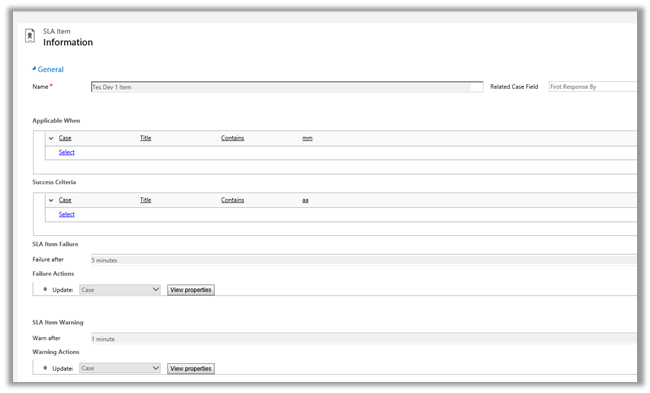
For this we a created new SLA record on CreatedOn field and which will update one of the fields on warning after one minute and some other field on failure after waiting for 5 minute.

And Applicable When -> when the Title field of Case contains “mm” text in it.


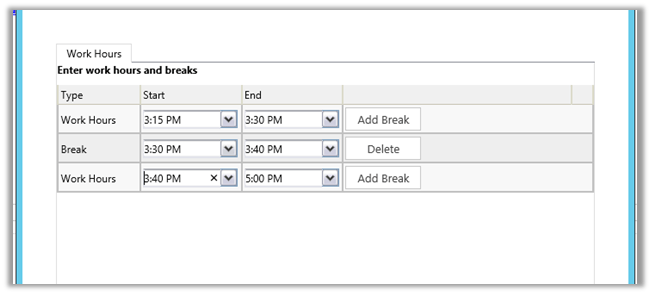
Following was the schedule

We created case record that satisfies the above condition at 3:28 P.M.

It updated one field on warning after one minute and then on 3:30 it went into wait condition and then resumed at 3:40 and showed failure at 3:43 as expected (i.e. total 5 minutes).

So it did consider the Break specified and on resuming ran for the remaining 3 minutes.

Hope it helps..


Fixed – Unhandled Exception: Microsoft.Crm.CrmException: Cannot create a lookup without the required parameters in CRM 2013


Hi,

Got this error in one of the steps in the Action. It was updating one of the lookup field using Update step.

The issue was that the lookup field was not in the form. Adding that particular field in the form back resolved the issue.

Hope this helps..


Using CreateMultiEntityAssociation method of CRMServiceClient for 1: n records.


Hi,

CreateMultiEntityAssociation method of CrmServiceclient can be used for associating 1 : n records i.e. if we have one contact record that we want to associate with multiple opportunity record ( 1-n) then we can use that method. This way we wont have to update each individual record.

http://msdn.microsoft.com/en-us/library/microsoft.xrm.tooling.connector.crmserviceclient.createmultientityassociation.aspx

Sample Code


Uri organizationUri = new Uri("http://server/crmrog/XRMServices/2011/Organization.svc");
Uri homeRealmUri = null;
ClientCredentials credentials = new ClientCredentials();
credentials.Windows.ClientCredential = System.Net.CredentialCache.DefaultCredentials;
OrganizationServiceProxy orgProxy = new OrganizationServiceProxy(organizationUri, homeRealmUri, credentials, null);

CrmServiceClient crmServiceClient = new CrmServiceClient(orgProxy);
List<Guid> lstOpportunityGuid = new List<Guid>();
lstOpportunityGuid.Add(new Guid("9DDCE989-0738-E411-9878-00155D56FF56"));
lstOpportunityGuid.Add(new Guid("019E1598-0738-E411-9878-00155D56FF56"));
lstOpportunityGuid.Add(new Guid("EA393A91-0738-E411-9878-00155D56FF56"));
crmServiceClient.CreateMultiEntityAssociation("contact", new Guid("CF1FC3C0-0738-E411-9878-00155D56FF56"), "opportunity", lstOpportunityGuid, "opportunity_customer_contacts");

Hope it helps ..

Calling a Windows Authenticated WCF Service in a Plugin in CRM


Hi,

Suppose we need to call the service created here in our plugin

https://nishantrana.me/2014/09/05/configure-a-wcf-service-for-windows-authentication/

As plugin don’t have configuration file, we need to specify binding information in Code.

The sample code to call the WCF Service by passing Network Credentials


private static void CallWCFService()
{
BasicHttpBinding binding = new BasicHttpBinding();
binding.Security.Mode = BasicHttpSecurityMode.TransportCredentialOnly;
binding.Security.Transport.ClientCredentialType = HttpClientCredentialType.Windows;

// Specify the endpointAddress
EndpointAddress endpointAddress = new EndpointAddress(new Uri("http://servername:port/Service1.svc"));

ServiceReference1.Service1Client client = new ServiceReference1.Service1Client(binding, endpointAddress);
if (client.ChannelFactory.Credentials != null)
client.ChannelFactory.Credentials.Windows.ClientCredential = new System.Net.NetworkCredential("username", "password", "domain");
if (client.ClientCredentials != null)
client.ClientCredentials.Windows.AllowedImpersonationLevel = System.Security.Principal.TokenImpersonationLevel.Delegation;
MessageBox.Show(client.GetData(1));
}

Hope it helps ..


Updated SOAPLogger for CRM 2013 to generate JavaScript


Hi,

We have tool called SOAPLogger (..\SDK\SampleCode\CS\Client\SOAPLogger\) that generates Soap request and response based on the C# code.

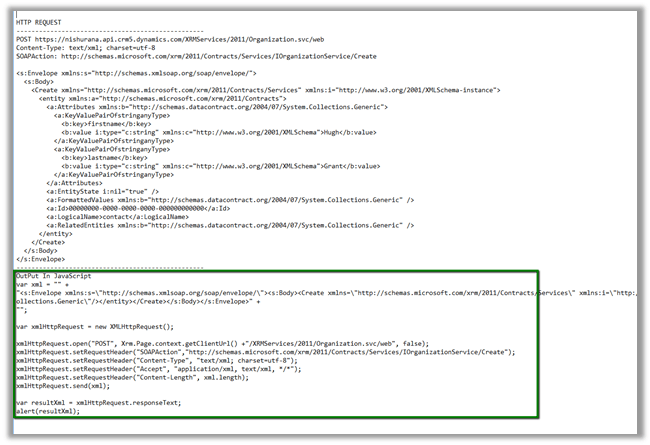
I have updated the tool to generate JavaScript that neatly wraps the Soap Request.

The output.txt and JavaScript code generated by the tool

Download the tool (convert .doc to .zip format)

https://nishantrana.me/wp-content/uploads/2014/08/soaplogger.doc


Hope it helps..

Microsoft Fakes and LINQ (Custom Workflow Activity) in CRM


Hi,

Just sharing a sample code to test a custom workflow activity using Microsoft Fakes.

The custom workflow activity uses LINQ.

The custom workflow activity code


public sealed class MyCustomWorkflowActivity : CodeActivity
{
#region Public Properties

[Input("Stage Name")]
public InArgument<string> StageName { get; set; }

#endregion

#region Methods

/// <summary>
/// Executes the workflow activity.
/// </summary>
/// <param name="executionContext">
/// The execution context.
/// </param>
protected override void Execute(CodeActivityContext executionContext)
{
// Create the tracing service
var tracingService = executionContext.GetExtension<ITracingService>();

// Create the context
var context = executionContext.GetExtension<IWorkflowContext>();

var serviceFactory = executionContext.GetExtension<IOrganizationServiceFactory>();

IOrganizationService service = serviceFactory.CreateOrganizationService(context.UserId);

try
{
using (var xrmServiceContext = new XrmServiceContext(service))
{
// get the business process workflow id
var workflow = (from w in xrmServiceContext.WorkflowSet
where w.Name == "Business Process Workflow Name"
select new Workflow { WorkflowId = w.WorkflowId }).FirstOrDefault();

if (workflow != null)
{
// get the stage name from the context's input parameter
var stageName = this.StageName.Get<string>(executionContext);
var stage = (from s in xrmServiceContext.ProcessStageSet
where s.StageName == stageName && s.ProcessId.Id == workflow.WorkflowId
select new ProcessStage { ProcessStageId = s.ProcessStageId }).FirstOrDefault();

if (stage != null)
{
// update the sales state in the case record to which the above business process flow is associated
var incident = new Incident
{
Id = context.PrimaryEntityId,
StageId = stage.ProcessStageId
};
service.Update(incident);
}
}
}
}
catch (FaultException<OrganizationServiceFault> e)
{
tracingService.Trace("Exception: {0}", e.ToString());
throw;
}

}

Unit Test Code


public void UnitTestCustomWorkflowActivity()
{

var workflowUserId = Guid.NewGuid();
var workflowCorrelationId = Guid.NewGuid();
var workflowInitiatingUserId = Guid.NewGuid();

var service = new Microsoft.Xrm.Sdk.Fakes.StubIOrganizationService();

var workflowContext = new Microsoft.Xrm.Sdk.Workflow.Fakes.StubIWorkflowContext();
workflowContext.UserIdGet = () =>
{
return workflowUserId;
};
workflowContext.CorrelationIdGet = () =>
{
return workflowCorrelationId;
};
workflowContext.InitiatingUserIdGet = () =>
{
return workflowInitiatingUserId;
};

// ITracingService
var tracingService = new Microsoft.Xrm.Sdk.Fakes.StubITracingService();
tracingService.TraceStringObjectArray = (f, o) =>
{
Debug.WriteLine(f, o);
};

// IOrganizationServiceFactory
var factory = new Microsoft.Xrm.Sdk.Fakes.StubIOrganizationServiceFactory();
factory.CreateOrganizationServiceNullableOfGuid = id =>
{
return service;
};

SetBpfStage target = new SetBpfStage();

var wfEntity = new Workflow();
wfEntity.Id = Guid.NewGuid();
wfEntity["name"] = "abcabcabc";
var wfEntity1 = new Workflow();
wfEntity1.Id = Guid.NewGuid();
wfEntity1["name"] = "abcabcabc";

var processStageEntity = new ProcessStage();
processStageEntity.Id = Guid.NewGuid();
processStageEntity["name"] = "abcabcabc";
service.ExecuteOrganizationRequest = r =>
{
RetrieveMultipleResponse response = null;
if (((Microsoft.Xrm.Sdk.Query.QueryExpression)((RetrieveMultipleRequest)r).Query).EntityName
== "workflow")
{
List<Entity> entities = new List<Entity> { wfEntity };

response = new RetrieveMultipleResponse
{
Results =
new ParameterCollection
{
{
"EntityCollection",
new EntityCollection
(entities)
}
}
};

return response;
}

if (((Microsoft.Xrm.Sdk.Query.QueryExpression)((RetrieveMultipleRequest)r).Query).EntityName
== "processstage")
{

List<Entity> entities = new List<Entity> { processStageEntity };

response = new RetrieveMultipleResponse
{
Results =
new ParameterCollection
{
{
"EntityCollection",
new EntityCollection
(entities)
}
}
};

return response;
}

return response;
};

service.UpdateEntity = (p) =>
{
};

var invoker = new WorkflowInvoker(target);
invoker.Extensions.Add<ITracingService>(() => tracingService);
invoker.Extensions.Add<IWorkflowContext>(() => workflowContext);
invoker.Extensions.Add<IOrganizationServiceFactory>(() => factory);

var inputs = new Dictionary<string, object>
{
{ "StageName", "New" }
};

invoker.Invoke(inputs);
}

Hope it helps..