Got this error while trying to edit user profile

There was no Managed Metadata Service Application configured.
Configuring it as mentioned in the post fixed the issue

Hope it helps..
Got this error while trying to edit user profile

There was no Managed Metadata Service Application configured.
Configuring it as mentioned in the post fixed the issue

Hope it helps..
After importing one of the solution was getting the below error in one of the processes

The solution was to find out the Currency field and set it to the currency that existed in our organization.

Hope it helps..
Query execution time of 60 seconds exceeded the threshold of 10 seconds warning in CRM 2013.
We were getting the below warning in one of our test environment

On analyzing figured out that one of the plugin was using retrieve with ColumnSet(true) option i.e. retrieving all the columns of the entity which was not required in this case.
Fetching only the required columns fixed the warning.
The other option could have been indexing or increate the value for LongQueryThersholdInSeconds column in ServerSetingProperties table of MSCRM_Config.
Helpful posts
Hope it helps..
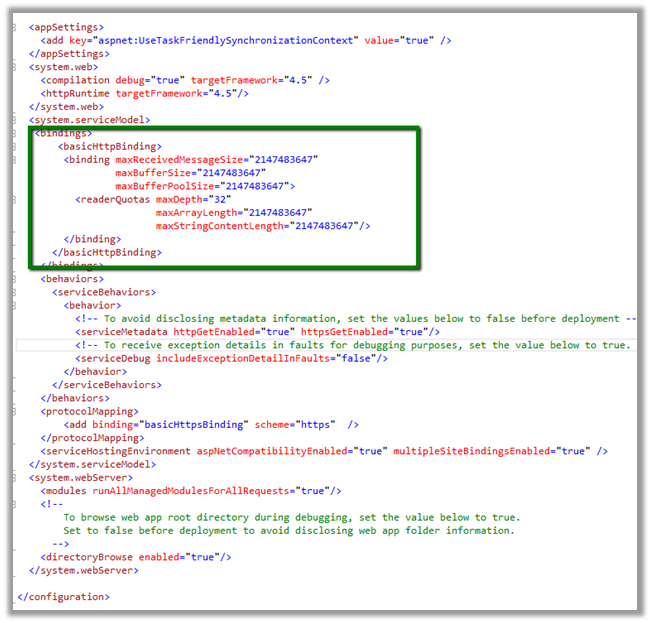
Got below error while uploading document to SharePoint folder.

Following PowerShell script can be used to increase the limit.
$ws = [Microsoft.SharePoint.Administration.SPWebService]::ContentService
$ws.ClientRequestServiceSettings.MaxReceivedMessageSize = 5242880
$ws.ClientRequestServiceSettings.MaxParseMessageSize = 5242880
$ws.Update()
https://msdn.microsoft.com/en-us/library/office/ff599489%28v=office.14%29.aspx
Hope it helps !
Open the System User and assign the license for Exchange Online


Open the system user record and click on Open Mailbox to open user’s mail box.

Set Server Profile as Microsoft Exchange Profile and Server Side Synchronization or Email Router option for Incoming and Outgoing email.

Followed by
Approve Email command.
Followed by
Test and Enable Mailbox command
On successful configuration all the warnings will be gone

Go to Settings à Email Configuration
Click on Email Server Profiles
Select and open the already existing Email Server Profile i.e. Microsoft Exchange Profile.


Open Mailboxes and select Test and Enable Mailboxes to test the mail boxes of the user.

Create an email activity and send.

Open Outlook to verify.

Hope it helps..
Hi,
To fire a plugin when an incident is resolved we need to register the plugin in
Close message for the incident entity.
And in the input parameters of the context we need to check for IncidentResolution.
This entity is a special entity that holds the information about the incident record that is being closed.
The sample plugin below gets the actual end attribute value of IncidentResolution and subtracts created on attribute value of Incident to get the duration and updates the duration (custom field) in the case being resolved.
public void Execute(IServiceProvider serviceProvider)
{
// Obtain the execution context from the service provider.
IPluginExecutionContext context = (IPluginExecutionContext)
serviceProvider.GetService(typeof(IPluginExecutionContext));
if (context.InputParameters.Contains("IncidentResolution"))
{
Entity incidentResolution = (Entity)context.InputParameters["IncidentResolution"];
Guid relatedIncidentGuid = ((EntityReference)incidentResolution.Attributes["incidentid"]).Id;
DateTime actualEnd = DateTime.Now;
if (incidentResolution.Contains("actualend"))
{
actualEnd = (DateTime)incidentResolution.Attributes["actualend"];
}
// Obtain the organization service reference.
IOrganizationServiceFactory serviceFactory = (IOrganizationServiceFactory)serviceProvider.GetService(typeof(IOrganizationServiceFactory));
IOrganizationService service = serviceFactory.CreateOrganizationService(context.UserId);
// Get created on of incident
Entity retrievedIncident = service.Retrieve("incident", relatedIncidentGuid, new ColumnSet(true));
DateTime createdOn = (DateTime)retrievedIncident.Attributes["createdon"];
TimeSpan totalTimeSpent = actualEnd.Subtract(createdOn);
Entity incident = new Entity("incident");
incident.Id = relatedIncidentGuid;
incident.Attributes["new_duration"] = totalTimeSpent.TotalMinutes;
service.Update(incident);
}
}
The helpful post
http://varghesedanny.com/2011/02/24/plug-in-when-case-incident-is-closed/