SandboxFault.ThrowIfGuidEmpty: entityId in CRM 2015.


Hi,

We had one of our Plugins registered in RetrieveMultiple of an entity. And one of the JavaScript was using FetchXML to retrieve that particular entity records. This JavaScript was throwing the following exception

Putting the Guid.Empty check for the OutputParameter EntityCollection fixed the issue.

Hope it helps..

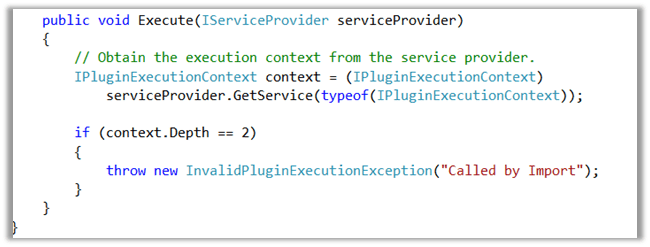
“The content of the import file is not valid. You must select a text file” – Error on Solution Import in CRM 2015 (and earlier)


Hi,

We got this issue while importing (managed) solution from dev to test organization. We had recently deleted one of our existing 1 – n relationship and had created a new n – n relationship between those entities. The issue was that the new relationship had exactly the same schema name as the old relationship which we deleted.

The solution was to delete the newly created n – n relationship in Dev and create a new one with different schema name. After this change we were able to import the solution successfully.

Hope it helps..

Cannot read property ‘raw’ of undefined error message in CRM 2015 (Update 1.2)


Hi,

After our CRM 2015 Online instance was updated with Update 1.2 https://support.microsoft.com/en-us/kb/3141809 , we started getting weird issues around Boolean fields.

In our existing records having Boolean fields which has no value in it, we started getting the following Jscript error.

<Message>inline control initialization failed for control : tk_sharingrefreshed : with controlMode : normal : and exception details :

Cannot read property ‘raw’ of undefined</Message>


The only way we got it fixed is by changing the format of the field from Two Radio Buttons to either List or Check Box in the form.

Hope it helps ..

Sample code to close a quote as won using WinQuoteRequest in CRM 2016 (and earlier)


Just sharing a sample code to close quote as won through C#


WinQuoteRequest winQuoteRequest = new WinQuoteRequest();
Entity quoteClose = new Entity("quoteclose");
quoteClose.Attributes["quoteid"] = new EntityReference("quote", new Guid("015816C2-2F10-E611-8112-3863BB353ED0"));
quoteClose.Attributes["subject"] = "Quote Close" + DateTime.Now.ToString();
winQuoteRequest.QuoteClose = quoteClose;
winQuoteRequest.Status = new OptionSetValue(-1);
organizationProxy.Execute(winQuoteRequest);

Hope it helps..

Using Rollup fields with Account Hierarchy in CRM 2015.


We recently had a requirement wherein we had one custom entity Financial Detail associated to Account as many to one relationship.

i.e. One account record can have multiple Financial Details records associated.

We had this field Total (currency) in Financial Detail entity of type currency.

The requirement was to have sum of Total of all related Financial Details records of the Account record plus of any Sub Accounts (child accounts up to n level).

It would have been painful if we had to implement the same using Plugin.

This we can achieve easily using Rollup Field in Account

Below is the definition of the Roll up field named Total Rollup

  • Set Hierarchy as Yes.
  • Select Financial Details as the related entity.
  • Filter based only Active records.
  • In Aggregation specify Sum of Total (currency field in Financial Details record).


Hope it helps.

Writing Scripts for SubGrids with CRM 2015 Update 1


anilambadan's avatarcrmcooking

With the release of CRM 2015 Update 1 we can write supported scripts to get information from the subgrids.

Before CRM Online 2015 Update 1 the only unique method for the subgrid control was refresh.

As an Xrm.Page.ui control, GridControl also has all the standard control methods: getControlType, Label methods, getParent,Visible methods, setFocus, and Notification methods as well as refresh

OnLoad event

Add event handlers to this event to run every time the subgrid refreshes. This includes when users sort the values by clicking the column headings. Use the GridControl.addOnLoad and GridControl.removeOnLoad methods to manage event handlers, usually in the form Onload event.

Example :

Xrm.Page.getControl("Contacts").addOnLoad(<functionname>);

getEntityName

Use this method to get the logical name of the entity data displayed in the grid.

getGrid

Use this method to get access to the Grid available in the GridControl.

getViewSelector

Returns the

View original post 203 more words

Nishant Rana's Weblog

Everything related to Microsoft .NET Technology

Skip to content ↓