FluentValidation – build strongly-typed validation rules in .NET


Install the FluentValidation .NET library for validation.

Below is our sample Contact class and its corresponding validator class.

The validator class needs to inherit AbstractValidator<Contact> and define the validation rules in the constructor using the RuleFor method.

Instantiate the validator class, and pass the object to be validated.

Here we have passed incorrect values for all the properties of the contact.

The ValidationResult holds all the validation error details.

Give it a try – https://docs.fluentvalidation.net/en/latest/index.html

Hope it helps..

using FluentValidation;
using FluentValidation.Results;
using System;
using System.Collections.Generic;
using System.Linq;
using System.Text;
using System.Threading.Tasks;

namespace FluentValidator
{
    class Program
    {
        static void Main(string[] args)
        {
            var myContact = new Contact();
            var contactValidator = new ContactValidator();

            myContact.FirstName = "";
            myContact.LastName = "Lei";
            myContact.Email = "aa.gcom";
            myContact.Age = 10;
            myContact.FamilyStatusCode = (FamilyStatusCode)Enum.Parse(typeof(FamilyStatusCode),"5");

            ValidationResult result = contactValidator.Validate(myContact);
        }
    }

    class Contact
    {
        public string FirstName { get; set; }
        public string LastName { get; set; }
        public string Email { get; set; }
        public int Age { get; set; }
        public FamilyStatusCode FamilyStatusCode { get; set; }
    }

    enum FamilyStatusCode
    {
        Single = 1,
        Married = 2,
        Divorced = 3,
        Widowed = 4
    }

    class ContactValidator : AbstractValidator<Contact>
    {
       public ContactValidator()
        {
            // First Name should not be null
            RuleFor(contact => contact.FirstName).NotEmpty();
            // Last Name should not be null and minimum length should be 4
            RuleFor(contact => contact.LastName).NotNull().MinimumLength(4);
            // Email Address Validation
            RuleFor(contact => contact.Email).EmailAddress();
            // Age should be between 18 to 60
            RuleFor(contact => contact.Age).ExclusiveBetween(18, 60);
            // Family Status Code Enum should be a valid value
            RuleFor(contact => contact.FamilyStatusCode).IsInEnum();

        }
    }
}
Advertisements


How to – Extract attachments from Notes in Dynamics 365 / Dataverse


There are different ways we can extract attachments from notes.

  • We can write an SSIS Package using the Premium Derived Column component of KingswaySoft

https://nishantrana.me/2020/11/09/extract-attachment-from-notes-in-dynamics-365-ce-cds-ssis-kingswaysoft/

  • XrmToolBox has a wonderful plugin – Bulk Attachment Manager

https://www.livingintech.com/2018/02/xrmtoolbox-bulk-attachment-manager.html

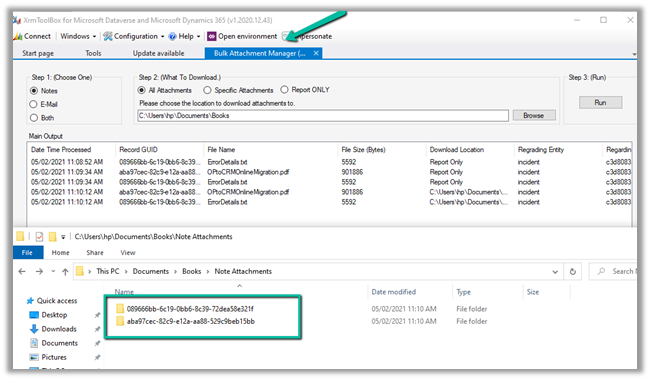
The tool can download attachments from both Note and Email, using note’s GUID as the folder name.

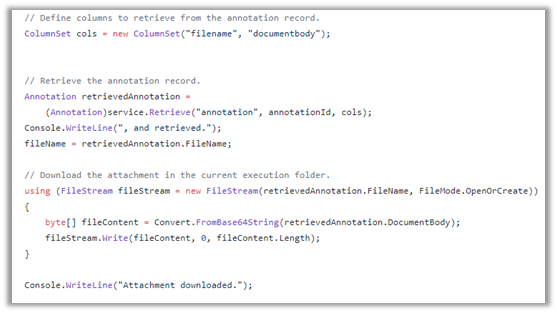
  • We can use SDK and write console app or tool.

https://github.com/microsoft/PowerApps-Samples/blob/master/cds/orgsvc/C%23/URDAttachment/URDAttachment/SampleProgram.cs

https://www.c-sharpcorner.com/article/downloading-notes-attachments-using-paginghis-artcile/

Or use the CRM SDK within the script component of SSIS if we are not using KingswaySoft’s CDS Component.

https://nishantrana.me/2020/10/19/connect-to-dynamics-365-through-script-component-ssis/

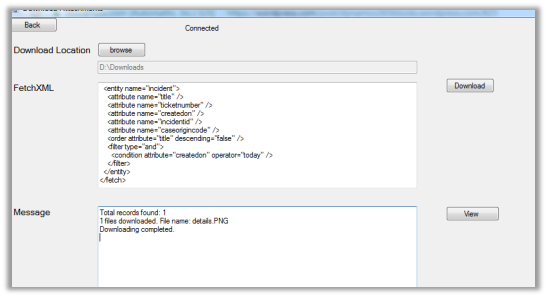
  • Attachment Downloader Tool

https://vishalgrade.com/2018/01/22/ms-crm-attachment-downloader/

https://github.com/vgrade/MSCRMAttachmentDownloader

We can update the tool as per our requirement.

  • Use LINQPad for extracting attachment

https://dreamingincrm.com/2018/01/18/export-all-attachments-using-linqpad/

Hope it helps..

Advertisements

JWT – JSON Web Token – Introduction


As we know, HTTP is a stateless protocol where each request is treated as an independent request. For rendering static web page, this could still be fine, but what if the web application needs to track a user across multiple requests.That is where Session and state management came to the picture. The server will authenticate the user and if it’s a valid request, the server will save the session id and return the same to the client. The client can pass this session-id for any subsequent request. The server will check for the session id and will process the request for the client.

With server-side session management, scalability can be a challenge, say we have a load-balanced scenario, the user sends a session id in the request which goes to a different server which knows nothing about the session causing failure. Now we can always save the session id in the database which will bring its overhead.

This is where JWT – JSON Web Token comes to rescue that comply with the stateless nature of the HTTP.

JSON is an open standard RFC 7519, that defines a compact and self-contained method for securely transferring information between parties.

The format of JSON Web Token

header.payload.signature

payload is the part of transmitted data that is the actual intended message in computing.

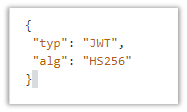
The header will typically contain

  • typ – the type of media, JWT in this case.
  • alg – the algorithm used for signing and/or decryption the JWT

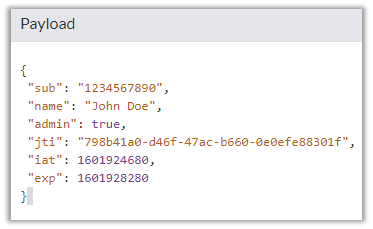
The payload contains information about the client or set of claims. There are seven registered (public) claims and we can define private (custom) claims also.

iss issuer The party that issued the JWT
sub subject The party that this JWT carries information
aud audience Intended recipient
exp expiration Exact moment from which the JWT is considered invalid in ‘seconds since Epoch’ format
nbf from not before Exact moment from which the JWT is considered valid.
Iat Issued at time Time when the JWT was issued
jti JWT ID Unique identifier for this JWT

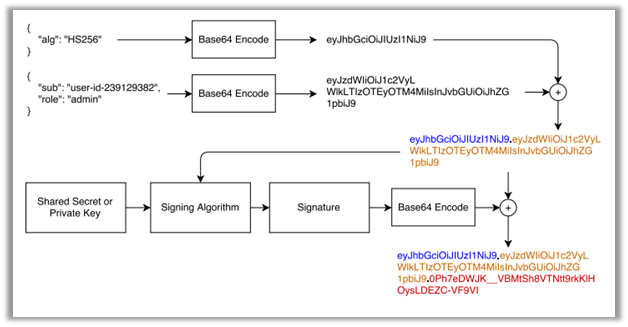
The third part signature is computed as follows:

Header and Payload are encoded using Base64url encoding and are concatenated with a period separator.

This is then run through the algorithm specified in the header.

HS256(secret, base64URLEncoding(header) + “.” + base64URLEncoding(payload))

The signature is also encoded using Base64urlEncoding

Finally, the token will be

token= base64urlEncoding(header) + ‘.’ + base64urlEncoding(payload) + ‘.’ + base64urlEncoding(signature)

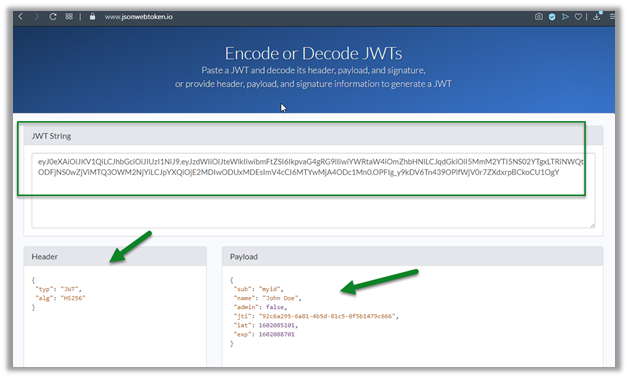
We can encode or decode JWTs at

https://www.jsonwebtoken.io

Here changing the Payload will change the JWT String.

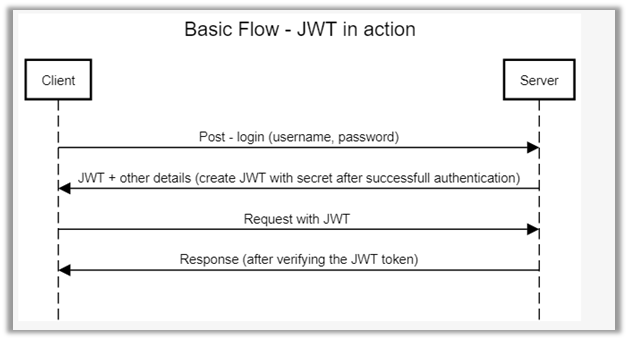
The flow will look something like below

Get the free comprehensive guide on JWT

https://auth0.com/resources/ebooks/jwt-handbook/

Hope it helps..

Fixed – “The application requires one of the following versions of the .NET Framework” or “.NET Framework 4.7.1 or later is already installed this computer” error while running application


While trying to run an application we were getting the below message

It was taking us to Microsoft Download site for downloading the framework.

We downloaded the 4.7.1 Framework but while trying to install it we got the below message that said the framework or a later update is already installed on this computer.

Tried uninstalling all the .NET Framework version installed including 4.7.

That also didn’t work.

Few of the forums talk about making changes in the registry, that also didn’t help.

Eventually we commented the supportedRuntime element in the configuration file of the application to get through this issue.

https://docs.microsoft.com/en-us/dotnet/framework/configure-apps/file-schema/startup/supportedruntime-element

https://stackoverflow.com/questions/21566528/what-happens-if-i-remove-the-auto-added-supportedruntime-element

Hope it helps..

Advertisements

Literal Improvement in C# 7.0


C# 7.0 now allows using underscore _ to be used a digit separator.

This adds more readability.

Similarly, we now have Binary Literals, so instead of specifying hexadecimal pattern we can specify bit patterns.

Hope it helps..

Using Out Variables (C# 7.0) instead of Out Parameters


Out Parameters must need to declared before they are used in the method which doesn’t seem intuitive.

Now with C# 7.0 we can now make use of Out variable.

Here in our second call to the method we have used out variable named outVariableString which we didn’t have to declare like output parameter.

Hope it helps..