Dynamics 365: Solution install failed


Zohaib Uddin Khan's avatarDynamics 365 Funda by Zohaib Uddin Khan

Author By: Zohaib Uddin Khan

Scenario:

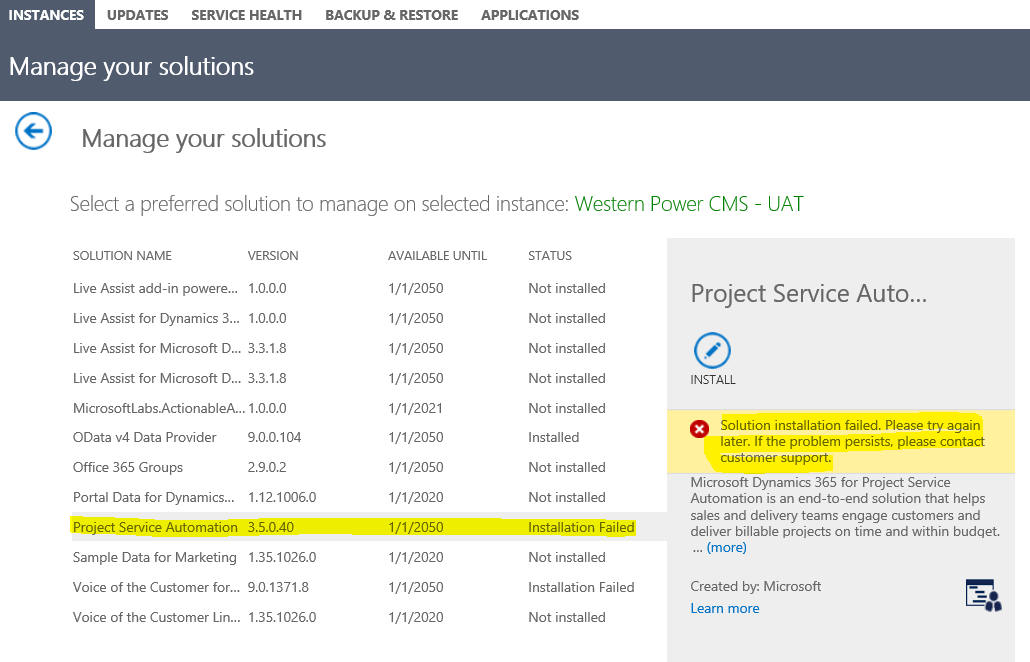
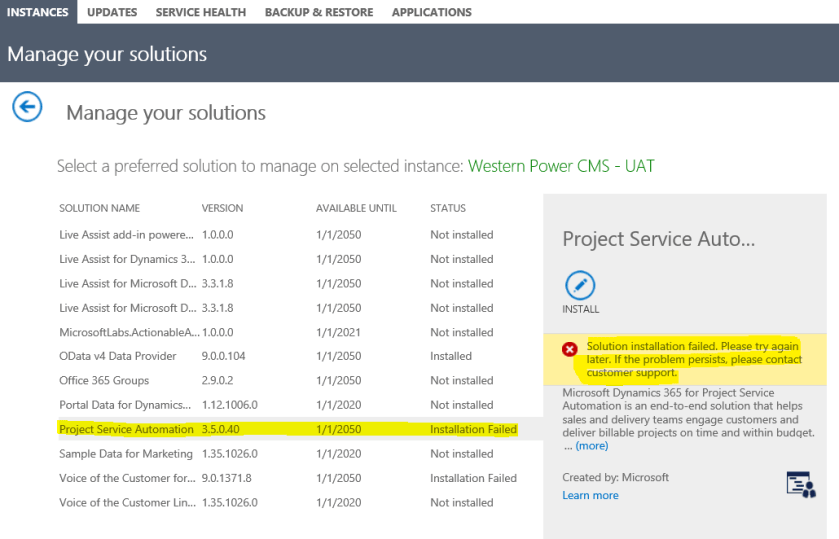
Let suppose you’re trying to install a managed solution (such as Project Services Automation, Field Services, Portal, etc.) through Admin Center and you’re facing ‘Solution Installation Failed‘.

Since, Admin Center don’t provide any reason for failure, apart from retry or contact the support which are not very productive.
SolutionImport-0

Solution:

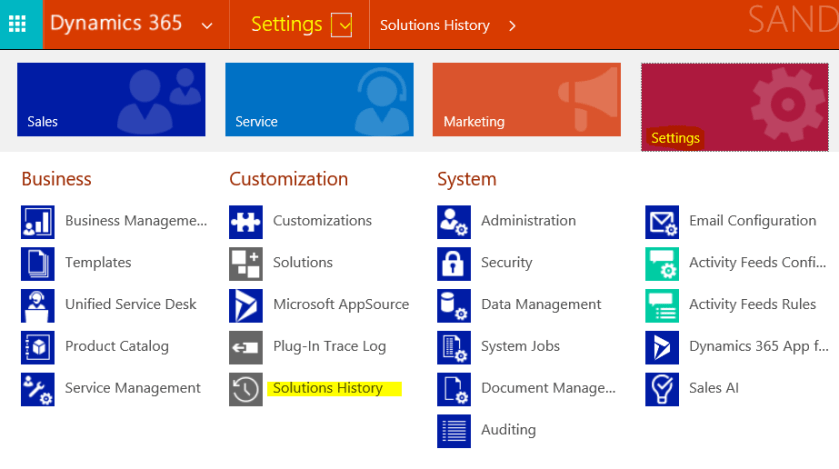
Go to Dynamics 365 Org – Settings – Customization – Solution History
SolutionImport-1

Open the latest or related solution from ‘Internal Solution History’ view. And, reason for the failure of the solution is available under Exception Message. 🙂
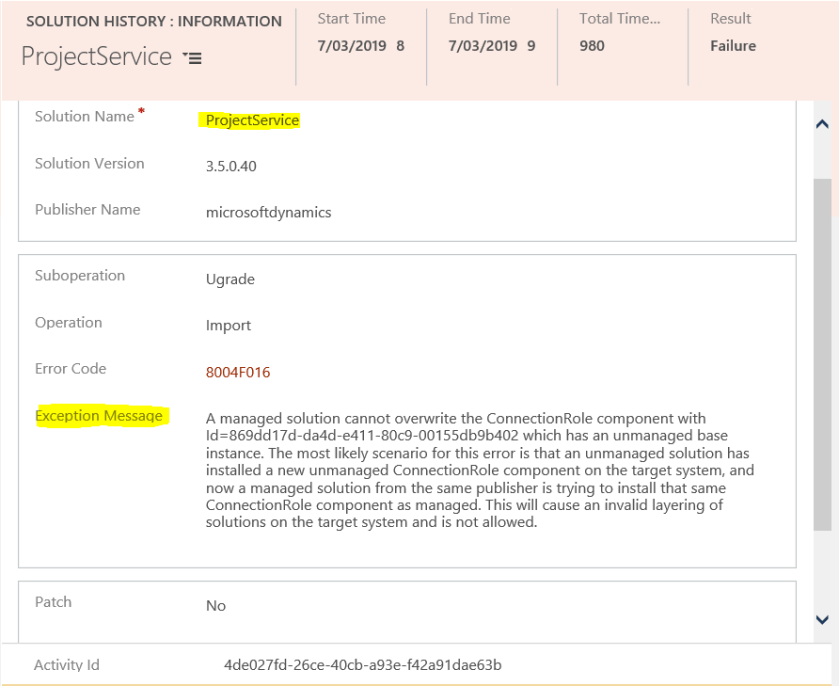
SolutionImport-2

View original post

Using CDS/CRM Connection Manager of KingswaySoft’s SSIS Dynamics 365 Integration toolkit in Script Component (SSIS)


Recently for one of our requirements we had to use the CDS/CRM Connection of KingswaySoft’s SSIS Integration Toolkit for Dynamics 365

Below are the steps to be followed –

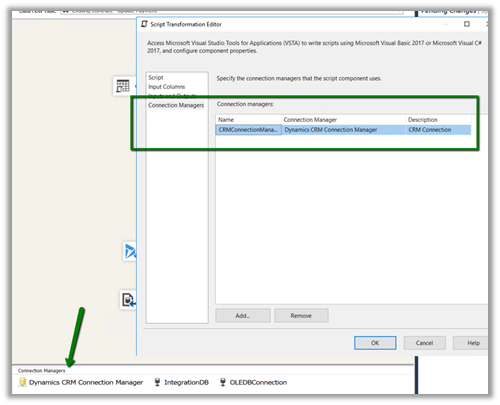
Drag the Script Transformation component, specify any input columns and inputs / outputs as required.

In the Connection Managers add the connection to Dynamics 365

Click on Edit Script to open the Visual Studio.

Add references to below 3 assemblies. We need to search for the 2 KingswaySoft assemblies in the machine and then add them.

The sample code –


public override void Input0_ProcessInputRow(Input0Buffer Row)
{
var connMgr = this.Connections.CRMConnectionManager;
var connectionString = (string)connMgr.AcquireConnection(null);
var conn = new CrmConnection(connectionString);

var orgService = (IOrganizationService)conn.GetCrmService();

RetrieveRequest retRequest = new RetrieveRequest();
retRequest.ColumnSet = new ColumnSet();
retRequest.ColumnSet.AddColumn("statuscode");
retRequest.Target = new EntityReference("dxc_contract", "dxc_contractnumberinternal", Row.dxccontractnumberinternal);
var response = (RetrieveResponse)orgService.Execute(retRequest);

if (response.Entity != null)
{
// status is closed
if (((OptionSetValue)response.Entity.Attributes["statuscode"]).Value == 282210002)
{
Row.IsApprovedContract = "N";
}
else
{
Row.IsApprovedContract = "Y";
}
}
}

Get all the details here

http://www.kingswaysoft.com/blog/2013/06/24/Writing-Script-Component-or-Script-Task-using-CRM-Connection-Manager

Hope it helps..

Fixed – Assembly must be registered in isolation error while trying to register plugin \ custom workflow activity in Isolation Mode None in Dynamics 365 On Premise


While trying to register our custom workflow activity from Isolation mode – Sandboxed to None for Dynamics 365 On Premise we got the below error

This was because the user through which we were trying to register the plugin in None Isolation Mode using Plugin Registration Tool was not having Deployment Administrator role.

Adding the user to that Deployment Administrator role through Deployment Manager fixed the issue.

https://docs.microsoft.com/en-us/dynamics365/customer-engagement/on-premises/deployment-administrators

Read more about it

https://docs.microsoft.com/en-us/previous-versions/dynamicscrm-2016/developers-guide/gg309620(v=crm.8)#security-restrictions

Hope it helps..

Advertisements

Scribe Insight Limitation – XML Source doesn’t support repeating sibling nodes


Recently we were evaluating Scribe Insight as our Integration tool for one of our clients. The requirement was to read an xml and create records in Dynamics 365 CE.

The basic structure was something like below, with Account as the parent tag and Payment, Assets, Consumer as repeating child nodes of Account i.e. 1 – n.

However, to our surprise when we started defining the same structure in the XML Component within Scribe Workbench we got the below error message à

—————————

XML Component

—————————

Repeating nodes are not supported for cousins, siblings, etc. Multiple repeating nodes must be related linearly to repeating nodes that already exist. Thus, a new repeating node must be a grandparent, parent, child, grandchild, etc., to an existing repeating node.

—————————

OK

—————————

Interestingly enough the same limitation doesn’t exist in Scribe Online. Had posted something similar few days’ back on that

https://nishantrana.me/2019/01/14/scribe-online-working-with-hierarchical-data-in-dynamics-365-ce/

As we wanted to go with something that works in On Premise setup we went ahead with SSIS Productivity Pack of KingswaySoft https://www.kingswaysoft.com/products/ssis-productivity-pack which had XML components that works perfectly well with this kind of schema or structure.

Hope it helps..

contextUserId is missing privilege ae5c41f0-e823-4cb9-b25a-8ef020201973 error in WebAPI


We were getting the below error while using impersonation in our WebAPI

2019-02-26_1044

Searching for the privilege id we got the following detail

{“@odata.etag”:”W/\”47875405\””,”overwritetime”:”1900-01-01T00:00:00Z”,”solutionid”:”fd140aad-4df4-11dd-bd17-0019b9312238″,”introducedversion”:”8.2.0.0″,”canbebasic”:false,”canbedeep”:false,”ismanaged”:false,”accessright”:32,”canbeglobal”:true,”privilegeid”:”ae5c41f0-e823-4cb9-b25a-8ef020201973″,”canbeentityreference”:false,”privilegerowid”:”1b218262-afac-4859-b9e0-c8c0f6550231″,”componentstate”:0,”canbelocal”:false,”versionnumber”:47875405,”canbeparententityreference”:false,”name”:”prvActOnBehalfOfAnotherUser“},

So the user was missing the Act On Behalf Of Another User privilege

https://nishantrana.me/2018/01/30/user-does-not-have-the-privilege-to-act-on-behalf-another-user-error-while-using-impersonation-in-web-api-in-dynamics-365/

Hope it helps..


{Advanced Customization}10 Tips to design CRM Views like a Pro


Nice tips !

deepeshsomani2013's avatarMSDYNAMICSBLOG BY DEEPESH

Here are a set of 10 Tips to design CRM Views like a Pro:

  1. Try to limit the number of columns on the View and limit the number of scrolls that are required to be done on the View. Usually, end users do not like to scroll more than 2 times even on the Web client. Also, more the number of columns, slower the view will load as it has performance implications.
  2. In case views show All Records then out of box status field (Active/Inactive) makes sense to be put on the View. As an example, for “Active Accounts does not make sense to show status field since this is self-explanatory and applied at the filter level itself. The column space can be saved to add another relevant column.
  3. Place generic fields such as Created On/ Modified On, Created By/Modified by towards the end of your View column definition. This…

View original post 317 more words