Action not returning Output Parameter in Organization Response in Dynamics 365 (CRM)


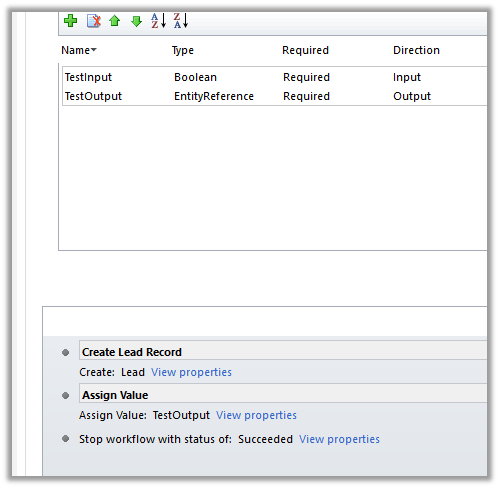
Recently we faced a strange issue in one of our Actions. We were not getting output parameter’s value in the organization response.

Eventually, we realized it was because of the Stop Workflow step added. Removing it fixed the issue for us. We also tried by adding few other Steps like send email, status change, create record etc. after Assign Value step, however, in all those cases it properly returned the response.

Only in the case of Stop Workflow, we got the issue where the response was null for that output parameter.

Hope it helps..

Hide a Primary Navigation link using Web Page Access Control rule in Portals in Dynamics 365


Say for e.g. we want to hide Test Page navigation link from the Portal for anonymous users and make it visible only for authenticated users.

For this we can create a Web Page Access Control Rule,

Go to Portals à Web Page Access Control Rules and create a new rule as shown below

Select the Website and the web page to be hidden.

For Right, select Restrict Read and in Web Roles add Authenticated Users Web Role.

On refreshing the portal à

For logged in user

For anonymous user

Hope it helps..

Fixed – (action:Skip) failed validation for reason code: LookupRecordNotAvailable in Configuration Migration (DataMigrationUtitliy.exe) in Dynamics 365 (CRM)


Recently while trying to migrate configuration records, we started getting warning in CRM Configuration Migration tool – “Completed importing x of x, x queued for second pass updates” for multiple entities.

Looking in the log we got the below error detail

“ImportEntity – Result: True – Entity: msdyusd_agentscriptaction – Adding msdyusd_agentscriptaction to the reprocess List as field owningbusinessunit with value aeb9a12b-dd3b-e711-80fb-5065f38b5691 – LookupEntity businessunit and Record Id dac37a7f-8e3c-e311-87f2-00155dd8d60b () – (action:Skip) failed validation for reason code: LookupRecordNotAvailable

Finally, we figured out that the records that were failing were owned by the system user, whose roles we had recently removed and had set its access mode as Administrative.

Assigning appropriate security role and setting access mode to Read-Write for that particular user, ensured that all the records that were owned by that user were migrated successfully.

The other option to fix this would be to remove those columns and add only appropriate columns while defining the schema in Configuration Migration Tool

Hope it helps..

Added support for Images for Plugin in Developer Toolkit for Dynamics 365 (CRM)


The old version of Dynamics 365 Development toolkit was not supporting registration of images, unlike previous versions of Developer Toolkit.

https://nishantrana.me/2016/12/21/not-able-to-register-image-for-plugin-in-microsoft-dynamics-365-developer-toolkit-public-beta-1/

However, in the new version of Developer Toolkit the support has been added.

https://marketplace.visualstudio.com/items?itemName=DynamicsCRMPG.MicrosoftDynamicsCRMDeveloperToolkit

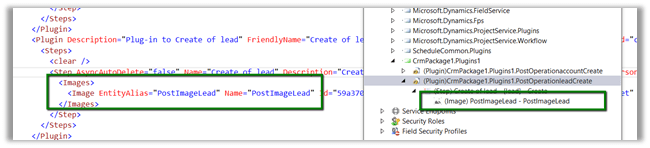
In our CRM Explorer, once we have created a plugin, we can go Plug-In assemblies option in the navigation, select our plugin’s step and can add image.

This as expected updates the RegisterFile.crmregister file as well.

Hope it helps..

Sample code to retrieve more than 5000 records using FetchXML in CRM


Hi,

Sharing a sample code to retrieve more than 5000 records using the Fetch XML.

Version 1 :

private List<Entity> GetTotalRecordsfromFetch(string fetchXML, IOrganizationService orgService)
{
List<Entity> lstEntity = new List<Entity>();

int fetchCount = 5000;
int pageNumber = 1;
string pagingCookie = null;

while (true)
{
// Build fetchXml string with the placeholders.
string xml = this.CreateXml(fetchXML, pagingCookie, pageNumber, fetchCount);
RetrieveMultipleRequest fetchRequest = new RetrieveMultipleRequest
{
Query = new FetchExpression(xml)
};

var returnCollections = ((RetrieveMultipleResponse)orgService.Execute(fetchRequest)).EntityCollection;

if (returnCollections.Entities.Count >= 1)
{
lstEntity.AddRange(returnCollections.Entities);
}

if (returnCollections.MoreRecords)
{
pageNumber++;

results.pagingCookie = returnCollections.PagingCookie;
}
else
{
// If no more records in the result nodes, exit the loop.
break;
}
}

return lstEntity;
}

public string CreateXml(string xml, string cookie, int page, int count)
{
StringReader stringReader = new StringReader(xml);
XmlTextReader reader = new XmlTextReader(stringReader);

XmlDocument doc = new XmlDocument();
doc.Load(reader);

XmlAttributeCollection attrs = doc.DocumentElement.Attributes;

if (cookie != null)
{
XmlAttribute pagingAttr = doc.CreateAttribute("paging-cookie");
pagingAttr.Value = cookie;
attrs.Append(pagingAttr);
}

XmlAttribute pageAttr = doc.CreateAttribute("page");
pageAttr.Value = System.Convert.ToString(page);
attrs.Append(pageAttr);

XmlAttribute countAttr = doc.CreateAttribute("count");
countAttr.Value = System.Convert.ToString(count);
attrs.Append(countAttr);

StringBuilder sb = new StringBuilder(1024);
StringWriter stringWriter = new StringWriter(sb);

XmlTextWriter writer = new XmlTextWriter(stringWriter);
doc.WriteTo(writer);
writer.Close();

return sb.ToString();
}

Version 2 –

private static List&lt;Entity&gt; GetTotalRecordsFetchXML(OrganizationServiceProxy orgProxy, string fetchXML)
{
XDocument xDocument = XDocument.Parse(fetchXML);
var fetchXmlEntity = xDocument.Root.Element("entity").ToString();

EntityCollection entityColl = new EntityCollection();
List&lt;Entity&gt; lstEntity = new List&lt;Entity&gt;();
int page = 1;
do
{

entityColl = orgProxy.RetrieveMultiple(new FetchExpression(
string.Format("&lt;fetch version='1.0' page='{1}' paging-cookie='{0}'&gt;" + fetchXmlEntity + "&lt;/fetch&gt;",
SecurityElement.Escape(entityColl.PagingCookie), page++)));

lstEntity.AddRange(entityColl.Entities);
}
while (entityColl.MoreRecords);

return lstEntity;
}


Hope it helps..

Advertisements

List is Locked. Cannot perform this action error while trying to remove marketing list member using RemoveMemberListRequest in Dynamics 365 (CRM)


Recently we got the below error while trying to remove the marketing list member from a marketing list.

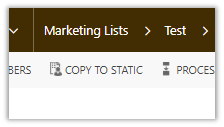
This occurs if the marketing list is locked. The marketing list gets locked if it is Dynamic Marketing List. However, we are getting this issue on our Static marketing lists. Later we realized that those static marketing lists were created using Copy To Static ribbon button. When a Dynamic Marketing List is created the locked field value is false. However it gets set as true when we convert it to Static using Copy To Static functionality.

Changing the Locked field value as No fixed the issue.

Hope this helps..