Recently we observed that our plugin registered on the Delete message of appointment on the PreValidation stage was not getting triggered when we were deleting or updating the occurrence of the Recurring Appointment.
For both of the below operations, our plugin was not getting triggered. The plugin had the logic to delete a few associated records to the appointment record.
Delete operation – This deletes all the existing appointment.
Recurrence Update –This deletes the existing appointment and creates new appointment records based on the new recurrence.
On trying out different things, we saw that the plugin was getting triggered if registered on the PreOperation.
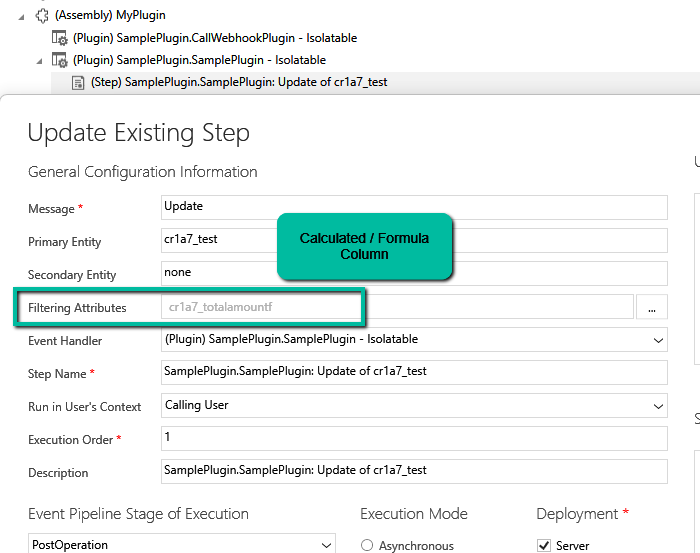
For testing, we registered a sample plugin that throws the InvalidPluginExecutionException and saw it getting triggered in case of PreOpertaion as shown below.
We might get the below error while using LINQ to query Dataverse –
System.NotSupportedException: ‘The method ‘GroupJoin’ cannot follow the method ‘SelectMany’ or is not supported. Try writing the query in terms of supported methods or call the ‘AsEnumerable’ or ‘ToList’ method before calling unsupported methods.’
This error occurs because the GroupJoin method, which is essentially what happens during the into … syntax in LINQ, is not supported in the Dataverse/LINQ provider for Dynamics CRM. The issue is related to how the LINQ provider translates queries into FetchXML or SQL that the Dataverse understands. Specifically, nested joins or SelectMany (used by DefaultIfEmpty() in left joins) are not fully supported by the LINQ provider for Dataverse.
The GroupJoin and DefaultIfEmpty methods (used for left joins) result in queries that cannot be translated directly into FetchXML. The LINQ provider for Dataverse does not support all LINQ-to-Entities features, such as nested joins or advanced grouping logic. When you perform nested joins with DefaultIfEmpty() for left joins, the LINQ provider struggles to translate it into the underlying Dataverse query format, which is why the exception is thrown.
To fix it we can break the query into multiple steps as shown below.
However, here as we are fetching partial data into memory and combining it, it increases transfer and processing overhead and can take a long time to process based on the number of records.
The better alternative from a performance perspective would be to use FetchXML or QueryExpression here.
We might get the below error while using LINQ to query Dataverse – “System.NotSupportedException: ‘Invalid ‘where’ condition. An entity member is invoking an invalid property or method.’” Here we got the below error because we used the HasValue property.
Here the issue with HasValue arises because FetchXML doesn’t have a direct equivalent for nullable checks like HasValue in LINQ. In FetchXML, null checks are handled explicitly through conditions like neq (not equal) or eq (equal) with the null value. Therefore, instead of using HasValue, we need to manually check for null using != null or GetValueOrDefault().
We will also get the same error on below query.
Here we get this error because OriginatingLeadId is a LookUp referencing Lead table, and we are trying to access the Name property of it in the where clause, which cannot be directly translated into FetchXML. To fix it we can perform a join between the Contact and Lead table.
Let us see one more example.
The query, c.Attributes[“firstname”].ToString() is trying to access the firstname attribute and convert it to a string. However, the LINQ provider doesn’t know how to translate.ToString() into a valid FetchXML query.
To fix it we can use GetAttributeValue method.
Or doing the casting
However, we will get the same not supported error if we try to use Attributes Collection.
The error occurs because of the syntax c.Attributes[“firstname”] directly accesses the internal Attributes dictionary of the Entity object. The LINQ provider in Dataverse (Dynamics 365) cannot translate this access pattern into a FetchXML
We can use the setIsValid method for validating field values in Model-driven apps. This method helps ensure that the data entered by users meets the required criteria before it’s processed or saved.
The setIsValid method is used to set the validity of a column’s value. It can mark a field as valid or invalid based on custom validation logic.
bool: A Boolean value. Set to false to mark the column value as invalid, and true to mark it as valid.
message: (Optional) A string containing the message to display when the value is invalid.
Below we are using the setIsValid method in the function that ensures that the “End Date” is earlier than or equal to the “Start Date”, else it will mark the “End Date” as invalid.
function validateDates(executionContext) {
var formContext = executionContext.getFormContext();
var startDate = formContext.getAttribute("custom_startdate");
var endDate = formContext.getAttribute("custom_enddate");
if (startDate && endDate && endDate.getValue() <= startDate.getValue()) {
endDate.setIsValid(false, "End Date must be after Start Date.");
} else {
endDate.setIsValid(true);
}
}
We have it registered in the On Change of the ‘Start Date’ and ‘End Date’ fields.
Here if we try saving the record, if the End Date is smaller than the Start Date, we will get the message specified.
Recently we had a requirement to make different sets of fields mandatory and non-mandatory on the Quick Create form for Contact, based on the parent record type it is opened from.
Below we have the contact’s quick create form opened from a custom table – custom_contract’s contact lookup.
On using the above properties in our form load script for the quick create form, we can see different sets of fields set as required and recommended on the Quick Create Contact form based on the parent record it is opened from.
In Dataverse, solution dependencies are a vital aspect of managing and deploying applications. Dependencies ensure that required components are present for a solution to work seamlessly across environments. However, with complex solutions, understanding and managing these dependencies can become overwhelming.
The updated dependencies page is designed to simplify dependency management by offering a more intuitive, action-driven experience.
Select a particular component in the solution, right-click>> Advanced >> Show dependencies.
We can see 3 different tabs.
Delete Blocked By (tab): Displays any dependencies preventing deletion of a component. Below we can see that for the Age column, it shows Contact’s System Form as the dependency.
Clicking on the Open option takes us to the component page, where we can see all the forms for the contact table.
Used By (tab): Lists other components dependent on the selected component.
Uses (tab): Shows dependencies that the selected component relies upon.
On clicking Open, it opens the Columns page for that table.
The different actions that we can take are Open and inspect the object, Delete the object, Remove dependency, and open the relevant documentation.
Below we have selected the option Remove dependency. As we saw the dependency here refers to the Contact System form in which we have the age field used.
Select Remove.
We get the success message after the successful removal of the dependency.
i.e. we can see the field removed from the blocking Contact’s System form.
Now if we want we can easily delete that particular field with no object blocking the delete.
Lastly, the Delete option for the solution allows the delete (uninstall) the solution that has dependencies on the solution component.