
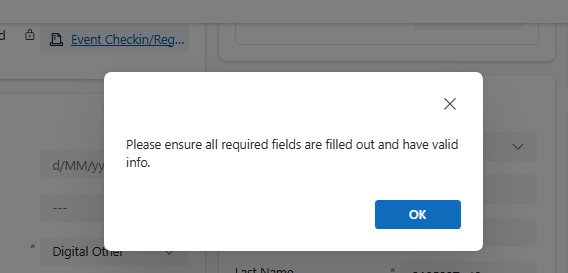
While working on a Lead Disqualification scenario in Dynamics 365, we ran into a strange issue.
When trying to Disqualify a Lead, Dynamics 365 was showing the generic error message:
“Please ensure all required fields are filled out and have valid info.”
Even more confusing, the form itself was not showing any missing required fields.
This is one of those classic “ghost validation” problems in Dynamics 365 where fields are being marked as required dynamically through JavaScript or Business Rules, even though they are not visible on the form. The message was generic and did not indicate which field was causing the validation failure.
Since the form was not highlighting any required fields, we suspected that some fields were being set as required dynamically in the background. To identify them, we executed the following JavaScript in the browser console.
(function () {
    var missingFields = [];
    var attributes = Xrm.Page.data.entity.attributes.get();
    attributes.forEach(function (attribute) {
        var requiredLevel = attribute.getRequiredLevel();
        var value = attribute.getValue();
        var isEmpty =
            value === null ||
            value === "" ||
            (Array.isArray(value) && value.length === 0);
        if (requiredLevel === "required" && isEmpty) {
            missingFields.push(attribute.getName());
        }
    });
    if (missingFields.length) {
        alert("Missing required fields: " + missingFields.join(", "));
    } else {
        alert("No missing required fields found.");
    }

})();
The script immediately showed the fields that were marked as required internally:
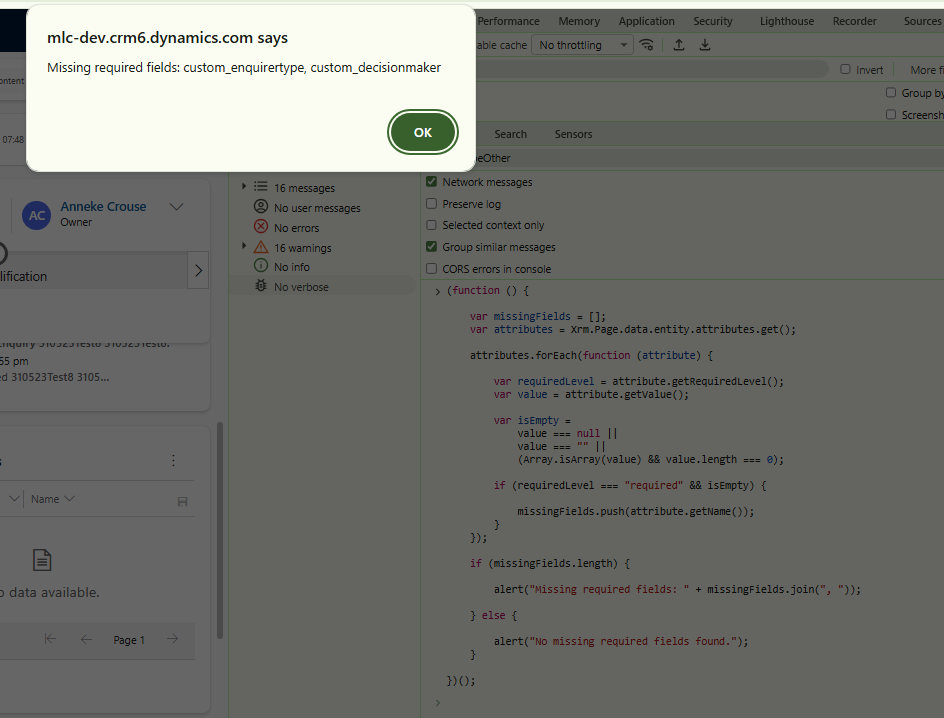
Even though these fields were not visible on the form, they were still configured as required dynamically somewhere in the background.
To fix it – we found and updated the JavaScript method that was setting those fields as required. This is the cleaner and recommended approach.
The other quick fix though not recommended is to reset the fields to non-required on OnLoad/ OnSave/ OnChange.
formContext.getAttribute("custom_enquirytype")
    .setRequiredLevel("none");
formContext.getAttribute("custom_decisionmaker")
    .setRequiredLevel("none");
Sometimes these generic validation popups in Dynamics 365 can be a bit tricky because the actual field causing the issue is not even visible on the form.
Running a quick console script like the one above helped us immediately identify which hidden fields were still marked as required and blocking the Disqualify action
Hope it helps..
Discover more from Nishant Rana's Weblog
Subscribe to get the latest posts sent to your email.
Share It -


One thought on “Hidden Required Fields Causing “Please ensure all required fields are filled out” Error While Disqualifying a Lead in Dynamics 365 / Dataverse”