
While implementing custom form submission validation (server side validation) for Dynamics 365 Customer Insights – Journeys Real-Time Marketing forms, we came across the following error,
“Required params cannot be null or empty –
ms_captcha_solution
ms_captcha_type
ms_captcha_flow_id”
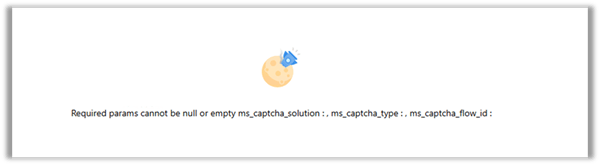
after enabling the data-validate-submission attribute on the form as shown below.

Setting this attribute to true caused the platform to invoke the msdynmkt_validateformsubmission Custom API, which ultimately resulted in the error.
After reviewing Microsoft’s documentation, plugin trace logs, and decompiling the Microsoft assemblies, we were able to understand exactly how the validation pipeline works.
When does this error occur?
• data-validate-submission=”true” is enabled.
• Microsoft CAPTCHA isn’t configured.
• No custom validation plugin overwrites the default validation response.
Understanding the Validation Pipeline
Customer Insights invokes the following Custom API:
msdynmkt_validateformsubmission
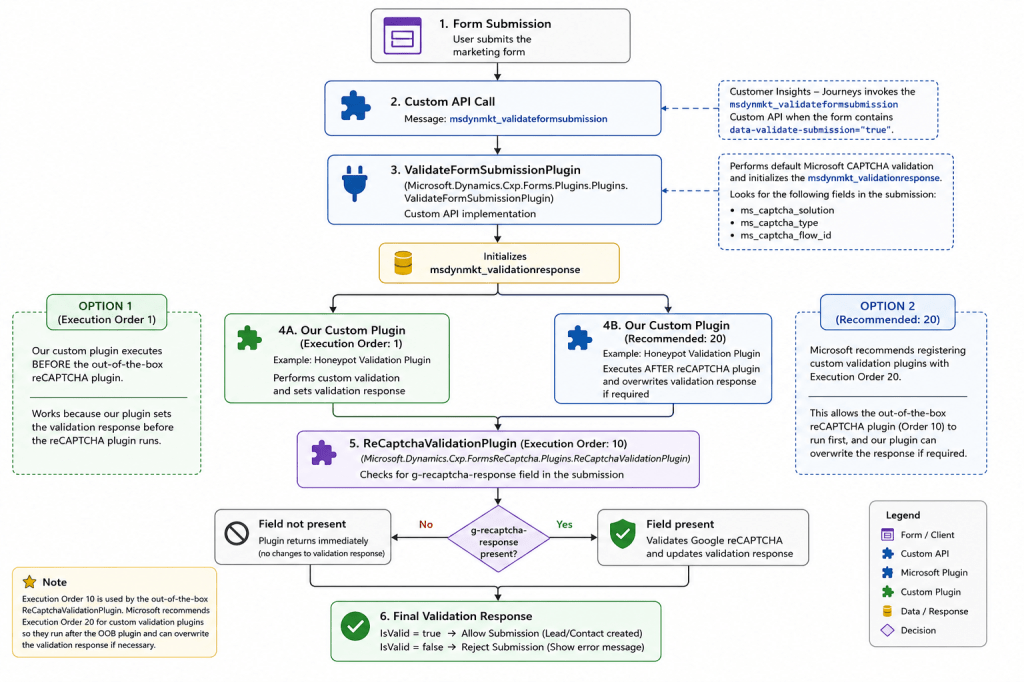
The msdynmkt_validateformsubmission Custom API is implemented by Microsoft’s Microsoft.Dynamics.Cxp.Forms.Plugins.Plugins.ValidateFormSubmissionPlugin, which performs the default CAPTCHA validation and initializes the msdynmkt_validationresponse.
We can then register our own plugin steps on the same message.
Microsoft recommends registering custom validation plugins with an Execution Order of 20, allowing them to execute after the out-of-the-box Microsoft.Dynamics.Cxp.FormsReCaptcha.Plugins.ReCaptchaValidationPlugin (Execution Order 10) and overwrite the validation response if required.
Check the flow below to get more details –
Why does the error occur?
The VerifyCaptchaChallenge service expects the following fields:
ms_captcha_solution
ms_captcha_type
ms_captcha_flow_id
If any are missing, it returns IsValid = false.
if (solution == null ||
    string.IsNullOrEmpty(captchaType) ||
    string.IsNullOrEmpty(flowId))
{
    return new VerifyCaptchaResponse
    {
        IsValid = false
    };
}
How our custom validation plugin resolves the issue
Our custom Honeypot custom plugin performs its own validation and overwrites the validation response.
SetValidationResponse(context, true, null);
// or
SetValidationResponse(context, false, “Form validation failed.”);
What about the ReCaptchaValidationPlugin?
The ReCaptchaValidationPlugin checks for g-recaptcha-response. If it isn’t present, it simply returns.
if (field == null)
{
    tracing.Trace("g-recaptcha-response field was not present in form submission");
    return;
}
Plugin Trace Logs
Our trace logs confirmed:
1. ValidateFormSubmissionPlugin executes.
2. Our Honeypot plugin overwrites the validation response.
3. ReCaptchaValidationPlugin executes afterwards and exits because g-recaptcha-response isn’t present without throwing any exception.

Conclusion
Although the error appears to be a configuration issue, it’s actually the expected behaviour of the default validation pipeline. The default implementation expects Microsoft’s CAPTCHA fields. If we’re implementing our own custom plugin for form submission validation, it should overwrite the validation response after performing its own server-side validation.
Get more details –
Check the previous posts –
Honey Pot Validation (Server-side)
Hope it helps..
Discover more from Nishant Rana's Weblog
Subscribe to get the latest posts sent to your email.
Share It -


2 thoughts on “Custom Form Submission Validation in Dynamics 365 Customer Insights – Journeys: Inside the Validation Pipeline and the “ms_captcha_solution” Error”