

Recently we had to delete records for one of our entities, and we tried out different combinations of batch sizes and the number of threads with 25000 records as a sample to find the optimum setting.
Below is our sample SSIS Package (uses KingswaySoft Dynamics 365 Tool Kit), it retrieves 25000 record’s GUID (Contact table / entity) and then distributes it equally among 3 different CRM Destination Component running under different users (CRM Connection Managers).
How to – improve data migration performance – SSIS & Azure Data Factory (Dataverse / Dynamics 365)

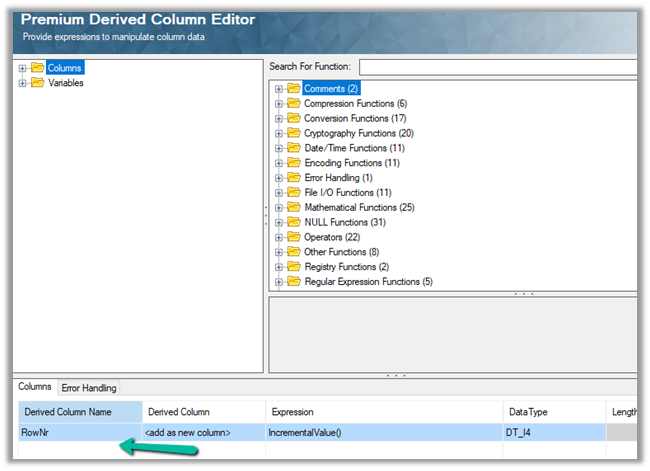
Below is our Premium Derived Column where we have added a new column with expression IncrementValue()
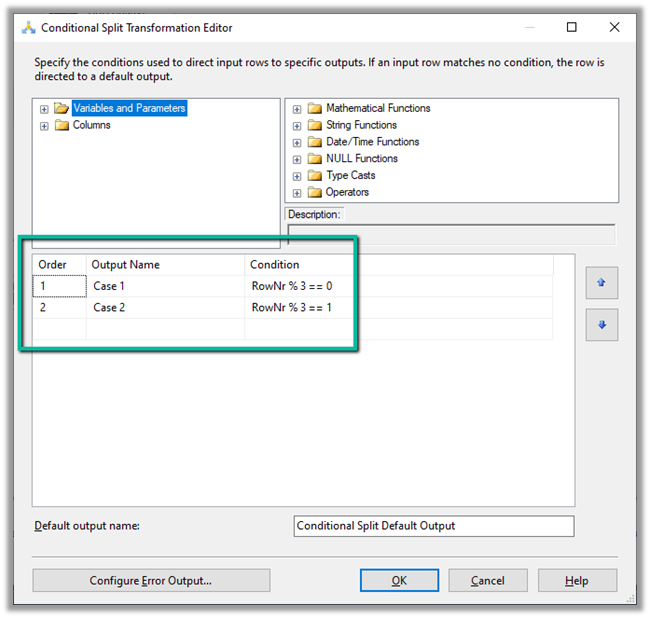
In Conditional Split component, we are then using this new column added to distrubute the output across three CRM Destination Component, each using a different CRM Connection Managers running under different application users.
We first started with 10 batch size and 20 thread followed by different combinations after that à


Below were our findings ->
| Records Count | Batch Size | Thread | Parallel Users | Elapsed Time |
| 25000 | 10 | 20 | 3 | 00:15:58.578 |
| 25000 | 10 | 15 | 3 | 00:14:43.734 |
| 25000 | 10 | 10 | 3 | 00:16:06.438 |
| 25000 | 10 | 5 | 3 | 00:23:52.094 |
| 25000 | 10 | 15 | 2 | 00:18.55.012 |
| 25000 | 10 | 15 | 1 | 00:39:15.828 |
| 25000 | 20 | 30 | 1 | 00:39:12.781 |
As we can see the Batch size 10 and thread around 15 gave us the best performance. However, evert environment / conditions will would be different so we should try out different combinations before finalizing.
SSIS and Microsoft Dynamics 365
Hope it helps..
Discover more from Nishant Rana's Weblog
Subscribe to get the latest posts sent to your email.
Share It -


 Nishant Rana's Weblog
3 thoughts on “How to – Optimize Delete operation – Dataverse / Dynamics 365”