
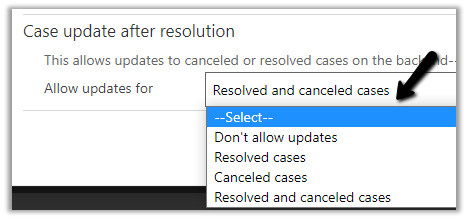
With the 2021 Release Wave 1 Update, now we can update resolved and canceled cases through API / Power Automate .
To set it, we can navigate to
Customer Service Hub > Service Management > Service Terms > Service Configuration Settings > Case Update after resolution

The different options available are
- Don’t allow updates
- Resolved cases
- Canceled cases
- Resolved and canceled cases
Blog posts on 2021 Release Wave 1 – Dynamics 365
Hope it helps..
Advertisements
Discover more from Nishant Rana's Weblog
Subscribe to get the latest posts sent to your email.
Share It -


 Nishant Rana's Weblog
3 thoughts on “Case update after resolution settings in Dynamics 365 Customer Service Hub”