
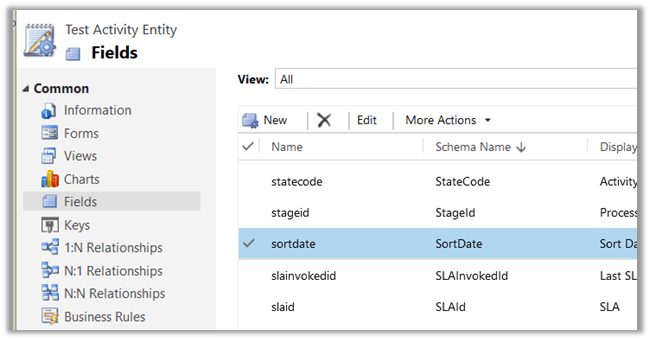
A new SortDate attribute of type DateTime is added for Activity Entity (so basically to all child Task, Phone Call, Email activity etc.) 
The value is null for it for the existing records and for the new record as well until we populate it through Business Rule, Plugin or any other method. The basic use could be to use it for sorting apart from OOB Modified on and Created on in View, Report, Chart as well as in Social Pane.
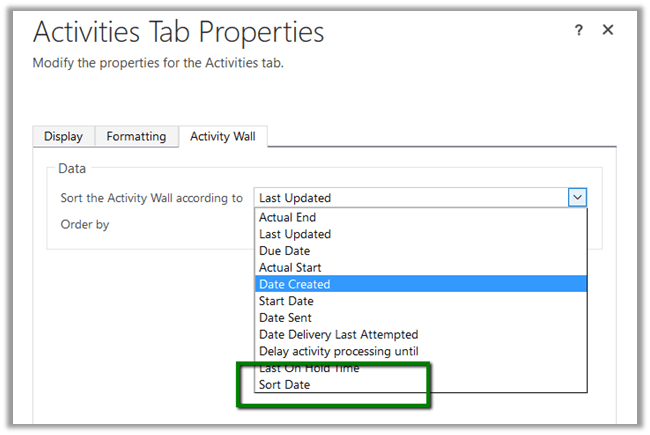
Check this awesome tip
http://crmtipoftheday.com/2016/11/15/change-the-default-order-of-activities-on-the-social-pane/
I remember while working in Oracle CRM On Demand project, where in we can add fields to the base Activity Entity and it would be available in all the child Activity entities. However, in Dynamics CRM the Activity Entity has always been locked i.e. we can’t add new fields in it.
Now what if we create a new custom activity entity?
Yes the field will be available in new custom activity entity as it would derive from the baes Activity Entity to which this new field has been added.
Hope it helps..














 Nishant Rana's Weblog