Sales Team Member app module in 2020 Release Wave 1 Plan


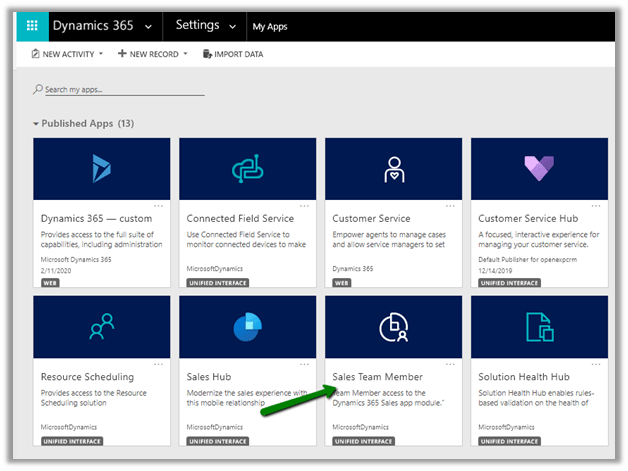
A new Sales Team Member App has been made available in the 2020 Release Wave 1 plan that is specifically designed for users having Team Member License.

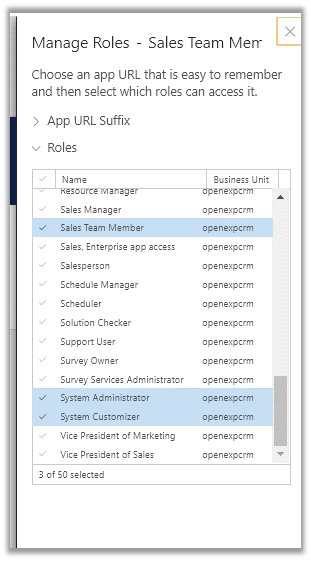
Below are the roles assigned to the app.

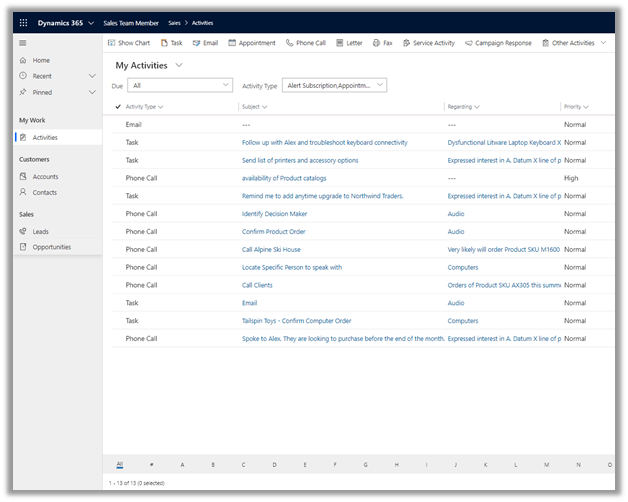
Below are the entities available for the users within the Sales Team Member app

Team member licensing is targeted towards the lightweight users that need limited access across the Dynamics 365 Apps.

Below are some of the rights/actions that Team member License User can perform –

  • Read all Dynamics 365 application data and Custom Entity Data.
  • Can Access Customer Engagement applications from Web App, Mobile, Tablet and Outlook.
  • Mobile Offline capabilities are not available for Team Member Licenses.
  • Create, Update and Delete
    à Activities, Announcements, Contacts, Custom Entities (15 max), Notes associated with them, Personal Views, Saved Views, Email Templates, Word Templates.
  • Create and modify up to 15 Custom Entities (per application) in addition to the OOB entities.
  • Export data to excel.
  • Access user reports, charts and dashboards.
  • Through Portal and API – create, read, update and delete Cases.
  • Post and follow activity feeds.
  • Perform mail merge.
  • Start a dialog.
  • Associate a marketing list with contact or account.
  • Use a queue item.
  • Use relationships and connections between records.
  • Use the search and advanced find.

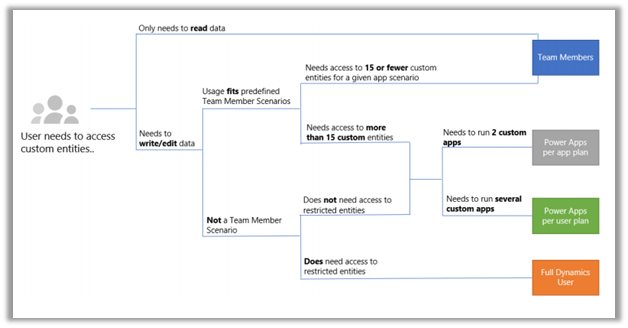
The below diagram from the Licensing guide explains how team members’ license fits with the need to access custom entities.

Licensing is one the most complex part about the product, so it always recommended to go through the licensing guide and clear any doubts from Microsoft before deciding.

Download the Dynamics 365 Licensing Guide

https://go.microsoft.com/fwlink/p/?LinkId=866544

Also, check

https://docs.microsoft.com/en-us/dynamics365/get-started/team-members-license

https://docs.microsoft.com/en-in/dynamics365/sales-enterprise/sales-team-member

Check other blog posts on

Release 2020 Wave 1: https://nishantrana.me/2020-release-wave-1/

Release 2019 Wave 2: https://nishantrana.me/2019/12/31/dynamics-365-2019-release-wave-2-blog-posts/

Hope it helps..

Email template enhancements in Dynamics 365 for Sales – 2020 Release wave 1


With 2020 Release wave 1 we have new features added to email templates selection, which makes it more intuitive and easier for the users to pick the correct template.

In 2019 Release wave 2 à

Clicking on the Insert Template button will open up a dialog box to specify language and search for the template.

In 2020 Release wave 1 à

Clicking on the Insert Template button will open the Email Templates Dialog box which will list down templates for selection based on the recipient selected.

And if we have 2 different types of recipients it asks us to select the recipient first to populate the template accordingly.

Search option lets us filter the templates further

We can also preview the messages before applying the template.

Also click on the Email button on the Activities window, opens the new email form as model dialog

This slideshow requires JavaScript.

Also check out

Opportunity Product enhancements in 2020 Release wave 1

https://nishantrana.me/2020/02/10/opportunity-products-enhancement-in-dynamics-365-for-sales-2020-release-wave-1/

Hope it helps..
Opportunity Products enhancement in Dynamics 365 for Sales – 2020 Release wave 1


With 2020 Release wave 1 we have new features added to the experience of adding opportunity product (product line items) to an opportunity, which makes it easy to search, explore and add multiple products at once.

In 2019 Release Wave 2 à

Clicking on Add Product button

Opens the new opportunity line form

With 2020 Release wave 1 à

On click on Add Product button, we get the Add Opportunity Products dialog box.

Which lets us

Search à

See more details of the product à

Select multiple products à

See the recently used products for quick accessà

Add write-in products à

View all the selected products and remove them if required using the delete icon and to add multiple products through the Add to Opportunity button.

The above features are only for Opportunity Products, for Orders, Invoices and Quote it will still open the corresponding create form for creating/adding the record.

Also, check out the enhancements added to Products in the previous version

https://nishantrana.me/2019/12/28/opportunity-quote-order-invoice-product-related-enhancements-in-dynamics-365-for-sales/

And

Email Template enhancements in 2020 Release wave 1

https://nishantrana.me/2020/02/11/email-template-enhancements-in-dynamics-365-for-sales-2020-release-wave-1/

Hope it helps..
Fixed – Microsoft.Crm.CrmException: Property ‘x’ isn’t declared on the control manifest in Microsoft Dynamics 365


We got this error while trying to save the form which uses the PCF Control.

This was because the name of the property was changed

And the updated solution was imported, while the control on the form was still referring to the old property name.

Fix is straightforward, remove the field using that control with old property name from the form and save the change.

Hope it helps..
Advertisements

PCF Control to show Twitter Likes Timeline


In the same line as Profile Timeline PCF Control, we can use the same concept to create a control that shows likes timeline that displays the recently like tweets of a specific public Twitter Account.

More on this

https://developer.twitter.com/en/docs/twitter-for-websites/timelines/guides/likes-timeline

Here we have specified the public twitter account nishantranacrm in this case, it will show all the tweets that are liked by that profile.

We can have both the Profile Timelines and Like Timelines control for the profile that we are interested in for a lead, contact or account record.

Get it here

https://github.com/nishantranacrm/PCFTwitterLikesControl

Hope it helps..
PCF Control to show the Twitter profile timelines


Created a simple PCF Control to show the twitter timelines for the profile. It basically uses embedded tweets.
Get the control here

https://github.com/nishantranacrm/TwitterPCFControl

Simply enter the twitter profile in the text field and it will render the latest tweets of that profile.

Inside an account form à

For the contact record à

Embedded timelines make it extremely easy to embed the Tweets on a web page.

We can navigate to publish.twitter.com to generate the code.

Here I have searched from my profile, which then next gives us the display options to select.

Here we selected the Embedded Timeline display option, which generated the code for us.

The code that we are using inside our PCF Control.

Read more about it here

https://developer.twitter.com/en/docs/twitter-for-websites/timelines/overview

Hope it helps..